# Clean Architecture Solution Template for .NET
> Setting up a Clean Architecture project from scratch takes time. Here is a complete .NET solution template with the right project structure, references, and configurations.
Published: 2026-08-11. Author: Milan Jovanović.
Canonical: https://milanjovanovic.tech/blog/clean-architecture-solution-template-dotnet
A Clean Architecture solution template for .NET sets up five projects (Domain, Application, Infrastructure, Persistence, Api), inward-only references, CQRS abstractions, base primitives, and architecture tests that enforce the dependency rule.
Setting that up by hand is the same hour of ceremony on every new solution: create the projects, wire the references, add MediatR and FluentValidation, set up DI.
None of that work is interesting, and all of it is easy to get subtly wrong.
This article walks through the complete template, piece by piece.
At the end, you can package it as a `dotnet new` template and never do the setup by hand again.
## Why a Solution Template?
Every time you start a new [**Clean Architecture**](https://milanjovanovic.tech/blog/clean-architecture-and-the-benefits-of-structured-software-design) project, you repeat the same steps - creating projects, adding references, configuring DI, setting up MediatR, adding FluentValidation.
A solution template saves hours and ensures consistency.
Here's the complete setup I use for production projects.
## The Solution Structure
```
src/
MyApp.Domain/
MyApp.Application/
MyApp.Infrastructure/
MyApp.Persistence/
MyApp.Api/
tests/
MyApp.Domain.UnitTests/
MyApp.Application.UnitTests/
MyApp.Infrastructure.IntegrationTests/
MyApp.Api.FunctionalTests/
MyApp.ArchitectureTests/
```
Five source projects.
Four layers plus a separate Persistence project (you can merge Infrastructure and Persistence if you prefer - I only split them when the infrastructure surface grows).
## Project References (The Dependency Rule)
The [**dependency rule**](https://milanjovanovic.tech/blog/dependency-rule-clean-architecture) is the non-negotiable constraint. Every project reference points inward, toward Domain:
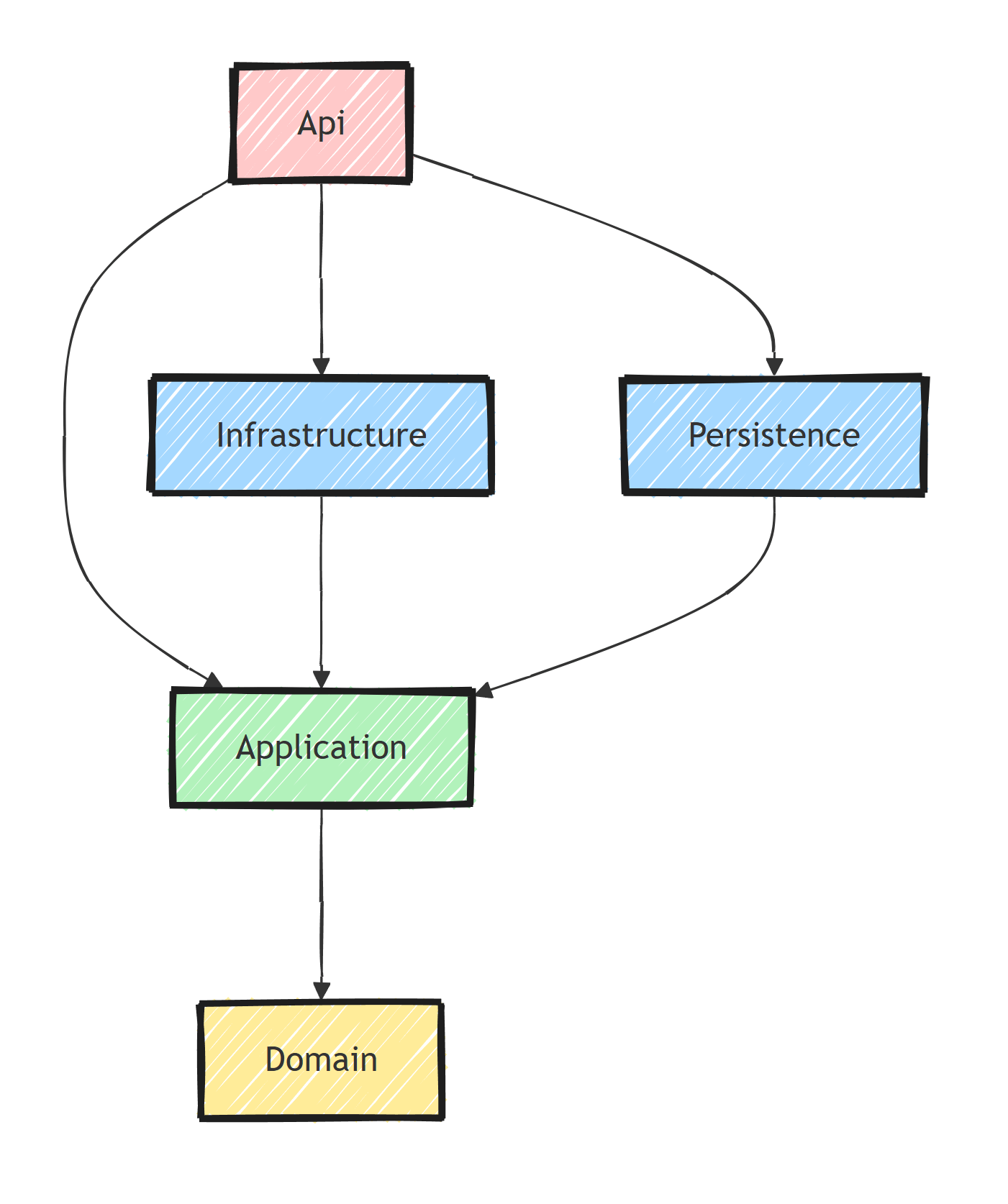
Domain depends on nothing.
Application depends only on Domain.
Infrastructure and Persistence depend on Application.
The API project wires everything together.
## Domain Project
The [**Domain layer**](https://milanjovanovic.tech/blog/domain-layer-clean-architecture) contains entities, value objects, domain events, and domain exceptions.
No NuGet packages:
```xml
net10.0
```
```
Domain/
Entities/
Order.cs
Customer.cs
Product.cs
ValueObjects/
Money.cs
Address.cs
Email.cs
Events/
OrderPlacedDomainEvent.cs
OrderCancelledDomainEvent.cs
Exceptions/
DomainException.cs
Repositories/
IOrderRepository.cs
ICustomerRepository.cs
Primitives/
Entity.cs
AggregateRoot.cs
IDomainEvent.cs
IUnitOfWork.cs
Result.cs
Error.cs
```
Base classes:
```csharp
public abstract class Entity
{
public Guid Id { get; protected init; }
}
public abstract class AggregateRoot : Entity
{
private readonly List _domainEvents = [];
public IReadOnlyCollection DomainEvents => _domainEvents;
protected void RaiseDomainEvent(IDomainEvent domainEvent) =>
_domainEvents.Add(domainEvent);
public void ClearDomainEvents() => _domainEvents.Clear();
}
public interface IDomainEvent;
```
Notice that `IDomainEvent` is a plain marker interface.
A lot of templates declare it as `IDomainEvent : MediatR.INotification`, which quietly gives your Domain project a MediatR dependency and contradicts the "no packages" rule.
You have two honest options:
1. **Keep the domain pure** (what I show above) and adapt domain events to MediatR notifications in the Application layer with a generic wrapper.
2. **Accept the tradeoff** and reference `MediatR.Contracts` from Domain. It's a contracts-only package, but it still couples your domain to a library. And with [**MediatR going commercial**](https://milanjovanovic.tech/blog/mediatr-and-masstransit-going-commercial-what-this-means-for-you), coupling your innermost layer to it deserves a second thought.
Either is workable.
Just make the choice deliberately instead of inheriting it from a template.
## Application Project
The [**Application layer**](https://milanjovanovic.tech/blog/application-layer-clean-architecture) contains use cases, validation, [**CQRS**](https://milanjovanovic.tech/blog/cqrs-pattern-the-way-it-should-have-been-from-the-start) abstractions, and behaviors.
```xml
net10.0
```
```
Application/
Abstractions/
Messaging/
ICommand.cs
ICommandHandler.cs
IQuery.cs
IQueryHandler.cs
ICurrentUserService.cs
IDateTimeProvider.cs
IEmailService.cs
Behaviors/
ValidationBehavior.cs
LoggingBehavior.cs
Orders/
PlaceOrder/
PlaceOrderCommand.cs
PlaceOrderCommandHandler.cs
PlaceOrderValidator.cs
GetOrderById/
GetOrderByIdQuery.cs
GetOrderByIdQueryHandler.cs
OrderResponse.cs
DependencyInjection.cs
```
CQRS abstractions:
```csharp
public interface ICommand : IRequest;
public interface ICommand : IRequest>;
public interface ICommandHandler
: IRequestHandler
where TCommand : ICommand;
public interface ICommandHandler
: IRequestHandler>
where TCommand : ICommand;
public interface IQuery : IRequest>;
public interface IQueryHandler
: IRequestHandler>
where TQuery : IQuery;
```
These thin interfaces buy you two things: every handler returns a `Result`, and pipeline behaviors can target commands or queries specifically (validate commands, cache queries).
DI registration:
```csharp
// Application/DependencyInjection.cs
public static class DependencyInjection
{
public static IServiceCollection AddApplication(
this IServiceCollection services)
{
var assembly = typeof(DependencyInjection).Assembly;
services.AddMediatR(config =>
{
config.RegisterServicesFromAssembly(assembly);
config.AddOpenBehavior(typeof(ValidationBehavior<,>));
config.AddOpenBehavior(typeof(LoggingBehavior<,>));
});
services.AddValidatorsFromAssembly(assembly);
return services;
}
}
```
## Persistence Project
Handles [**EF Core**](https://milanjovanovic.tech/blog/ef-core-postgresql-getting-started) configuration:
```xml
net10.0
```
```
Persistence/
ApplicationDbContext.cs
Configurations/
OrderConfiguration.cs
CustomerConfiguration.cs
Repositories/
OrderRepository.cs
CustomerRepository.cs
DependencyInjection.cs
```
```csharp
// Persistence/DependencyInjection.cs
public static class DependencyInjection
{
public static IServiceCollection AddPersistence(
this IServiceCollection services,
IConfiguration configuration)
{
services.AddDbContext(options =>
options.UseNpgsql(
configuration.GetConnectionString("Database")));
services.AddScoped(sp =>
sp.GetRequiredService());
services.AddScoped();
services.AddScoped();
return services;
}
}
```
## Infrastructure Project
The [**Infrastructure layer**](https://milanjovanovic.tech/blog/infrastructure-layer-clean-architecture) handles external concerns - email, caching, authentication, file storage:
```
Infrastructure/
Authentication/
CurrentUserService.cs
JwtConfiguration.cs
Email/
EmailService.cs
Caching/
CacheService.cs
Time/
DateTimeProvider.cs
DependencyInjection.cs
```
```csharp
// Infrastructure/DependencyInjection.cs
public static class DependencyInjection
{
public static IServiceCollection AddInfrastructure(
this IServiceCollection services,
IConfiguration configuration)
{
services.AddScoped();
services.AddSingleton();
services.AddTransient();
services.AddJwtAuthentication(configuration);
return services;
}
}
```
## API Project
The entry point. Wires everything together:
```csharp
// Program.cs
var builder = WebApplication.CreateBuilder(args);
builder.Services
.AddApplication()
.AddPersistence(builder.Configuration)
.AddInfrastructure(builder.Configuration);
builder.Services.AddOpenApi();
builder.Services.AddExceptionHandler();
builder.Services.AddProblemDetails();
var app = builder.Build();
app.UseExceptionHandler();
if (app.Environment.IsDevelopment())
{
app.MapOpenApi();
}
app.UseAuthentication();
app.UseAuthorization();
app.MapOrderEndpoints();
app.MapCustomerEndpoints();
app.Run();
```
A few deliberate choices here:
- `AddOpenApi()`/`MapOpenApi()` is the built-in OpenAPI support in .NET 9+; no Swashbuckle package needed.
- The exception handler is registered as a service (`IExceptionHandler`) and `UseExceptionHandler()` sits at the top of the pipeline, so it catches failures from everything after it.
- Each layer contributes exactly one `AddX()` extension method. `Program.cs` stays readable at a glance.
## The Architecture Tests Project
The template isn't complete without tests that keep it honest.
The `MyApp.ArchitectureTests` project enforces the dependency rule in CI:
```csharp
[Fact]
public void Domain_Should_Not_Reference_Other_Projects()
{
var result = Types
.InAssembly(typeof(Entity).Assembly)
.ShouldNot()
.HaveDependencyOnAny("MyApp.Application", "MyApp.Infrastructure",
"MyApp.Persistence", "MyApp.Api")
.GetResult();
result.IsSuccessful.Should().BeTrue();
}
```
Without this, the template's project references are just a suggestion.
I shared my five go-to rules in [**5 architecture tests you should add to your .NET projects**](https://milanjovanovic.tech/blog/5-architecture-tests-you-should-add-to-your-dotnet-projects).
## Should You Use an Existing Template?
There are excellent public templates (Jason Taylor's Clean Architecture template and Ardalis' Clean Architecture solution are the best known).
They're great for learning the patterns.
But I'd still encourage you to build your own, for two reasons:
1. **Public templates encode someone else's defaults.** Identity setup, mapping libraries, front-end scaffolding - you'll spend the first day deleting things.
2. **The best template is a project you already shipped.** Strip out the business logic, keep the skeleton, and you have a starting point that matches how your team actually works.
My own version of this setup is the foundation of [**Pragmatic Clean Architecture**](https://milanjovanovic.tech/pragmatic-clean-architecture), where I walk through every one of these decisions in depth.
## Creating the Template
To turn the solution into a `dotnet new` template, create a `.template.config/template.json` file in the solution root:
```json
{
"$schema": "http://json.schemastore.org/template",
"author": "Your Name",
"classifications": ["Web", "Clean Architecture"],
"identity": "CleanArchitecture.Template",
"name": "Clean Architecture Solution",
"shortName": "cleanarch",
"sourceName": "MyApp",
"tags": {
"language": "C#",
"type": "solution"
}
}
```
The `sourceName` means every occurrence of "MyApp" in filenames and file content gets replaced with whatever name you pass via `-n`.
Then install the template and create new solutions from it:
```bash
dotnet new install ./path/to/template
dotnet new cleanarch -n MyApp
```
## Summary
A Clean Architecture solution template for .NET needs:
1. **Five projects** - Domain, Application, Infrastructure, Persistence, Api
2. **Strict dependency rule** - references only flow inward
3. **CQRS abstractions** - ICommand, IQuery, handlers, pipeline behaviors
4. **DI extension methods** - one `AddX()` per project
5. **Base primitives** - Entity, AggregateRoot, IDomainEvent, Result
6. **Architecture tests** - the dependency rule enforced in CI, not just in a diagram
Set it up once and reuse it across every project.
Thanks for reading, and stay awesome!
---
## Frequently asked questions
### How many projects should a Clean Architecture solution have?
Four is the common baseline: Domain, Application, Infrastructure, and a Presentation project like an API. Some teams split persistence out of Infrastructure into a fifth project. More than that is usually over-engineering for a single deployable.
### Which project should reference which in Clean Architecture?
Domain references nothing. Application references only Domain. Infrastructure and Persistence reference Application. The API project references Application and Infrastructure so it can wire up dependency injection. References only flow inward.
### Should the Domain project reference MediatR?
Ideally no. Keep IDomainEvent as a plain marker interface so the Domain project has zero package dependencies. If you want MediatR to dispatch domain events, adapt them in the Application or Infrastructure layer, or accept the pragmatic tradeoff of referencing the MediatR contracts package.
### Should I use an existing Clean Architecture template or build my own?
Start from an existing template to learn the patterns, but expect to trim it. Public templates ship with choices you may not want. Building your own dotnet new template from a project you have shipped gives you a starting point that matches how your team actually works.
### How do I turn my solution into a dotnet new template?
Add a .template.config/template.json file with a sourceName property, then run dotnet new install on the folder. The sourceName token gets replaced in file names and content when someone runs dotnet new with the -n option.