

Use AsNoTracking for read-only queries whose results you map to DTOs, and AsNoTrackingWithIdentityResolution when the result is an object graph you will traverse.
Both skip the change tracker, but only identity resolution keeps a temporary identity map, so shared related entities resolve to one instance per key instead of a fresh copy per row.
That deduplication costs a little CPU per row.
AsNoTracking is probably the most repeated EF Core performance tip on the internet, and it is good advice.
I give it myself.
But it has a side effect. Query 100 orders with their customer, where all 100 belong to the same customer, and you get 100 separate Customer objects in memory. Every one of them has the same key and the same data. There is a third query mode that fixes exactly this.
The Three Query Modes
Every EF Core query runs in one of three modes:
Tracking (the default).
Every materialized entity is registered in the change tracker with a snapshot of its original values.
That is what makes SaveChanges work, and it is also why the change tracker maintains an identity map: one instance per key, guaranteed.
Read the same row twice, get the same object reference.
No tracking.
var orders = await dbContext.Orders
    .Include(o => o.Customer)
    .AsNoTracking()
    .ToListAsync();
EF skips snapshots, change tracker entries, and the identity map. It materializes a fresh object for each row and keeps no reference to it. This is the right default for read-only queries, and you will find it in every EF Core performance guide.
No tracking with identity resolution.
var orders = await dbContext.Orders
    .Include(o => o.Customer)
    .AsNoTrackingWithIdentityResolution()
    .ToListAsync();
The query is still untracked and read-only.
But during materialization, EF keeps a temporary identity map: the first time it sees Customer 42 it creates the instance, and every subsequent row with CustomerId = 42 gets a reference to that same instance.
The map is thrown away when the query completes.
Seeing the Duplication
The behavior difference is easiest to see with reference equality. Take 100 orders that all belong to one customer:
// Plain AsNoTracking
var orders = await dbContext.Orders
    .Where(o => o.CustomerId == customerId)
    .Include(o => o.Customer)
    .AsNoTracking()
    .ToListAsync();

var distinctInstances = orders
    .Select(o => o.Customer)
    .Distinct(ReferenceEqualityComparer.Instance)
    .Count();

Console.WriteLine(distinctInstances); // 100
That is 100 Customer objects with the same primary key and identical copies of every column.
Swap in AsNoTrackingWithIdentityResolution and the same code prints 1.
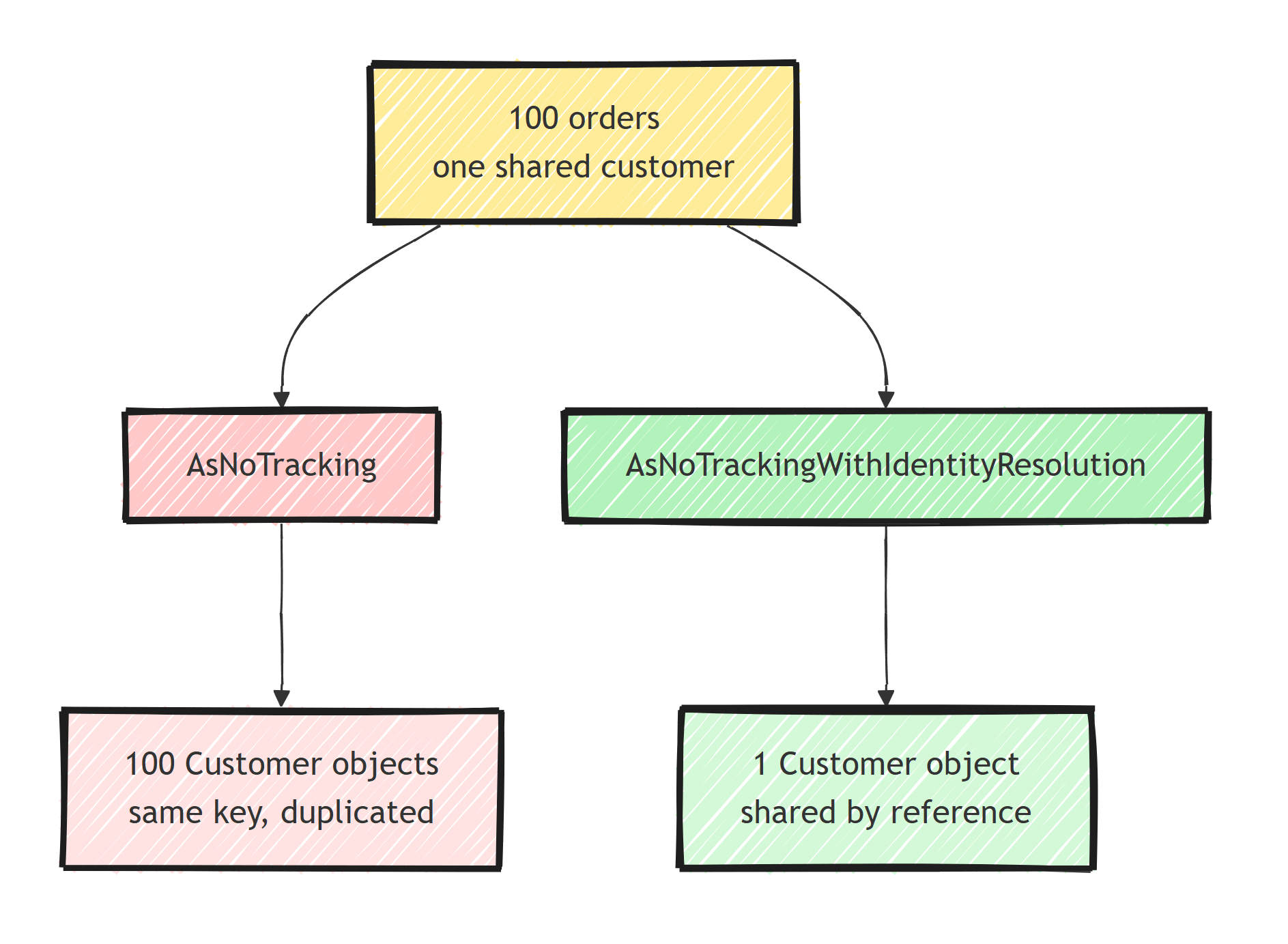
The rows coming over the wire are the same in both modes, because the JOIN repeats the customer columns in every row either way. The duplication is in materialization: 100 allocated objects instead of 1, and 100x the memory for that entity's data.
If the customer row is wide (a JSON column, a description, a byte array), the memory multiplication gets serious.
1,000 rows sharing 10 customers with 2 KB of customer data each: tracking or identity resolution holds 20 KB of customer data, plain AsNoTracking holds 2 MB.
When Do the Duplicates Actually Hurt?
Most of the time, duplicated instances are harmless.
You map the rows to a DTO, serialize, respond, and the garbage collector cleans up.
That is why plain AsNoTracking is still the right default.
The duplication bites in three specific situations:
1. In-memory graph processing. Any logic that assumes "same entity means same object" breaks without an error. Grouping by reference, building lookups keyed by instance, walking the object graph and mutating shared nodes: with plain no-tracking, "shared" nodes are not shared, so you update one copy of the customer and the other 99 still show the old value.
2. Memory-heavy read paths. Reporting queries with wide shared parents, exports, or anything that holds large result sets alive while processing. Here the duplication adds real allocation and GC cost.
3. Cyclic or diamond-shaped Includes. Multiple include paths reaching the same entity produce independent copies of it. Serializers configured with reference preservation then see distinct objects instead of one, and payload sizes grow.
In all three, you are treating the result as a graph, not as rows.
Rows you map to DTOs get AsNoTracking.
A graph you will traverse gets identity resolution (or projection, more on that below).
What Identity Resolution Costs
AsNoTrackingWithIdentityResolution maintains a dictionary of materialized keys for the duration of the query, so it pays lookup and bookkeeping CPU per row, plus the map itself.
The expected cost profile is:
AsNoTracking: fastest, most allocations when parents are shared.AsNoTrackingWithIdentityResolution: slightly slower per row, but allocations drop as sharing grows.- Tracking: the expensive one, because snapshots and change tracker registration dwarf the identity map cost.
The break-even depends on the share ratio. With no shared entities at all (every order has a distinct customer), the identity map is pure overhead: skip it. With high sharing, the reduced allocations can pay the CPU back, and the semantic correctness comes free. Benchmark the actual query instead of treating general ratios as a guarantee.
Here is how the two modes compare, dimension by dimension:
| AsNoTracking | AsNoTrackingWithIdentityResolution | |
|---|---|---|
| Change tracker entries | None | None |
| Identity map | None | Temporary, discarded when the query completes |
| Shared related entities | A fresh instance per row | One shared instance per key |
| Per-row cost | Lowest | Slightly higher, a dictionary lookup per row |
| Allocations when parents are shared | Highest | Drop as sharing grows |
| Usable with SaveChanges | No | No |
| Best for | Rows you map to a DTO and return | Graphs you traverse, group, or serialize with references |
| As the context-wide default | The one to set for read-heavy apps | Pays the map cost on every query |
Setting a Default (and Overriding It)
You can make no-tracking the context-wide default, which I do for read-heavy applications and in the query side of CQRS:
builder.Services.AddDbContext<AppDbContext>(options =>
    options.UseNpgsql(connectionString)
        .UseQueryTrackingBehavior(QueryTrackingBehavior.NoTracking));
QueryTrackingBehavior.NoTrackingWithIdentityResolution is also valid as a default, but it pays the identity-map cost on every query to fix a problem many queries do not have.
Set NoTracking as the default and opt up per query:
// Read model: default no-tracking applies.
var summaries = await dbContext.Orders
    .Select(o => new OrderSummary(o.Id, o.Customer.Name, o.Total))
    .ToListAsync();

// Graph-shaped read: opt into identity resolution.
var graph = await dbContext.Orders
    .Include(o => o.Customer)
    .Include(o => o.Lines).ThenInclude(l => l.Product)
    .AsNoTrackingWithIdentityResolution()
    .ToListAsync();

// Command: opt back into tracking to modify.
var order = await dbContext.Orders
    .AsTracking()
    .FirstAsync(o => o.Id == orderId);
One warning for the no-tracking-by-default setup: it is the classic source of "I changed the entity and SaveChanges did nothing".
If updates stop saving without an error after you flip the default, that is why, and it is related to the already-tracked errors you get when mixing modes carelessly.
The Option That Beats Both: Projection
Before choosing between the two no-tracking flavors, ask whether you need entities at all.
var report = await dbContext.Orders
    .Where(o => o.CreatedAt >= from)
    .Select(o => new OrderReportRow(
        o.Id,
        o.Customer.Name,
        o.Lines.Sum(l => l.Quantity * l.UnitPrice)))
    .ToListAsync();
A Select into a DTO sidesteps the entire question: EF tracks and duplicates nothing, builds no identity map, and fetches only the needed columns.
Projections do not need AsNoTracking at all, because there are no entities to track.
For pure read endpoints this wins on every axis, and skipping it is one of the EF Core query mistakes I see most often.
The same materialization behavior also underlies query splitting decisions.
Entities (and therefore this article's choice) remain relevant when you need the object graph: domain-shaped reads, mappers that consume entities, or code paths shared with tracking scenarios.
Summary
AsNoTrackingskips both the change tracker and the identity map. Every row materializes a fresh instance, so shared parents are duplicated: 100 orders with one customer means 100Customerobjects.AsNoTrackingWithIdentityResolutionkeeps queries untracked but deduplicates by key during materialization, at the price of a per-query identity map.- Decide by shape: rows (map to DTO and return) take plain
AsNoTracking; graphs (traverse, group, serialize with references) take identity resolution. - Set
NoTrackingas the context default for read-heavy apps, opt intoAsTrackingfor commands, and reach for identity resolution explicitly where sharing matters. - The best version of a read query is often a projection, which avoids the choice entirely.
Frequently Asked Questions
What does AsNoTracking do in EF Core?
It runs the query without registering the results in the change tracker. EF skips snapshot creation and identity resolution, which makes read-only queries faster and less memory-hungry, but the returned entities cannot be updated through SaveChanges.
Why does AsNoTracking create duplicate entities?
Without the change tracker, EF has no identity map, so it materializes a fresh object for every row it reads. If 100 orders share one customer, an Include gives you 100 separate Customer instances with the same key.
What is AsNoTrackingWithIdentityResolution?
A query mode that stays untracked but uses a temporary identity map during materialization. Rows with the same key resolve to a single shared instance, so shared related entities are no longer duplicated.
Is AsNoTrackingWithIdentityResolution slower than AsNoTracking?
Slightly. It maintains a dictionary of seen keys during materialization, which costs some CPU and allocations. It is still cheaper than full tracking because no snapshots are created and nothing is registered for change detection.
Should I use AsNoTracking by default?
For read-only queries, yes. You can set QueryTrackingBehavior.NoTracking as the DbContext default and opt back into tracking only in commands that modify data.
