
Feature folders organize .NET code by business capability instead of technical layer. Everything related to one feature (endpoint, command, handler, validator, DTOs) lives in a single folder, so the solution reads like a list of capabilities. Here is how to implement them in .NET, and when they pay off.
Open almost any .NET solution and you can guess the top-level folders before it loads: Controllers, Services, Models. That structure tells you which framework the team used, but nothing about what the application does.
The Problem With Layer-Based Organization
Most .NET projects start like this:
Controllers/
    OrdersController.cs
    CustomersController.cs
    ProductsController.cs
Services/
    OrderService.cs
    CustomerService.cs
    ProductService.cs
Models/
    Order.cs
    Customer.cs
    Product.cs
DTOs/
    OrderRequest.cs
    OrderResponse.cs
    CustomerRequest.cs
Validators/
    OrderValidator.cs
    CustomerValidator.cs
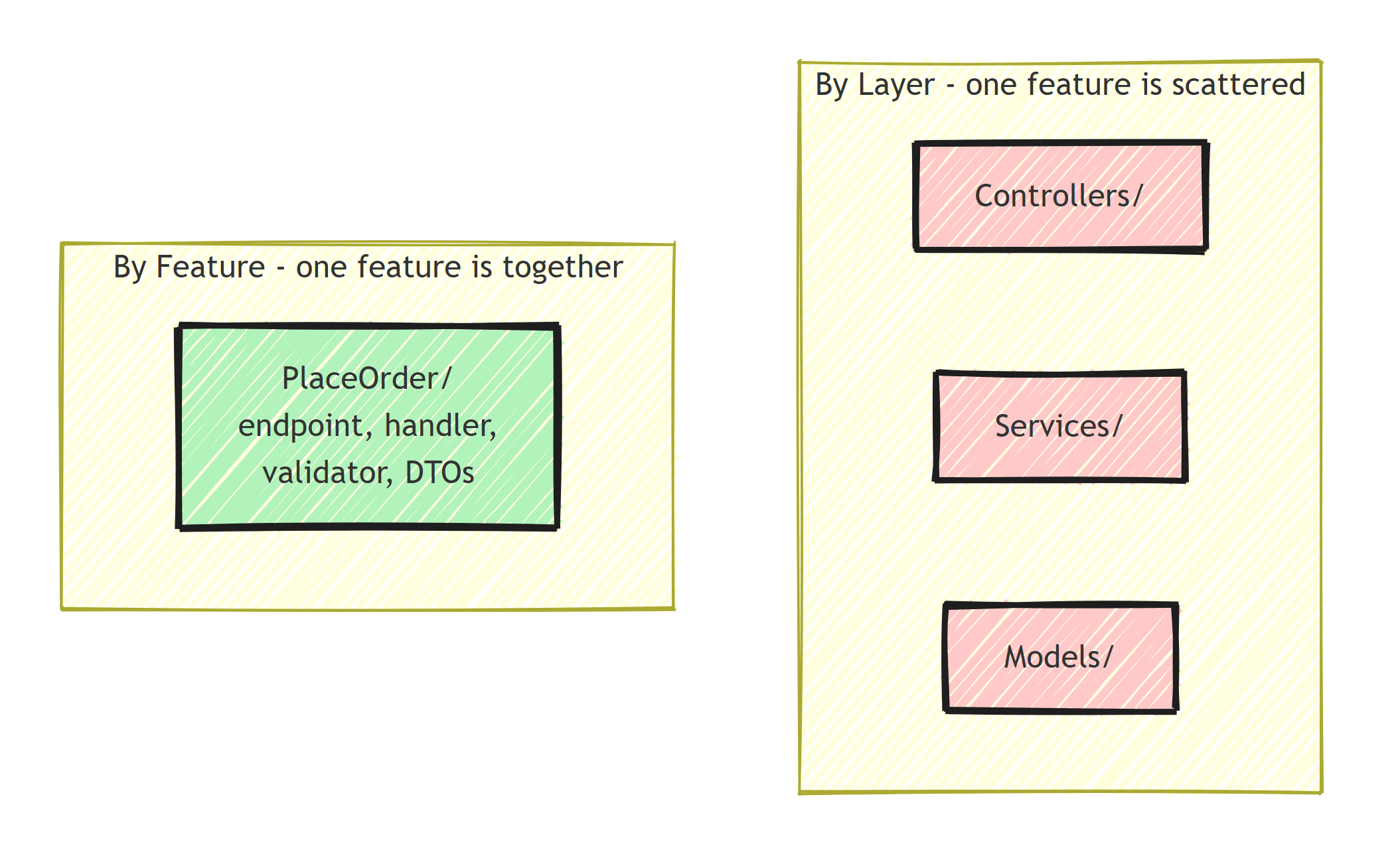
To work on one feature (placing an order), you touch files in 5+ folders. To understand a feature, you jump between directories piecing together how OrdersController calls OrderService which uses Order and OrderRequest.
This is organizing by layer: it groups files by what they are (controller, service, model), not by what they do.
Feature Folders: Organize by What Code Does
Feature folders flip the structure. Everything related to a feature lives together:
Features/
    Orders/
        PlaceOrder/
            PlaceOrderEndpoint.cs
            PlaceOrderCommand.cs
            PlaceOrderCommandHandler.cs
            PlaceOrderRequest.cs
            PlaceOrderResponse.cs
            PlaceOrderValidator.cs
        CancelOrder/
            CancelOrderEndpoint.cs
            CancelOrderCommand.cs
            CancelOrderCommandHandler.cs
        GetOrderById/
            GetOrderByIdEndpoint.cs
            GetOrderByIdQuery.cs
            GetOrderByIdQueryHandler.cs
            OrderResponse.cs
    Customers/
        RegisterCustomer/
            RegisterCustomerEndpoint.cs
            RegisterCustomerCommand.cs
            RegisterCustomerCommandHandler.cs
        GetCustomer/
            GetCustomerEndpoint.cs
            GetCustomerQuery.cs
To work on "Place Order," you open one folder.
This is how Vertical Slice Architecture and Screaming Architecture naturally organize code.
Implementing Feature Folders
Step 1: Create the Feature Structure
Each feature gets its own folder with everything it needs:
// Features/Orders/PlaceOrder/PlaceOrderCommand.cs
public sealed record PlaceOrderCommand(
    Guid CustomerId,
    List<OrderItemRequest> Items) : ICommand<Guid>;

// Features/Orders/PlaceOrder/PlaceOrderCommandHandler.cs
public sealed class PlaceOrderCommandHandler(
    IOrderRepository orderRepository,
    IUnitOfWork unitOfWork)
    : ICommandHandler<PlaceOrderCommand, Guid>
{
    public async Task<Result<Guid>> Handle(
        PlaceOrderCommand command, CancellationToken ct)
    {
        var order = Order.Create(command.CustomerId, command.Items);
        orderRepository.Add(order);
        await unitOfWork.SaveChangesAsync(ct);
        return order.Id;
    }
}

// Features/Orders/PlaceOrder/PlaceOrderEndpoint.cs
public static class PlaceOrderEndpoint
{
    public static void Map(IEndpointRouteBuilder app)
    {
        app.MapPost("/api/orders", async (
            PlaceOrderRequest request,
            ICommandHandler<PlaceOrderCommand, Guid> handler,
            CancellationToken ct) =>
        {
            var command = new PlaceOrderCommand(request.CustomerId, request.Items);
            var result = await handler.Handle(command, ct);

            return result.IsSuccess
                ? Results.Created($"/api/orders/{result.Value}", result.Value)
                : result.ToProblemDetails();
        });
    }
}

// Features/Orders/PlaceOrder/PlaceOrderValidator.cs
public sealed class PlaceOrderValidator : AbstractValidator<PlaceOrderCommand>
{
    public PlaceOrderValidator()
    {
        RuleFor(x => x.CustomerId).NotEmpty();
        RuleFor(x => x.Items).NotEmpty();
    }
}
The ICommand and ICommandHandler abstractions are the thin CQRS interfaces I defined in CQRS Pattern: The Way It Should Have Been From the Start.
Step 2: Auto-Register Endpoints
Scan for all endpoint classes and register them:
public static class EndpointRegistration
{
    public static void MapFeatureEndpoints(this IEndpointRouteBuilder app)
    {
        var endpointTypes = typeof(Program).Assembly
            .GetTypes()
            .Where(t => t.GetMethods(BindingFlags.Public | BindingFlags.Static)
                .Any(m => m.Name == "Map" &&
                    m.GetParameters().Length == 1 &&
                    m.GetParameters()[0].ParameterType == typeof(IEndpointRouteBuilder)));

        foreach (var type in endpointTypes)
        {
            var method = type.GetMethod("Map",
                BindingFlags.Public | BindingFlags.Static,
                [typeof(IEndpointRouteBuilder)]);

            method?.Invoke(null, [app]);
        }
    }
}
// Program.cs
app.MapFeatureEndpoints();
Step 3: Register Handlers
Use assembly scanning with the Scrutor library, so a new slice never means editing Program.cs:
dotnet add package Scrutor
builder.Services.Scan(scan => scan
    .FromAssemblyOf<PlaceOrderCommandHandler>()
    .AddClasses(c => c.AssignableTo(typeof(ICommandHandler<,>)))
    .AsImplementedInterfaces()
    .WithScopedLifetime()
    .AddClasses(c => c.AssignableTo(typeof(IQueryHandler<,>)))
    .AsImplementedInterfaces()
    .WithScopedLifetime());
One File or One Folder per Feature?
There are two popular granularities, and both are fine:
Folder per operation (shown above): PlaceOrder/ contains five or six small files. Best when slices carry validators, mappers, and multiple DTOs.
Single file per operation: the whole slice lives in PlaceOrder.cs as a static class with nested types:
// Features/Orders/PlaceOrder.cs
public static class PlaceOrder
{
    public sealed record Command(
        Guid CustomerId, List<OrderItemRequest> Items) : ICommand<Guid>;

    public sealed class Validator : AbstractValidator<Command> { /* ... */ }

    internal sealed class Handler : ICommandHandler<Command, Guid> { /* ... */ }

    public static void Map(IEndpointRouteBuilder app) { /* ... */ }
}
The single-file style keeps the entire feature on one screen and makes names collision-free (PlaceOrder.Command, CancelOrder.Command).
The static Map method keeps the same shape as before, so the endpoint scanner from Step 2 picks it up unchanged. It's the style I lean toward for small-to-medium slices, and I've written more about structuring vertical slices if you want the full reasoning.
Start with one file. Split into a folder when the file gets uncomfortable to scroll.
Feature Folders in Clean Architecture
You can combine feature folders with Clean Architecture:
src/
  MyApp.Domain/
    Orders/
      Order.cs
      OrderLineItem.cs
      IOrderRepository.cs
    Customers/
      Customer.cs
  MyApp.Application/
    Orders/
      PlaceOrder/
        PlaceOrderCommand.cs
        PlaceOrderCommandHandler.cs
        PlaceOrderValidator.cs
      CancelOrder/
        CancelOrderCommand.cs
        CancelOrderCommandHandler.cs
      GetOrderById/
        GetOrderByIdQuery.cs
        GetOrderByIdQueryHandler.cs
        OrderResponse.cs
  MyApp.Infrastructure/
    Persistence/
      Repositories/
        OrderRepository.cs
  MyApp.Api/
    Endpoints/
      Orders/
        PlaceOrderEndpoint.cs
        CancelOrderEndpoint.cs
        GetOrderByIdEndpoint.cs
The Application layer uses feature folders. The Domain layer groups entities by aggregate. The Presentation layer mirrors the Application structure.
When to Use Feature Folders
Feature folders work well when:
- Features are relatively independent
- The team works on features, not layers
- You want code locality (related code close together)
- You're using CQRS (commands and queries naturally form features)
Stick with layers when:
- There's extensive code sharing between features
- The project is very small (5-10 files total)
- Your team is more comfortable with the traditional structure
Shared Code
Some code is shared across features: domain entities, base classes, common helpers.
Put these in a Common or Shared folder:
Features/
    Orders/
        PlaceOrder/...
        CancelOrder/...
    Customers/...
Common/
    Domain/
        Entity.cs
        ValueObject.cs
        AggregateRoot.cs
    Results/
        Result.cs
        Error.cs
Keep the shared folder minimal. If code is only used by one feature, it belongs in that feature's folder.
When two features start needing the same logic, don't abstract it immediately. I've written about where shared logic should live, and the short answer is to extract it when the duplication hurts.
Migrating an Existing Codebase
You don't need a rewrite to adopt feature folders. The incremental path:
- Create the
Featuresfolder next to your existingControllers/Servicesfolders. - Move one feature end to end. Pick a small, actively developed one. Pull its controller action, service method, DTOs, and validator into a feature folder, collapsing the service and repository indirection where it adds nothing.
- Ship it. The old layers and the new folder coexist fine; routing doesn't depend on where files live.
- Repeat opportunistically. Migrate features when you touch them for other reasons. Untouched code stays where it is.
The biggest friction is usually that the codebase looks inconsistent during the transition, with some features in Features and the rest still spread across layers.
That's fine.
Summary
Feature folders organize code by business capability instead of technical concern. Every file related to placing an order lives in the PlaceOrder folder.
You get faster navigation, fewer merge conflicts, and a folder structure that shows what the application does.
Thanks for reading, and stay awesome!
Frequently Asked Questions
What are feature folders in .NET?
Feature folders organize code by business capability instead of technical layer. Everything related to one feature (endpoint, command, handler, validator, DTOs) lives in a single folder, instead of being spread across Controllers, Services, and Models directories.
What is the difference between feature folders and Vertical Slice Architecture?
Feature folders are the file organization; Vertical Slice Architecture is the design approach that treats each feature as an independent slice through all layers. VSA almost always uses feature folders, but you can adopt feature folders inside a layered architecture too.
How do you handle shared code with feature folders?
Keep a small Common or Shared folder for cross-feature code like base entity classes and the Result type. If something is used by only one feature, it belongs in that feature folder. Extract shared code when duplication hurts, not preemptively.
Do feature folders work with Clean Architecture?
Yes. Keep the project-level layer separation and apply feature folders inside each project, so the Application layer has one folder per use case and the API layer mirrors it.
