
SELECT FOR UPDATE locks every row a query returns until the transaction ends, so other writers block instead of racing you.
FOR UPDATE SKIP LOCKED skips rows another transaction holds, turning a table into a job queue for competing workers.
Advisory locks lock an application-defined 64-bit key rather than a row.
EF Core has no LINQ operator for these, so you reach for raw SQL inside an explicit transaction.
Optimistic concurrency detects a race after another writer wins. Some workflows need to prevent the conflicting work from starting, or let several workers claim different rows without waiting on each other. PostgreSQL row and advisory locks provide those guarantees, but only while their transaction and timeout rules are explicit.
When You Need Database Locks
Optimistic concurrency works great when conflicts are rare. But in high-contention scenarios (ticket booking, inventory management, financial transfers), retrying failed operations can be expensive or impractical.
That's when you lock rows in the database: acquire the lock first, then make your changes. No other transaction can modify the locked row until you commit or roll back.
I covered the general EF Core approach in pessimistic locking in EF Core.
This article goes deeper into what PostgreSQL specifically gives you: FOR UPDATE and its variants, SKIP LOCKED job queues, and advisory locks.
SELECT FOR UPDATE From EF Core
PostgreSQL's SELECT FOR UPDATE acquires a row-level lock on every row returned by the query.
Other transactions that try to lock the same rows will block until the lock is released.
EF Core doesn't have built-in support for SELECT FOR UPDATE, but you can use raw SQL:
public async Task<Order?> GetOrderForUpdate(
    AppDbContext context,
    Guid orderId,
    CancellationToken ct = default)
{
    return await context.Orders
        .FromSqlInterpolated(
            $@"SELECT * FROM ""Orders""
               WHERE ""Id"" = {orderId}
               FOR UPDATE")
        .FirstOrDefaultAsync(ct);
}
The entity comes back fully tracked, so the normal SaveChangesAsync workflow still applies.
The lock is held for the duration of the transaction and released when it commits or rolls back.
The Full Transaction Pattern
The lock only makes sense inside an explicit transaction. Without one, PostgreSQL runs the statement in its own auto-committed transaction, and the lock is released the moment the query finishes.
public async Task ProcessPayment(Guid orderId, decimal amount)
{
    await using var transaction = await context.Database
        .BeginTransactionAsync();

    try
    {
        // Lock the row - other transactions will wait here
        var order = await context.Orders
            .FromSqlInterpolated(
                $@"SELECT * FROM ""Orders""
                   WHERE ""Id"" = {orderId}
                   FOR UPDATE")
            .FirstOrDefaultAsync();

        if (order is null)
        {
            throw new InvalidOperationException("Order not found.");
        }

        order.RecordPayment(amount);

        await context.SaveChangesAsync();
        await transaction.CommitAsync();
    }
    catch
    {
        await transaction.RollbackAsync();
        throw;
    }
}
Between BeginTransactionAsync and CommitAsync, the locked row is exclusively yours.
Any other transaction running the same SELECT FOR UPDATE will block until this transaction completes.
One caveat if you enabled EnableRetryOnFailure: a retrying execution strategy can't replay a manually started transaction, so EF Core throws when you call BeginTransactionAsync.
Wrap the whole operation in CreateExecutionStrategy().ExecuteAsync(...) in that case.
PostgreSQL Row Lock Modes
FOR UPDATE is the strongest row lock, but PostgreSQL has a whole family of locking clauses:
-- Blocks other FOR UPDATE, allows plain reads
SELECT * FROM "Orders" WHERE "Id" = @id FOR UPDATE;

-- Weaker than FOR UPDATE: allows inserts into child tables
-- that reference this row via a foreign key
SELECT * FROM "Orders" WHERE "Id" = @id FOR NO KEY UPDATE;

-- Shared lock - multiple transactions can hold it simultaneously
SELECT * FROM "Orders" WHERE "Id" = @id FOR SHARE;

-- Fail immediately instead of waiting
SELECT * FROM "Orders" WHERE "Id" = @id FOR UPDATE NOWAIT;

-- Skip locked rows (great for job queues)
SELECT * FROM "Orders" WHERE "Status" = 'Pending'
FOR UPDATE SKIP LOCKED LIMIT 1;
If you're locking a parent row (say, an Order) while inserting child rows into another table that references it (say, OrderLines in a different transaction), prefer FOR NO KEY UPDATE.
Plain FOR UPDATE blocks those inserts because inserting a referencing row needs a key-share lock on the parent.
FOR UPDATE NOWAIT is useful when you'd rather fail fast than block.
SKIP LOCKED for Job Queues
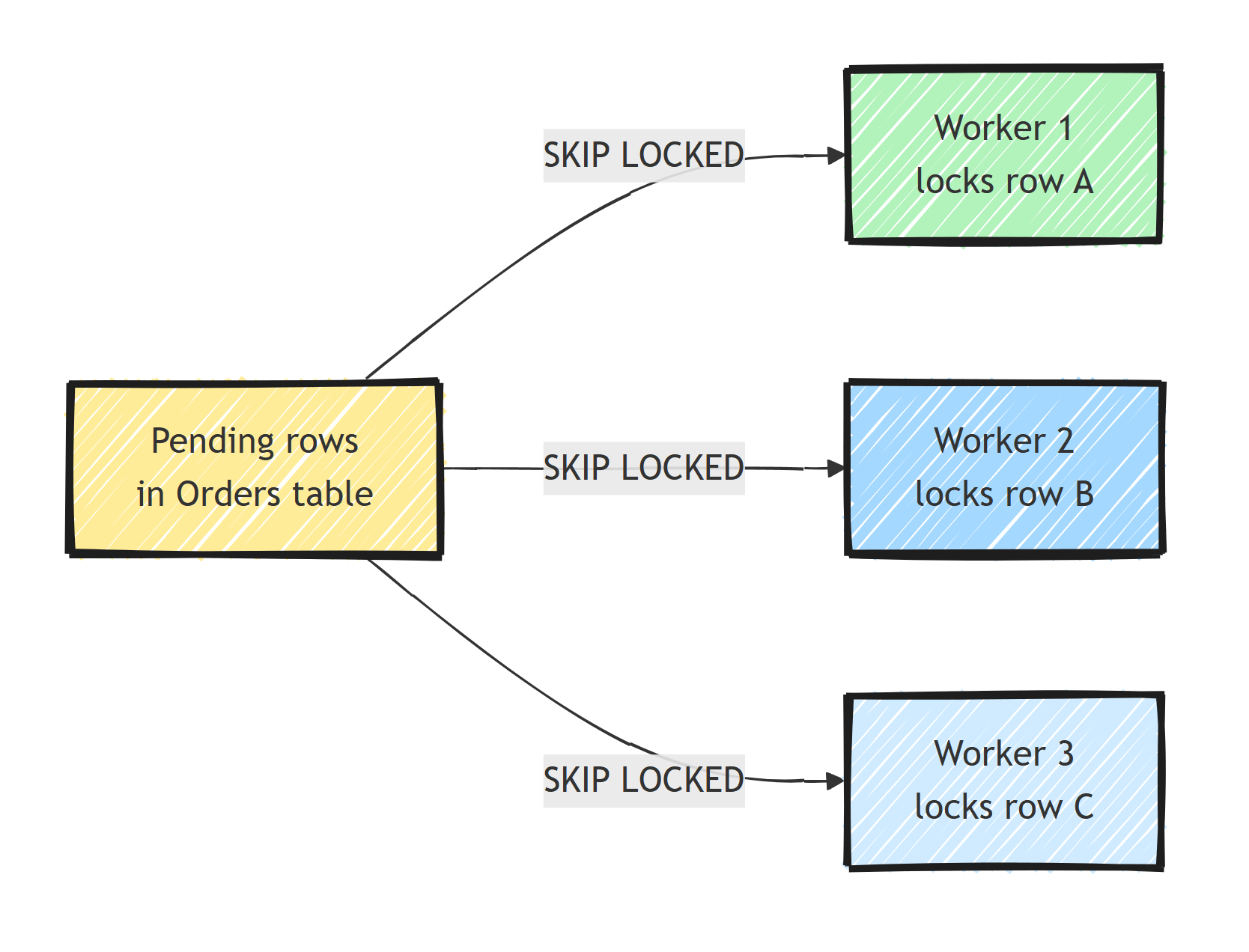
SKIP LOCKED turns a plain table into a competing-consumers job queue.
Each worker locks and processes a different row without waiting on the others:
public async Task<Order?> DequeueNextOrder(AppDbContext context)
{
    await using var transaction = await context.Database
        .BeginTransactionAsync();

    var order = await context.Orders
        .FromSqlRaw(
            @"SELECT * FROM ""Orders""
              WHERE ""Status"" = 'Pending'
              ORDER BY ""CreatedAt""
              FOR UPDATE SKIP LOCKED
              LIMIT 1")
        .FirstOrDefaultAsync();

    if (order is not null)
    {
        order.Status = OrderStatus.Processing;
        await context.SaveChangesAsync();
    }

    await transaction.CommitAsync();
    return order;
}
Multiple workers can call this concurrently. Each one gets a different row, so workers don't block each other or process the same order twice.
This is how you scale a transactional outbox processor across multiple instances.
Each instance grabs its own batch of outbox messages with SKIP LOCKED, and the rows locked by one instance are invisible to the others.
One gotcha: keep the processing inside the transaction short.
The row stays locked until you commit, so if your handler calls a slow external API while holding the lock, you're serializing on that API call.
For long-running work, mark the row as Processing in one short transaction, commit, then do the work.
Advisory Locks
Sometimes you need to lock a concept rather than a row. Maybe the row doesn't exist yet (preventing duplicate user registration), or the thing you're protecting isn't in the database at all (a file, an external API).
PostgreSQL advisory locks let you lock an arbitrary 64-bit integer key:
public async Task<bool> TryAcquireAdvisoryLock(
    AppDbContext context, long lockKey)
{
    var result = await context.Database
        .SqlQuery<bool>(
            $"SELECT pg_try_advisory_xact_lock({lockKey}) AS \"Value\"")
        .FirstAsync();

    return result;
}
pg_try_advisory_xact_lock returns true if the lock was acquired, false if another session holds it.
The _xact_ variant is the one you want with connection pooling: it releases automatically when the transaction ends, so a returned pooled connection can never carry a forgotten lock.
Use advisory locks for things like:
- Preventing concurrent processing of the same event
- Ensuring only one instance runs a scheduled job
- Coordinating access to external resources
public async Task ProcessEvent(Guid eventId)
{
    await using var transaction = await context.Database
        .BeginTransactionAsync();

    var lockKey = BitConverter.ToInt64(eventId.ToByteArray(), 0);

    if (!await TryAcquireAdvisoryLock(context, lockKey))
    {
        return; // Another process is handling this event
    }

    // Safe to process - we hold the lock
    await HandleEvent(eventId);
    await transaction.CommitAsync();
}
The lock is released when the transaction commits, so it only stops concurrent duplicates.
A copy of the event redelivered after that acquires the lock and runs again, which is why HandleEvent still needs an idempotency check.
Deriving the key from the first 8 bytes of a Guid loses information, so two different GUIDs could theoretically map to the same key.
If that happens, pg_try_advisory_xact_lock doesn't wait: the second event gets false and returns early, so it is skipped unless the caller retries it.
Use the blocking pg_advisory_xact_lock instead if colliding events should wait for each other.
Advisory locks are also the foundation for distributed locking in .NET when you don't want to bring in Redis or another external system.
Bounding Wait Times With lock_timeout
By default, PostgreSQL lets a blocked FOR UPDATE wait forever (lock_timeout is 0).
From EF Core, Npgsql's default 30-second command timeout eventually cancels the query, but that still ties up the web request and a connection for 30 seconds.
Set lock_timeout inside the transaction with SET LOCAL, so it applies only to that transaction and resets automatically:
await using var transaction = await context.Database
    .BeginTransactionAsync();

await context.Database.ExecuteSqlRawAsync(
    "SET LOCAL lock_timeout = '5s'");

// Throws after 5 seconds of waiting on the lock
var order = await GetOrderForUpdate(context, orderId);
Prefer SET LOCAL over plain SET.
A plain SET changes the session, and with Npgsql connection pooling you don't want session-level settings escaping the code that made them.
Isolation Levels and Row Locks
You can combine explicit row locks with a transaction isolation level:
await using var transaction = await context.Database
    .BeginTransactionAsync(IsolationLevel.Serializable);
Here's how PostgreSQL's isolation levels compare:
- Read Committed (the default): each statement sees data committed before that statement started. Non-repeatable reads and phantoms are possible.
- Repeatable Read: the whole transaction sees a snapshot from its start. In PostgreSQL this also prevents phantom reads, which the SQL standard doesn't require at this level.
- Serializable: transactions behave as if they ran one at a time. PostgreSQL aborts transactions that would violate serializability, so you must be prepared to retry.
For most locking scenarios, ReadCommitted combined with SELECT FOR UPDATE is sufficient.
Serializable gives you the strongest guarantees without explicit locks, but you pay with retry logic for serialization failures.
Avoiding Deadlocks
Deadlocks occur when two transactions lock rows in opposite order.
Transaction A locks row 1, transaction B locks row 2, then A tries to lock row 2 while B tries to lock row 1.
PostgreSQL detects this and kills one of the transactions with error 40P01.
The main defense is to lock rows in a deterministic order.
// Always lock rows in a consistent order
var orders = await context.Orders
    .FromSqlInterpolated(
        $@"SELECT * FROM ""Orders""
           WHERE ""Id"" = ANY({orderIds})
           ORDER BY ""Id""
           FOR UPDATE")
    .ToListAsync();
Other deadlock prevention tips:
- Keep transactions short: acquire locks, do the work, commit
- Use
FOR UPDATE NOWAITto fail fast instead of waiting for the lock - Set a
lock_timeoutto bound wait times - Don't mix lock acquisition with slow I/O (external HTTP calls, file access)
Choosing the Right Tool
Choose between the options from the contention model:
- Optimistic concurrency: conflicts are rare, retries are cheap, you want maximum throughput. See optimistic locking in EF Core.
- FOR UPDATE: conflicts are frequent on specific rows, and the operation isn't safely retryable (payments, inventory decrements).
- SKIP LOCKED: multiple workers competing for rows in a queue-like table.
- Advisory locks: the thing you're protecting isn't a row (singleton jobs, external resources, "create if not exists" flows).
Summary
Acquire row locks inside an explicit transaction and keep the protected work as short as possible.
Use SKIP LOCKED for workers competing over queue-like rows and transaction-scoped advisory locks for concepts that have no row to lock.
Bound wait time and acquire multiple locks in a consistent order so contention fails predictably instead of becoming a deadlock.
Frequently Asked Questions
What does SELECT FOR UPDATE do in PostgreSQL?
SELECT FOR UPDATE acquires a row-level lock on every row the query returns. Other transactions that try to lock or update the same rows block until the locking transaction commits or rolls back. Plain reads are not blocked.
What is FOR UPDATE SKIP LOCKED used for?
SKIP LOCKED makes the query skip rows that are already locked by another transaction instead of waiting. It is the standard building block for database-backed job queues, where multiple workers each grab a different pending row without conflicts.
What are PostgreSQL advisory locks?
Advisory locks let you lock an arbitrary application-defined key (a 64-bit integer) rather than a table row. PostgreSQL only tracks the lock; your code decides what it means. They are useful for singleton jobs, preventing two workers from processing the same item at the same time, and coordinating access to external resources.
Does EF Core support pessimistic locking natively?
No. EF Core has no LINQ operator for FOR UPDATE, so you drop down to raw SQL with FromSql or FromSqlInterpolated inside an explicit transaction. The rest of the change tracking and SaveChanges workflow works as usual.
What is the difference between FOR UPDATE and FOR NO KEY UPDATE?
FOR UPDATE takes the strongest row lock and blocks inserts of rows referencing the locked row via foreign keys. FOR NO KEY UPDATE is slightly weaker: it still blocks concurrent updates but allows inserts into child tables that reference the row, which reduces contention in parent-child schemas.
