

Problem Details is a machine-readable JSON format for describing errors in HTTP API responses, standardized by RFC 9457.
In ASP.NET Core, you call AddProblemDetails and UseExceptionHandler, and unhandled exceptions become application/problem+json responses.
This issue also covers the .NET 8 IExceptionHandler and how to customize every Problem Details response.
Telerik UI for ASP.NET Core Grid: Enable data editing without code. Multiple options for customizing user experience. Configure the grid easily to meet your UX needs. Learn more here.
Webinar: Accelerating with AI using Postman Flows. Second in our series on visualizing, accelerating, and collaborating with Postman Flows. Learn how AI enhances API development and speeds up your workflow. Register here for free.
When developing HTTP APIs, providing consistent and informative error responses is crucial for a smooth developer experience. Problem Details in ASP.NET Core offers a standardized solution to this challenge, ensuring your APIs communicate errors effectively and uniformly.
In this article, we'll explore the latest developments in Problem Details, including:
- The new RFC 9457 that refines the Problem Details standard
- Using the .NET 8
IExceptionHandlerfor global exception handling - Using the
IProblemDetailsServicefor customizing Problem Details
Let's dive into these features and see how they can improve your API's error handling.
Understanding Problem Details
Problem Details is a machine-readable format for specifying errors in HTTP API responses. HTTP status codes don't always contain enough details about errors to be helpful. The Problem Details specification defines a JSON (and XML) document format to describe problems.
Problem Details includes:
type: A URI reference that identifies the problem typetitle: A short, human-readable summary of the problem typestatus: The HTTP status codedetail: A human-readable explanation specific to this occurrence of the probleminstance: A URI reference that identifies the specific occurrence of the problem
RFC 9457, which replaces RFC 7807, introduces improvements such as clarifying the use of the type field and providing guidelines for extending Problem Details.
Here's an example Problem Details response:
Content-Type: application/problem+json

{
  "type": "https://tools.ietf.org/html/rfc9110#section-15.5.5",
  "title": "Not Found",
  "status": 404,
  "detail": "The habit with the specified identifier was not found",
  "instance": "PUT /api/habits/aadcad3f-8dc8-443d-be44-3d99893ba18a"
}
Implementing Problem Details
Let's see how to implement Problem Details in ASP.NET Core.
We want to return a Problem Details response for unhandled exceptions.
By calling AddProblemDetails, we're configuring the application to use the Problem Details format for failed requests.
With UseExceptionHandler, we introduce an exception handling middleware to the request pipeline.
By adding UseStatusCodePages, we're introducing a middleware that will convert error responses with an empty body to a Problem Details response.
var builder = WebApplication.CreateBuilder(args);

// Adds services for using Problem Details format
builder.Services.AddProblemDetails();

var app = builder.Build();

// Converts unhandled exceptions into Problem Details responses
app.UseExceptionHandler();

// Returns the Problem Details response for (empty) non-successful responses
app.UseStatusCodePages();

app.Run();
When we encounter an unhandled exception, it will be translated to a Problem Details response:
Content-Type: application/problem+json

{
  "type": "https://tools.ietf.org/html/rfc9110#section-15.6.1",
  "title": "An error occurred while processing your request.",
  "status": 500
}
Now, let's explore how we can customize this response.
Global Error Handling
We have a few options for implementing global error handling.
The most popular approach is creating a custom exception handling middleware.
You wrap the API request in a try-catch statement and return a response based on any caught exception.
With .NET 8, we can use the IExceptionHandler that runs in the built-in exception handling middleware.
This handler allows you to tailor the Problem Details response for specific exceptions.
Returning true from the TryHandleAsync method short-circuits the pipeline and returns the API response.
If we return false, the next handler in the chain attempts to handle the exception.
We can map different exception types to appropriate HTTP status codes, providing more precise error information to API consumers.
Here's an example CustomExceptionHandler implementation:
internal sealed class CustomExceptionHandler : IExceptionHandler
{
    public async ValueTask<bool> TryHandleAsync(
        HttpContext httpContext,
        Exception exception,
        CancellationToken cancellationToken)
    {
        int status = exception switch
        {
            ArgumentException => StatusCodes.Status400BadRequest,
            _ => StatusCodes.Status500InternalServerError
        };
        httpContext.Response.StatusCode = status;

        var problemDetails = new ProblemDetails
        {
            Status = status,
            Title = "An error occurred",
            Type = exception.GetType().Name,
            Detail = exception.Message
        };

        await httpContext.Response.WriteAsJsonAsync(problemDetails, cancellationToken);

        return true;
    }
}

// In Program.cs
builder.Services.AddExceptionHandler<CustomExceptionHandler>();
Using The ProblemDetailsService
Calling AddProblemDetails registers a default implementation of the IProblemDetailsService.
The IProblemDetailsService will set the response status code based on the ProblemDetails.Status.
Here's how we can use it in the CustomExceptionHandler:
public class CustomExceptionHandler(IProblemDetailsService problemDetailsService) : IExceptionHandler
{
    public async ValueTask<bool> TryHandleAsync(
        HttpContext httpContext,
        Exception exception,
        CancellationToken cancellationToken)
    {
        var problemDetails = new ProblemDetails
        {
            Status = exception switch
            {
                ArgumentException => StatusCodes.Status400BadRequest,
                _ => StatusCodes.Status500InternalServerError
            },
            Title = "An error occurred",
            Type = exception.GetType().Name,
            Detail = exception.Message
        };

        return await problemDetailsService.TryWriteAsync(new ProblemDetailsContext
        {
            Exception = exception,
            HttpContext = httpContext,
            ProblemDetails = problemDetails
        });
    }
}
This approach seems very similar to the previous one, where we wrote to the response body.
However, using the IProblemDetailsService gives an easy way to customize all Problem Details responses.
We can return Problem Details in controllers using the Problem method, or Results.Problem in Minimal APIs.
These methods respect the configured Problem Details customizations (more on this in the next section).
IdentityUser identityUser = new() { UserName = registerUserDto.UserName, Email = registerUserDto.Email };
IdentityResult result = await userManager.CreateAsync(identityUser, registerUserDto.Password);

if (!result.Succeeded)
{
    // return Results.Problem - Minimal APIs
    return Problem(
        type: "Bad Request",
        title: "Identity failure",
        detail: result.Errors.First().Description,
        statusCode: StatusCodes.Status400BadRequest);
}
Customizing Problem Details
We can pass a delegate to the AddProblemDetails method to set the CustomizeProblemDetails.
You can use this to add extra information to all Problem Details responses.
This is an excellent place for solving cross-cutting concerns, like setting the instance value and adding diagnostics information.
builder.Services.AddProblemDetails(options =>
{
    options.CustomizeProblemDetails = context =>
    {
        context.ProblemDetails.Instance =
            $"{context.HttpContext.Request.Method} {context.HttpContext.Request.Path}";

        context.ProblemDetails.Extensions.TryAdd("requestId", context.HttpContext.TraceIdentifier);

        Activity? activity = context.HttpContext.Features.Get<IHttpActivityFeature>()?.Activity;
        context.ProblemDetails.Extensions.TryAdd("traceId", activity?.Id);
    };
});
This customization adds the request path, a request ID, and a trace ID to every Problem Details response, enhancing debuggability and traceability of errors.
Content-Type: application/problem+json

{
  "type": "https://tools.ietf.org/html/rfc9110#section-15.5.5",
  "title": "Not Found",
  "status": 404,
  "instance": "PUT /api/habits/aadcad3f-8dc8-443d-be44-3d99893ba18a",
  "traceId": "00-63d4af1807586b0d98901ae47944192d-9a8635facb90bf76-01",
  "requestId": "0HN7C8PRNMGIA:00000001"
}
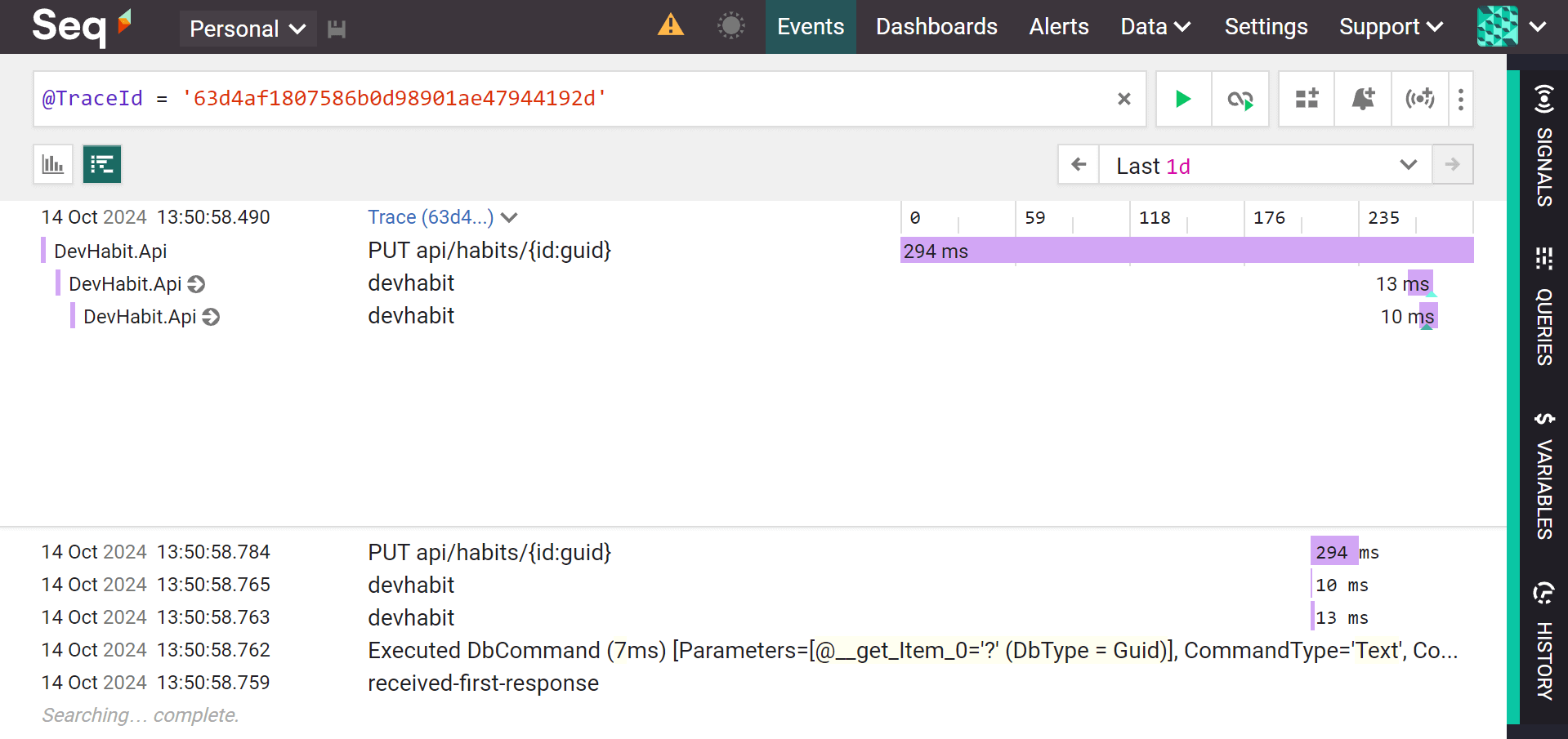
You can use the traceId to find the distributed traces and logs in a monitoring system like Seq.
Handling Specific Exceptions (Status Codes)
.NET 9 introduces a simpler way to map exceptions to status codes.
Great news for fans of throwing exceptions.
You can use the StatusCodeSelector to define the mappings.
This makes it easier to maintain consistent error responses across your API.
app.UseExceptionHandler(new ExceptionHandlerOptions
{
    StatusCodeSelector = ex => ex switch
    {
        ArgumentException => StatusCodes.Status400BadRequest,
        NotFoundException => StatusCodes.Status404NotFound,
        _ => StatusCodes.Status500InternalServerError
    }
});
If you use this together with an IExceptionHandler that sets the StatusCode, then the StatusCodeSelector is ignored.
Takeaway
Implementing Problem Details in your ASP.NET Core APIs is more than just a best practice - it's a standard for improving the developer experience of your API consumers. By providing consistent, detailed, and well-structured error responses, you make it easier for clients to understand and handle error scenarios gracefully.
As you implement these practices in your own projects, you'll discover even more ways to tailor Problem Details to your specific needs. I shared what worked well for my use cases.
Problem Details is just one of the best practices covered in my REST APIs course. Check it out if you're looking for a comprehensive guide.
Good luck out there, and I'll see you next week.
Frequently Asked Questions
What is Problem Details in ASP.NET Core?
Problem Details is a machine-readable JSON (and XML) format for describing errors in HTTP API responses, because status codes alone often lack detail. A response carries type, title, status, detail, and instance fields and is served with the application/problem+json content type.
What is RFC 9457 and how does it relate to RFC 7807?
RFC 9457 is the Problem Details specification that replaced RFC 7807. It refined the standard by clarifying how the type field should be used and by providing guidelines for extending Problem Details responses with additional fields.
How do you return Problem Details for unhandled exceptions in ASP.NET Core?
Call AddProblemDetails to register the services, add UseExceptionHandler so unhandled exceptions become Problem Details responses, and add UseStatusCodePages to convert empty error responses to the same format. Failed requests then return application/problem+json documents.
What is IExceptionHandler in .NET 8?
.NET 8 added IExceptionHandler, which runs inside the built-in exception handling middleware. In TryHandleAsync you map exception types to status codes and write a tailored Problem Details response. Returning true short-circuits the pipeline, while false lets the next handler in the chain try.
How do you add custom fields to every Problem Details response?
Pass a delegate to AddProblemDetails and set CustomizeProblemDetails. It is the place for cross-cutting concerns, such as setting the instance value to the request method and path and adding extensions like a request ID and a trace ID, which you can use to find distributed traces in a monitoring system.
How do you map exceptions to HTTP status codes in .NET 9?
.NET 9 introduced the StatusCodeSelector option on UseExceptionHandler, a delegate that maps exception types to status codes, for example ArgumentException to 400 and a NotFoundException to 404. If an IExceptionHandler already sets the status code, the StatusCodeSelector is ignored.
