

Redis Pub/Sub sends messages to named channels, and every subscriber listening at that moment receives them.
Nothing is stored, so a message published with no subscribers is discarded, which gives you at-most-once delivery.
In .NET you publish and subscribe through an ISubscriber from StackExchange.Redis.
API Collaboration has never been easier with comments on collections, folders, and requests using Postman! Launch into hyper-efficiency using comments to discuss your work with your teammates in Postman. Learn more here.
Build automations with UiPath Autopilot™. Join this free webinar to learn how to build automation workflows, generate code, and create ready-to-use apps by simply describing your needs to the AI-powered Autopilot. Register today!
Redis is a popular choice for caching data, but its capabilities go far beyond that. One of its lesser-known features is Pub/Sub support. Redis channels offer an interesting approach for implementing real-time messaging in your .NET applications. However, as you'll soon see, channels also have some drawbacks.
In this week's newsletter, we'll explore:
- Basics of Redis channels
- Practical use cases for channels
- Implementing a Pub/Sub example in .NET
- Cache invalidation in distributed systems
Let's dive in.
Redis Channels
Redis channels are named communication channels that implement the Publish/Subscribe messaging paradigm.
Each channel is identified by a unique name (e.g., notifications, updates).
Channels facilitate message delivery from publishers to subscribers.
Publishers use the PUBLISH command to send messages to a specific channel.
Subscribers use the SUBSCRIBE command to register interest in receiving messages from a channel.
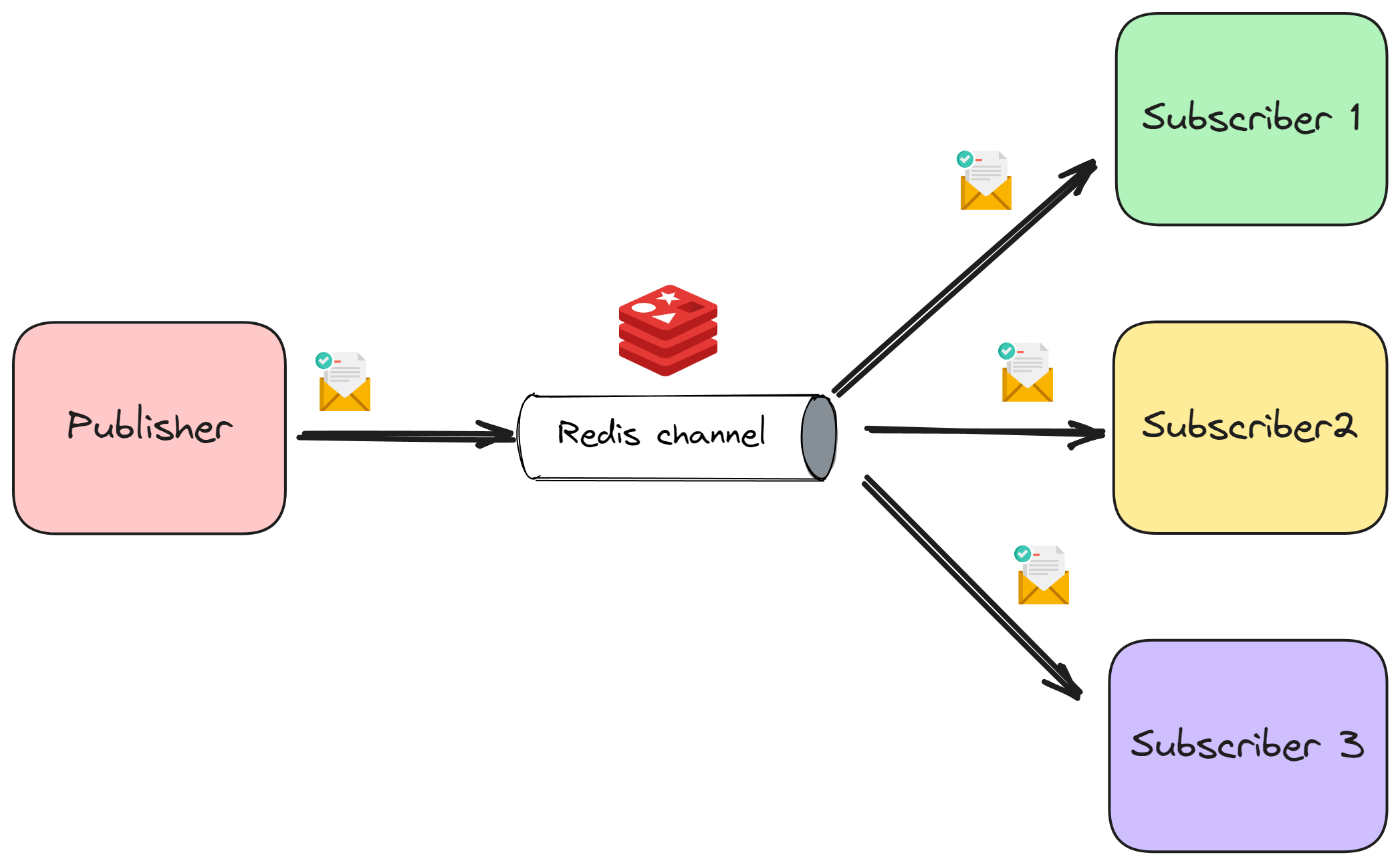
Redis channels follow a topic-based publish-subscribe model. Multiple publishers can send messages to a channel, and multiple subscribers can receive messages from that channel.
However, it's crucial to note that Redis channels do not store messages. If there are no subscribers for a channel when a message is published, that message is immediately discarded.
Redis channels have an at-most-once delivery semantics.
Practical Use Cases
Given that Redis channels operate with at-most-once delivery (messages might be lost if there are no subscribers), they are well-suited for scenarios where occasional message loss is acceptable and real-time or near-real-time communication is desired.
Here are a few possible use cases:
- Social media feeds: Broadcasting new posts or updates to users.
- Live score updates: Sending live game scores or sports updates to subscribers.
- Chat applications: Delivering chat messages in real-time to active participants.
- Collaborative editing: Propagating changes in collaborative editing environments.
- Distributed cache updates: Invalidating cache entries across multiple servers when data changes. We'll cover this in detail later in the article.
Redis channels aren't the best choice for critical data where message loss is unacceptable. In such cases, you should consider a more reliable messaging system.
Let's see how we can use Redis channels in .NET.
Pub/Sub With Redis Channels
We will use the StackExchange.Redis library to send messages with Redis channels.
Let's start by installing it:
Install-Package StackExchange.Redis
You can run Redis locally in a Docker container.
The default port is 6379.
docker run -it -p 6379:6379 redis
Here's a simple background service that'll act as our message Producer.
We're creating a ConnectionMultiplexer by connecting to our Redis instance.
This allows us to obtain an ISubscriber that we can use for pub/sub messaging.
The ISubscriber will enable us to publish a message to a channel by specifying the channel name.
public class Producer(ILogger<Producer> logger) : BackgroundService
{
    private static readonly string ConnectionString = "localhost:6379";
    private static readonly ConnectionMultiplexer Connection =
        ConnectionMultiplexer.Connect(ConnectionString);

    private const string Channel = "messages";

    protected override async Task ExecuteAsync(CancellationToken stoppingToken)
    {
        var subscriber = Connection.GetSubscriber();

        while (!stoppingToken.IsCancellationRequested)
        {
            var message = new Message(Guid.NewGuid(), DateTime.UtcNow);

            var json = JsonSerializer.Serialize(message);

            await subscriber.PublishAsync(Channel, json);

            logger.LogInformation(
                "Sending message: {Channel} - {@Message}",
                message);

            await Task.Delay(5000, stoppingToken);
        }
    }
}
Let's also introduce a separate background service for consuming messages.
The Consumer connects to the same Redis instance and obtains an ISubscriber.
The ISubscriber exposes a SubscribeAsync method that we can use to subscribe to messages from a given channel.
This method accepts a callback delegate that we can use to handle the message.
public class Consumer(ILogger<Consumer> logger) : BackgroundService
{
    private static readonly string ConnectionString = "localhost:6379";
    private static readonly ConnectionMultiplexer Connection =
        ConnectionMultiplexer.Connect(ConnectionString);

    private const string Channel = "messages";

    protected override async Task ExecuteAsync(CancellationToken stoppingToken)
    {
        var subscriber = Connection.GetSubscriber();

        await subscriber.SubscribeAsync(Channel, (channel, message) =>
        {
            var message = JsonSerializer.Deserialize<Message>(message);

            logger.LogInformation(
                "Received message: {Channel} - {@Message}",
                channel,
                message);
        });
    }
}
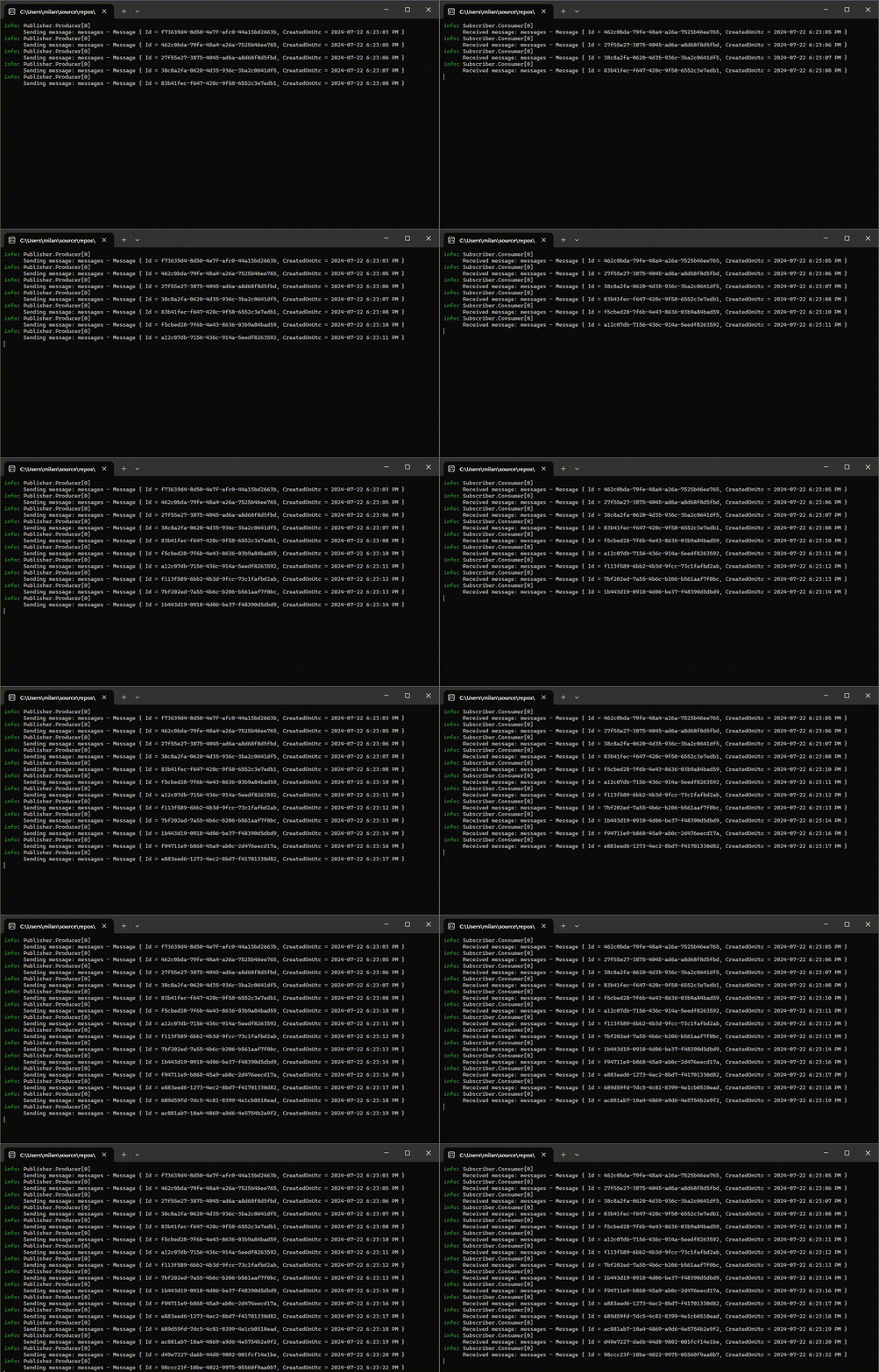
Finally, here's what we get when we run both the Producer and Consumer services:
Cache Invalidation in Distributed Systems
In a recent project, I tackled a common challenge in distributed systems: keeping the caches in sync. We were using a two-level caching approach. First, we had an in-memory cache on each web server for super-fast access. Second, we had a shared Redis cache to avoid hitting our database too often.
The problem was that when data changed in the database, we needed a way to quickly tell all the web servers to clear their in-memory caches. This is where Redis Pub/Sub came to the rescue. We set up a Redis channel specifically for cache invalidation messages.
Each application would run a CacheInvalidationBackgroundService that subscribes to messages from the cache invalidation channel.
public class CacheInvalidationBackgroundService(
    IServiceProvider serviceProvider)
    : BackgroundService
{
    public const string Channel = "cache-invalidation";

    protected override async Task ExecuteAsync(CancellationToken stoppingToken)
    {
        await subscriber.SubscribeAsync(Channel, (channel, key) =>
        {
            var cache = serviceProvider.GetRequiredService<IMemoryCache>();

            cache.Remove(key);

            return Task.CompletedTask;
        });
    }
}
Whenever data changes in the database, we publish a message on this channel with the cache key of the updated data. All the web servers are subscribed to this channel, so they instantly know to remove the old data from their in-memory caches. Since the in-memory cache is wiped if the application isn't running, losing cache invalidation messages isn't a problem. This keeps our caches consistent and ensures our users always see the most up-to-date information.
In Summary
Redis Pub/Sub is not a silver bullet for every messaging need, but its simplicity and speed make it a valuable tool. Channels allow us to easily implement communication between loosely coupled components.
Redis channels have at-most-once delivery semantics, so they're best suited for cases where the occasional dropped message is acceptable.
I used it to solve the challenge of synchronizing caches across multiple servers. This allowed our system to serve up-to-date data without sacrificing performance.
P.S. When you're ready to dive deeper into creating message-driven systems, check out Modular Monolith Architecture. I have an entire module dedicated to building reliable distributed messaging and event-driven architecture.
Good luck out there, and see you next week.
Frequently Asked Questions
What are Redis channels?
Redis channels are named communication channels that implement the publish/subscribe messaging paradigm. Publishers send messages to a channel with the PUBLISH command, subscribers register interest with SUBSCRIBE, and multiple publishers and subscribers can share the same channel.
Does Redis Pub/Sub store messages?
No. Redis channels do not store messages. If no subscriber is listening when a message is published, the message is immediately discarded. That gives Redis Pub/Sub at-most-once delivery semantics.
When should you use Redis Pub/Sub?
Use it when occasional message loss is acceptable and you want real-time or near-real-time communication: social media feeds, live score updates, chat, collaborative editing, or distributed cache invalidation. For critical data where loss is unacceptable, pick a more reliable messaging system.
How do you implement Redis Pub/Sub in .NET?
Install the StackExchange.Redis package, create a ConnectionMultiplexer for your Redis instance, and get an ISubscriber. The publisher calls PublishAsync with a channel name and payload, and the consumer calls SubscribeAsync with a callback that handles incoming messages.
How do you invalidate caches across multiple servers with Redis Pub/Sub?
With two-level caching (in-memory per server plus shared Redis), publish the cache key to a dedicated invalidation channel whenever data changes. Every server subscribes and removes that key from its in-memory cache. Lost messages are tolerable because the in-memory cache resets on restart anyway.
