

Vertical Slice Architecture organizes .NET code by business feature instead of technical layer.
Each slice holds everything one feature needs: the request, handler, validation, and endpoint in a single folder.
You change one folder to change a feature, instead of editing files spread across Controllers, Services, and Repositories.
What does context engineering have to do with shipping better code faster? CodeRabbit explains in The art and science of context engineering for AI code reviews. Give it a read or try CodeRabbit today and cut code review time and bugs in half.
You're a developer, not a Jenkins admin. Switch to Bitbucket Pipelines: build, test, deploy, and get back to being a dev.
Let's say you need to add an "export user data" feature to your .NET application. Users click a button, your system generates their data export, uploads it to cloud storage, and emails them a secure download link.
In your current layered architecture with a technical folder structure, you'll probably touch six different folders:
Controllers, Services, Models, DTOs, Repositories, and Validators.
You'll scroll up and down your solution explorer, lose your train of thought,
and wonder why adding one feature requires editing files scattered across your entire codebase.
If this sounds familiar, you're not alone. Most .NET developers start with the "standard" layered architecture, organizing code by technical concerns rather than business features.
But there's a better way: Vertical Slice Architecture.
What is Vertical Slice Architecture?
Instead of organizing your code by technical layers (Controllers, Services, Repositories),
Vertical Slice Architecture organizes it by business features.
Each feature becomes a self-contained "slice" that includes everything needed for that specific functionality.
Think of it this way: traditional layered architecture is like organizing a library by book size or color, while vertical slices are like organizing by subject. When you want to learn about history, you don't want to hunt through the entire library, you want all the history books in one place.
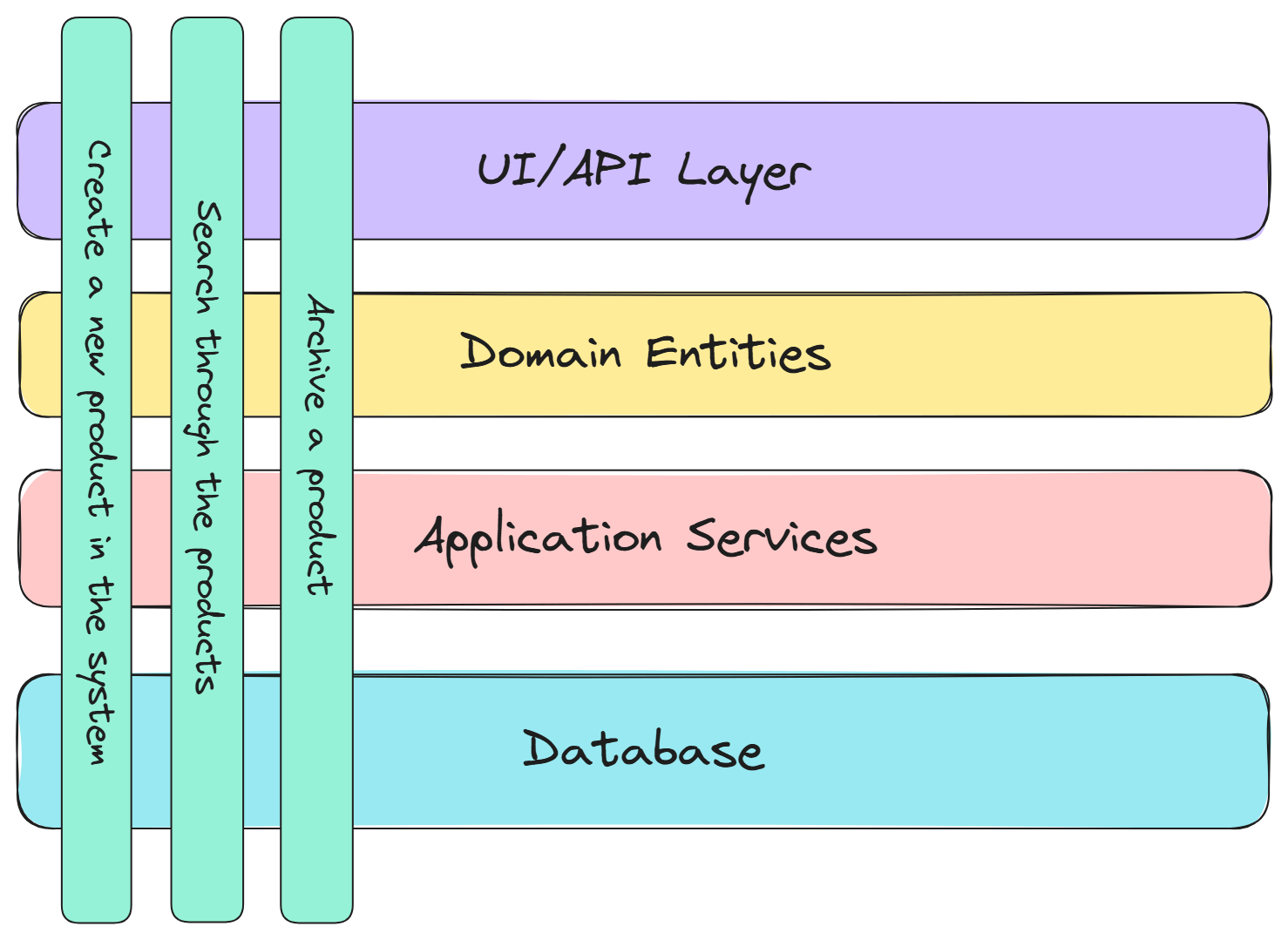
Let's look at a practical example.
The Traditional Approach vs. Vertical Slices
Let's look at our data export example. Here's how a typical .NET project would structure this feature:
Traditional Layered Structure:
📁 Controllers/
└── UsersController.cs (export endpoint)
📁 Services/
├── IDataExportService.cs
├── DataExportService.cs
├── ICloudStorageService.cs
├── CloudStorageService.cs
├── IEmailService.cs
└── EmailService.cs
📁 Models/
├── ExportDataRequest.cs
└── ExportDataResponse.cs
📁 Repositories/
├── IUserRepository.cs
└── UserRepository.cs
Now here's the same functionality organized as vertical slices:
Vertical Slice Structure:
📁 Features/
└──📁 Users/
   └──📁 ExportData/
      ├── ExportUserData.cs
      └── ExportUserDataEndpoint.cs
      📁 Create/
      └── CreateUser.cs
      📁 GetById/
      └── GetUserById.cs
The ExportData folder contains everything related to exporting user data: the request, response, business logic, and API endpoint.
Notice I'm still injecting ICloudStorageClient and IEmailSender rather than putting that logic directly in the handler.
These are genuine cross-cutting concerns that multiple features will use.
The key is distinguishing between 'shared because it should be' vs 'shared because this pattern told me to'.
Show Me the Code
I organize by domain first (Users), then by feature (ExportData).
Some teams prefer Features/ExportUserData directly, but I find the domain grouping helps when you have many features.
Related features stay visually grouped.
Here's what our data export feature slice looks like using a request, handler, and minimal APIs:
Features/Users/ExportData/ExportUserData.cs
public static class ExportUserData
{
    public record Request(Guid UserId) : IRequest<Response>;

    public record Response(string DownloadUrl, DateTime ExpiresAt);

    public class Handler(
        AppDbContext dbContext,
        ICloudStorageClient storageClient,
        IEmailSender emailSender)
        : IRequestHandler<Request, Response>
    {
        public async Task<Response> Handle(Request request, CancellationToken ct = default)
        {
            // Get user data
            var user = await dbContext.Users
                .Include(u => u.Orders)
                .Include(u => u.Preferences)
                .FirstOrDefaultAsync(u => u.Id == request.UserId, ct);

            if (user == null)
            {
                throw new NotFoundException($"User {request.UserId} not found");
            }

            // Generate export data
            var exportData = new
            {
                user.Email,
                user.Name,
                user.CreatedAt,
                Orders = user.Orders.Select(o => new { o.Id, o.Total, o.Date }),
                Preferences = user.Preferences
            };

            // Upload to cloud storage
            var fileName = $"user-data-{user.Id}-{DateTime.UtcNow:yyyyMMdd}.json";
            var expiresAtUtc = DateTime.UtcNow.AddDays(7);

            var downloadUrl = await storageClient.UploadAsJsonAsync(
                fileName,
                exportData,
                expiresAtUtc,
                ct);

            // Send email notification
            await emailSender.SendDataExportEmailAsync(user.Email, downloadUrl, ct);

            return new Response(downloadUrl, expiresAtUtc);
        }
    }

    // Simple validation using FluentValidation
    public sealed class Validator : AbstractValidator<Request>
    {
        public Validator()
        {
            RuleFor(r => r.UserId).NotEmpty();
        }
    }
}
Everything related to exporting user data is in one place: the database query, validation, business logic, cloud storage integration, and email notification.
The minimal API endpoint is straightforward:
public static class ExportUserDataEndpoint
{
    public static void Map(IEndpointRouteBuilder app)
    {
        app.MapPost("/users/{userId}/export", async (
            Guid userId,
            IRequestHandler<ExportUserData.Request, ExportUserData.Response> handler) =>
        {
            var response = await handler.Handle(new ExportUserData.Request(userId));
            return Results.Ok(response);
        });
    }
}
We could even define the endpoint inside the ExportUserData.cs file if we wanted to keep everything together.
This is more a matter of preference and team conventions.
Either approach works well, from my experience.
One File vs. Multiple Files: Your Choice
You might have noticed something: I put everything in a single file. This is a design choice with trade-offs.
Single File Approach (ExportUserData.cs):
public static class ExportUserData
{
    public record Request(Guid UserId) : IRequest<Response>;
    public record Response(string DownloadUrl, DateTime ExpiresAt);
    public class Handler : IRequestHandler<Request, Response> { /* ... */ }
    public class Validator : AbstractValidator<Request> { /* ... */ }
}
Multiple Files Approach:
📁 ExportData/
├── ExportUserDataCommand.cs
├── ExportUserDataResponse.cs
├── ExportUserDataHandler.cs
├── ExportUserDataValidator.cs
└── ExportUserDataEndpoint.cs
Single file is great when: the feature is straightforward, you want maximum locality, and the file doesn't exceed a few hundred lines of code.
Lines of code isn't a strict rule, but if a file grows beyond 300-400 lines, consider splitting it up for readability. Again, this is a matter of team preference and not a hard rule I go by. It's important to trust your instincts and what feels right for your team.
Multiple files work better when: you have complex validation logic, multiple response types, or when the handler grows large enough that you want to focus on one concern at a time.
You can even mix both approaches within the same project.
Both approaches keep related code together. And this is what matters most in Vertical Slice Architecture.
Why This Actually Works (And How to Start)
The benefits of vertical slices become obvious once you try it. Your brain doesn't have to remember which files are related to which features. Everything lives together.
Need to modify the data export feature?
Everything's in the ExportData folder.
No hunting across Controllers, Services, and Repositories layers.
Each slice can evolve independently, so simple CRUD operations stay simple while complex features like data export can use sophisticated approaches.
You don't need to rewrite your entire application overnight. Start with new features using vertical slices. As you touch existing code, gradually move related pieces into feature folders.
Good architecture is about making your codebase easier to understand and modify. When all the code for a feature lives together, you spend less mental energy navigating your solution and more time solving actual problems.
Here are a few resources if you want to learn more:
All of these concepts tie together to help you build maintainable, scalable .NET applications.
Frequently Asked Questions
What is Vertical Slice Architecture?
Vertical Slice Architecture organizes code by business features instead of technical layers. Each feature becomes a self-contained slice that holds everything the functionality needs: the request, response, handler, validation, and API endpoint all live together in one feature folder.
What is the difference between Vertical Slice Architecture and layered architecture?
Layered architecture groups code by technical concern (Controllers, Services, Repositories), so adding one feature means editing files scattered across many folders. Vertical slices keep all the code for a feature in one place, so you modify a single folder instead of hunting across layers.
Should a vertical slice be one file or multiple files?
Both work. A single file gives maximum locality and suits straightforward features; consider splitting once it grows past 300 to 400 lines. Multiple files help with complex validation or large handlers. You can mix both approaches in the same project, since keeping related code together is what matters.
How do you organize feature folders in Vertical Slice Architecture?
Group by domain first, then by feature, for example Features/Users/ExportData. Some teams put features directly at the top level instead, but domain grouping keeps related features visually together once the number of features grows.
Can you adopt Vertical Slice Architecture incrementally?
Yes. You do not need to rewrite the application overnight. Build new features as vertical slices, and as you touch existing code, gradually move related pieces into feature folders.
What code should be shared between vertical slices?
Genuine cross-cutting concerns that multiple features use, such as a cloud storage client or an email sender, stay behind injected abstractions. The key is distinguishing between 'shared because it should be' and 'shared because this pattern told me to'.
