
The C4 model is a lightweight way to describe software architecture, and C4 stands for context, containers, components, and code. It gives you four abstractions (person, software system, container, component) and four diagram types that zoom in from the system as a whole down to the code.
Today's issue is sponsored by IcePanel. IcePanel is a collaborative C4 model modelling & diagramming tool that helps explain complex software systems. With an interactive map, you can align your software engineering & product teams on technical decisions across the business.
And by Rebus Pro. Rebus is a free .NET "service bus", and Rebus Pro is the perfect one-up for serious Rebus users. Use Fleet Manager to get Slack alerts when something fails and retry dead-lettered messages with a click of the mouse.
Software architecture diagrams are a great way to communicate how you are planning to build a software system or how an existing software system works.
However, the majority of software architecture diagrams I've seen are a total mess.
If only there was a standard way to visualize your software architecture...
Enter the C4 model, which stands for context, containers, components, and code.
The C4 model is a lightweight approach to describing your software architecture.
And it's essentially just two things, a predefined set of common abstractions and four diagram types:
- Context diagram - high-level view of the system
- Container diagram - shows the objects running inside a system
- Component diagram - shows the building blocks that make each container
- Code diagram - rarely used, typically UML or ER diagram
Let's see how we can use the C4 model to visualize our software architecture.
First You Need Abstractions
Before we dive into the C4 diagrams, we first need to understand the ubiquitous language of the C4 model.
A software system is made up of one or more containers (applications and data stores), each of which contains one or more components, which in turn are implemented by one or more code elements (classes, interfaces, objects, functions, etc). And people may use the software systems that we build.
The C4 model defines a set of abstractions that you can use to describe your software systems:
- Person - the end user using your system
- Software system - highest level of abstraction that delivers value to end users
- Container - applications and data stores that make up a system
- Component - building blocks/modules that make up the container
With these high-level concepts in place, let's take a look at how to use them in our C4 diagrams.
System Context Diagram
The System Context diagram is a high-level view of your software system.
It shows your software system as the central part, and any external systems and users that your system interacts with.
It should be technology agnostic, and the focus on the people and software systems instead of low-level details.
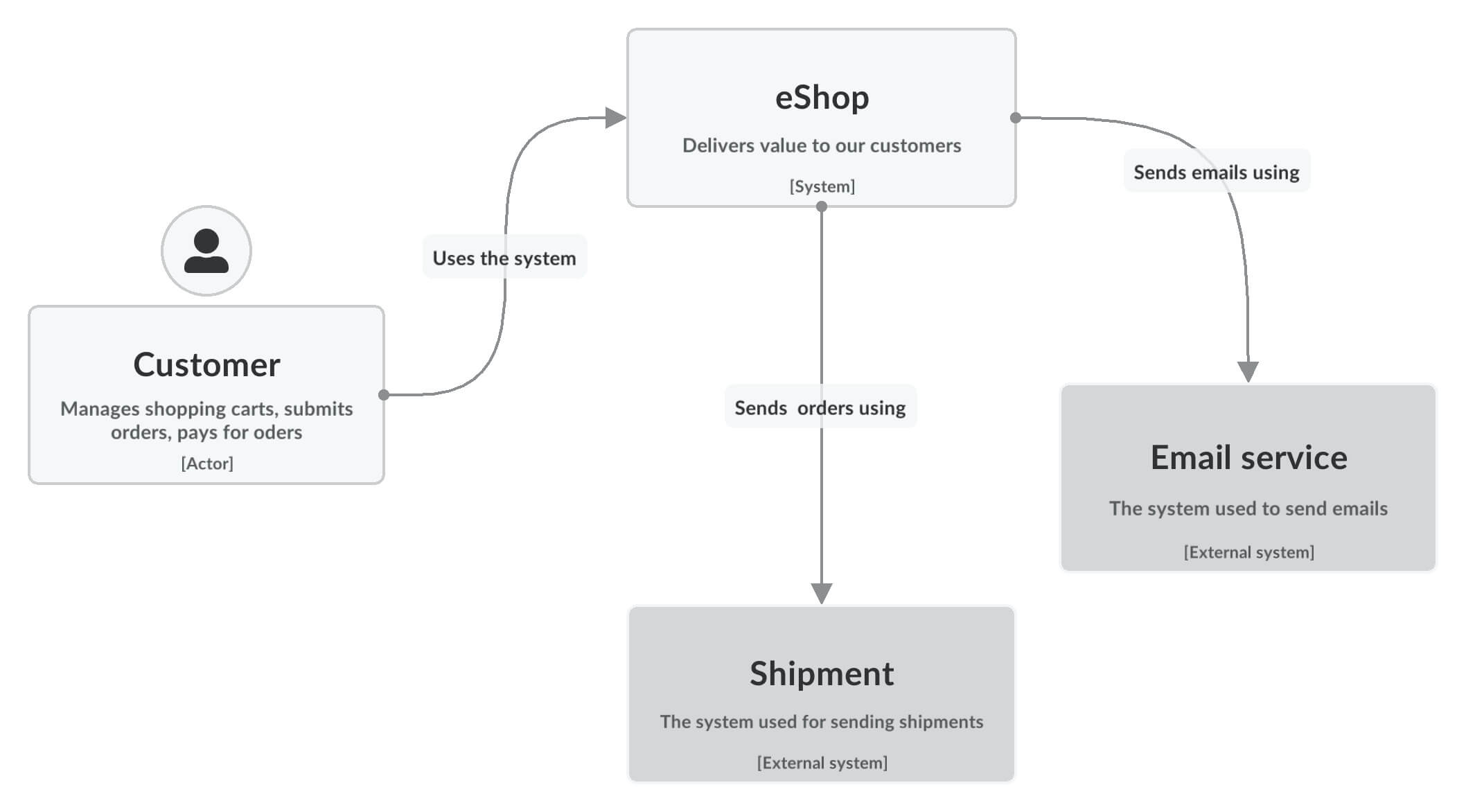
The intended audience for the System Context Diagram is everybody.
If you can show it to non-technical people and they are able to understand it, then you know you're on the right track.
Container Diagram
When you zoom into one software system, you get to the Container diagram.
Your software system is comprised of multiple running parts - containers.
A container can be a:
- Web application
- Single-page application
- Database
- File system
- Object store
- Message broker
You can look at a container as a deployment unit that executes code or stores data.
The Container diagram shows the high-level view of the software architecture and the major technology choices.
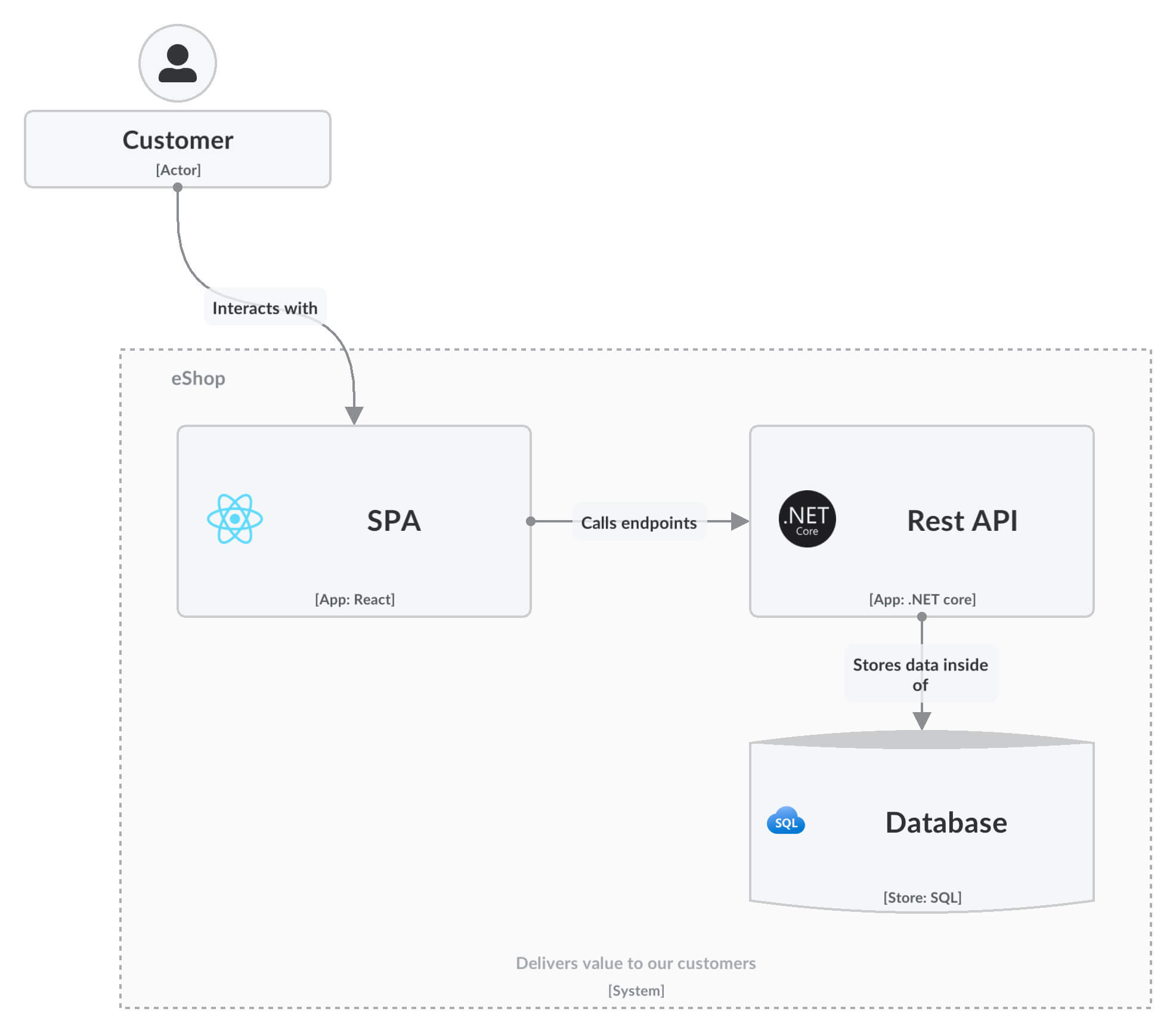
The Container diagram is intended for technical people inside and outside of the software development team:
- Software architects
- Developers
- Operations/support staff
Component Diagram
Next you can zoom into an individual container to decompose it into its building blocks.
The Component diagram show the individual components that make up a container:
- What each of the components are
- The technology and implementation details
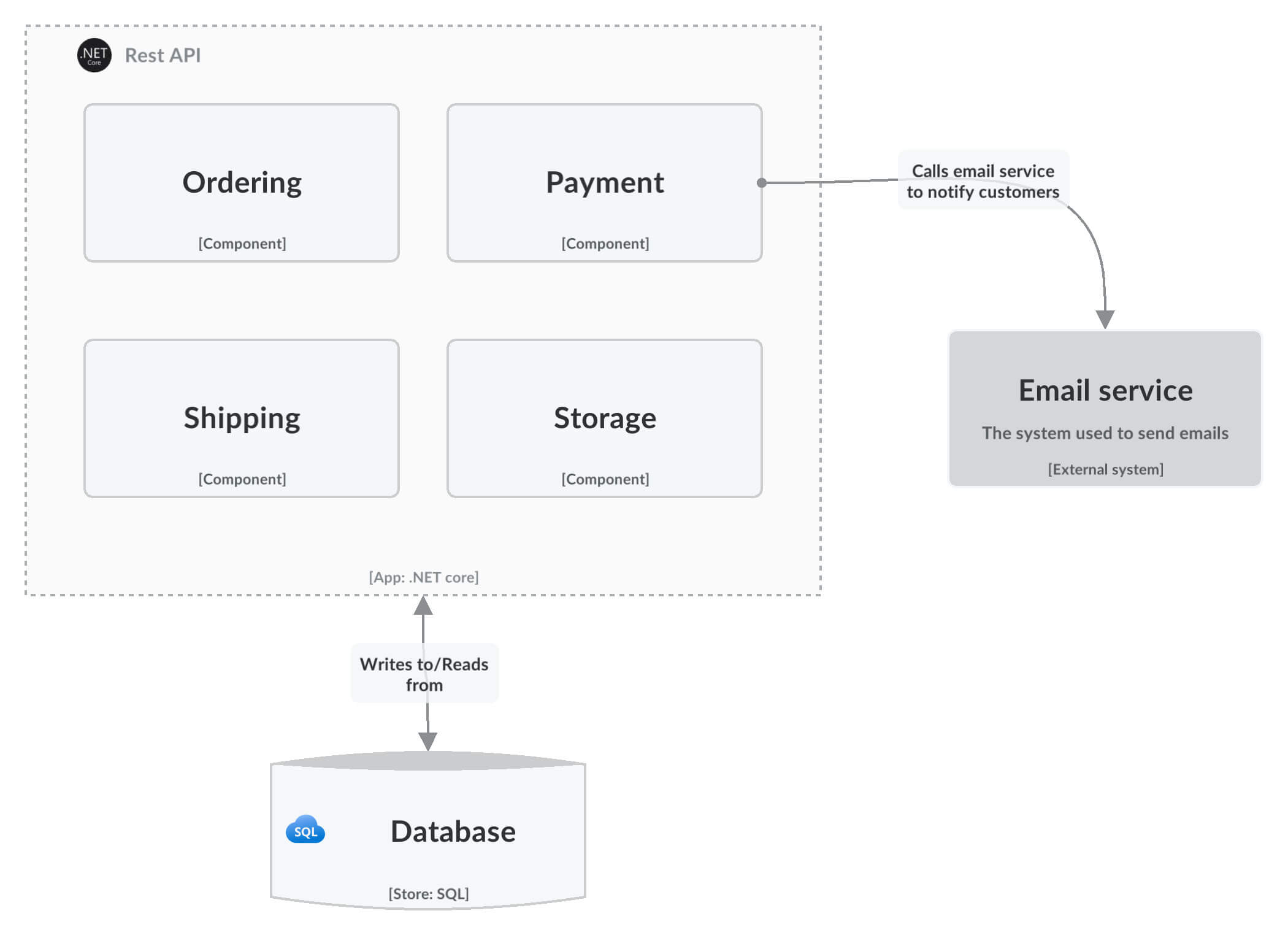
The Component diagram is intended for software architects and developers.
Code Diagram
Finally, you can zoom into each component to show how it is implemented with code, typically using a UML class diagram or an ER diagram.
This level is rarely used as it goes into too much technical detail for most use cases.
However, there are supplementary diagrams that can be useful to fill in missing information by showcasing:
- Sequence of events
- Deployment information
- How systems interact at a higher level
It's only recommended for the most important or complex components.
Of course, the target audience are software architects and developers.
Takeaway
The C4 model is a tool for visual and verbal communication, enabling your team to talk in the same language and have a common understanding of the design.
It's valuable for many reasons, to name a few:
- Product and business people benefit from understanding user behavior at the Context level
- Context and Container diagrams provide a simple view of how software systems work
- New developers can quickly understand system flows
Now that you understand what the C4 model is, there's one question left to answer.
Should you use the C4 model to express your software architecture?
I can't give you a definitive answer.
I used it with a lot of success.
But I think you should at least give it a try.
You can learn more about the C4 model here.
Thank you for reading, and have an awesome Saturday.
Frequently Asked Questions
What is the C4 model?
The C4 model is a lightweight approach to describing software architecture. C4 stands for context, containers, components, and code. It consists of a predefined set of common abstractions (person, software system, container, component) and four diagram types at increasing levels of detail.
What are the four levels of the C4 model?
The System Context diagram gives a high-level view of the system and its users and external systems. The Container diagram shows the running parts inside a system. The Component diagram shows the building blocks of each container. The Code diagram, rarely used, is typically a UML or ER diagram.
What is a container in the C4 model?
A container is a deployment unit that executes code or stores data. Examples include a web application, a single-page application, a database, a file system, an object store, or a message broker. The Container diagram shows these parts and the major technology choices.
Who is the audience for each C4 diagram?
The System Context diagram is for everybody, including non-technical people. The Container diagram targets technical people inside and outside the team: architects, developers, and operations staff. Component and Code diagrams are intended for software architects and developers.
Should you create Code diagrams in the C4 model?
Rarely. The code level goes into too much technical detail for most use cases and is only recommended for the most important or complex components. Supplementary diagrams can fill gaps by showing a sequence of events, deployment information, or higher-level system interactions.
Why use the C4 model for architecture diagrams?
It gives the team a common language and shared understanding of the design. Product and business people can follow user behavior at the context level, the Context and Container diagrams offer a simple view of how systems work, and new developers can quickly understand system flows.
