# What's New in EF Core 10: LeftJoin and RightJoin Operators in LINQ
> .NET 10 finally adds proper LeftJoin and RightJoin methods to LINQ, replacing the complex GroupJoin + DefaultIfEmpty pattern with clean, readable code that does exactly what it says.
Published: 2025-11-01. Author: Milan Jovanović.
Canonical: https://milanjovanovic.tech/blog/whats-new-in-ef-core-10-leftjoin-and-rightjoin-operators-in-linq
.NET 10 adds first-class `LeftJoin` and `RightJoin` methods to LINQ, and EF Core translates them to `LEFT JOIN` and `RIGHT JOIN` in SQL.
Before that, a left join meant combining `GroupJoin`, `DefaultIfEmpty`, and `SelectMany`.
EF Core generates the same SQL either way, so the win is fewer moving parts and clearer intent.
If you've ever worked with databases, you know about `LEFT JOIN` (and conversely `RIGHT JOIN`).
It's one of those things we use often, if not all the time.
But in Entity Framework Core, doing a left join has always been... well, a bit of a pain.
I like joins that read like what they do.
Unfortunately, until now, LINQ didn't have a straightforward way to express left/right joins.
You had to jump through hoops with `GroupJoin` and `DefaultIfEmpty`, which made the code harder to read and maintain.
But **.NET 10** finally fixes this with the brand new `LeftJoin` and `RightJoin` methods.
## What's a LEFT JOIN (in plain words)?
A **LEFT JOIN** returns **all rows from the left side** and the **matching rows from the right side**.
If there's **no match**, the right side is **null**.
Why we use it: to keep "owners" even when they have **no related rows** (e.g., show all products even if some don't have a review).
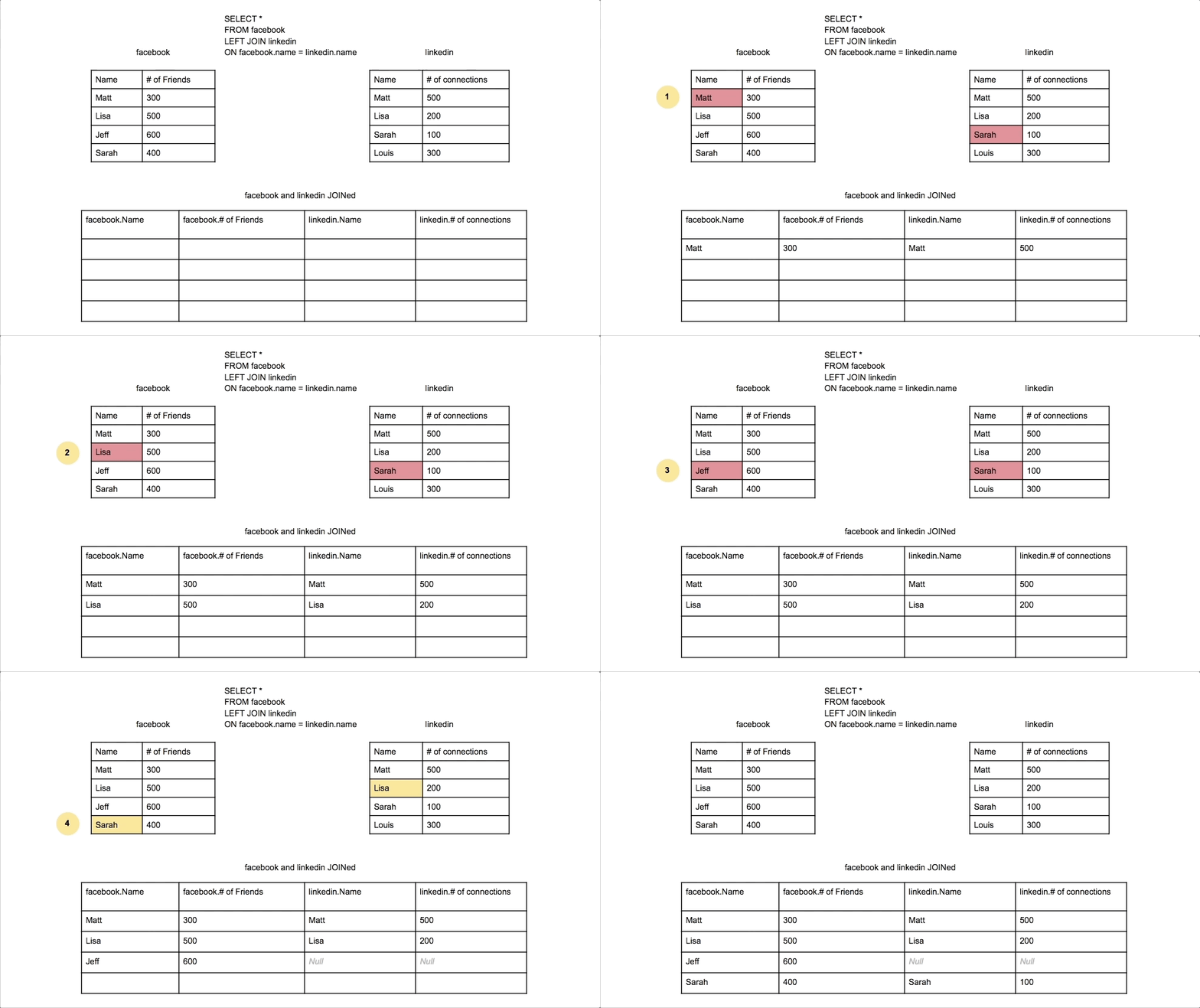
Source: [Data
School](https://dataschool.com/how-to-teach-people-sql/left-right-join-animated/)
## The Old Way (`GroupJoin` + `DefaultIfEmpty`)
Before .NET 10, a left join in LINQ needed a **group join** (`GroupJoin`), then `DefaultIfEmpty` to keep left rows with no match.
It worked, but the intent was buried in noise.
There are two ways you could write it: **query syntax** and **method syntax**.
### Query syntax
```csharp
var query =
from product in dbContext.Products
join review in dbContext.Reviews on product.Id equals review.ProductId into reviewGroup
from subReview in reviewGroup.DefaultIfEmpty()
orderby product.Id, subReview.Id
select new
{
ProductId = product.Id,
product.Name,
product.Price,
ReviewId = (int?)subReview.Id ?? 0,
Rating = (int?)subReview.Rating ?? 0,
Comment = subReview.Comment ?? "N/A"
};
```
Here's the SQL generated by EF Core for the above query:
```sql
SELECT
p."Id" AS "ProductId",
p."Name",
p."Price",
COALESCE(r."Id", 0) AS "ReviewId",
COALESCE(r."Rating", 0) AS "Rating",
COALESCE(r."Comment", 'N/A') AS "Comment"
FROM "Products" AS p
LEFT JOIN "Reviews" AS r ON p."Id" = r."ProductId"
ORDER BY p."Id", COALESCE(r."Id", 0)
```
### Method syntax
```csharp
var query = dbContext.Products
.GroupJoin(
dbContext.Reviews,
product => product.Id,
review => review.ProductId,
(product, reviewList) => new { product, subgroup = reviewList })
.SelectMany(
joinedSet => joinedSet.subgroup.DefaultIfEmpty(),
(joinedSet, review) => new
{
ProductId = joinedSet.product.Id,
joinedSet.product.Name,
joinedSet.product.Price,
ReviewId = (int?)review!.Id ?? 0,
Rating = (int?)review!.Rating ?? 0,
Comment = review!.Comment ?? "N/A"
})
.OrderBy(result => result.ProductId)
.ThenBy(result => result.ReviewId);
```
Why this works: `GroupJoin` matches rows, `DefaultIfEmpty` inserts a single **default** (null) when no matches exist, so the left row still appears.
We then **flatten** with `SelectMany`.
I think we can all agree that this is way too verbose for something as common as a left join.
## The New Way in EF 10: `LeftJoin`
Now we can write what we mean.
`LeftJoin` is **first-class LINQ** and EF Core translates it to a **LEFT JOIN** in SQL.
```csharp
var query = dbContext.Products
.LeftJoin(
dbContext.Reviews,
product => product.Id,
review => review.ProductId,
(product, review) => new
{
ProductId = product.Id,
product.Name,
product.Price,
ReviewId = (int?)review.Id ?? 0,
Rating = (int?)review.Rating ?? 0,
Comment = review.Comment ?? "N/A"
})
.OrderBy(x => x.ProductId)
.ThenBy(x => x.ReviewId)
```
The generated SQL is identical to the previous example.
Why this is better:
- **Intent is clear**: you see `LeftJoin`, you know what to expect.
- **Less code**, fewer moving parts (no `GroupJoin`, no `DefaultIfEmpty`, no `SelectMany`).
- **Same result**: all products kept, reviews may be null.
**Note**: At the time of writing this article, C# **query syntax** (`from …
select …`) doesn't have a `left join` or `right join` keyword yet. You should
use the method syntax shown above.
## Also New: `RightJoin`
`RightJoin` keeps **all rows from the right side** and only matching rows from the left.
EF Core translates it to **RIGHT JOIN**.
It's handy when the "must keep" side is the **second** sequence.
Conceptually:
```csharp
var query = dbContext.Reviews
.RightJoin(
dbContext.Products,
review => review.ProductId,
product => product.Id,
(review, product) => new
{
ProductId = product.Id,
product.Name,
product.Price,
ReviewId = (int?)review.Id ?? 0,
Rating = (int?)review.Rating ?? 0,
Comment = review.Comment ?? "N/A"
});
```
Why use `RightJoin`: when your reporting starts from **Reviews** (keep all), and bring in matching **Products** if they exist.
Here's the generated SQL:
```sql
SELECT
p."Id" AS "ProductId",
p."Name",
p."Price",
COALESCE(r."Id", 0) AS "ReviewId",
COALESCE(r."Rating", 0) AS "Rating",
COALESCE(r."Comment", 'N/A') AS "Comment"
FROM "Reviews" AS r
RIGHT JOIN "Products" AS p ON r."ProductId" = p."Id"
```
## Wrapping Up
Think about how often you need left joins.
Showing all users with optional profile settings.
All products with optional reviews.
All orders with optional shipping info.
It's everywhere!
Before, developers would sometimes skip the proper left join and do two separate queries instead.
Or worse, they'd use an inner join and miss data.
Now there's no excuse - it's just as easy as any other LINQ method.
A few quick tips when writing LINQ queries:
- In the projection, guard nullable side: `review.Comment ?? "N/A"`
- [**Keep projections small**](https://milanjovanovic.tech/blog/ef-core-performance-guide) to avoid pulling more columns than needed
- Add indexes on the **join keys** for better query plans
That's it.
With `LeftJoin` and `RightJoin`, the code finally matches the mental model.
See you next Saturday.
---
## Frequently asked questions
### How do you write a LEFT JOIN in EF Core?
.NET 10 added a first-class LeftJoin method to LINQ, and EF Core 10 translates it directly to a LEFT JOIN in SQL. Before that, you had to combine GroupJoin, DefaultIfEmpty, and SelectMany, which buried the intent of the query in noise.
### What is the difference between LeftJoin and RightJoin in LINQ?
LeftJoin returns all rows from the left sequence and matching rows from the right, with null when there is no match. RightJoin keeps all rows from the right sequence and only matching rows from the left. Both arrived in .NET 10 and translate to LEFT JOIN and RIGHT JOIN in SQL.
### How did you write a left join in LINQ before .NET 10?
You used GroupJoin to match rows, DefaultIfEmpty to insert a null default when no matches existed so the left row still appeared, and SelectMany to flatten the result. It worked, but it was far too verbose for something as common as a left join.
### Does the LeftJoin method generate different SQL than the old GroupJoin pattern?
No. EF Core generates identical LEFT JOIN SQL for both. The benefit of LeftJoin is clearer intent and less code: no GroupJoin, no DefaultIfEmpty, no SelectMany, with the same result of keeping all left rows while the right side may be null.
### Does C# query syntax support a left join keyword?
When EF Core 10 shipped, C# query syntax (from ... select ...) had no left join or right join keyword yet, so you had to use method syntax with the LeftJoin and RightJoin extension methods.
### When should you use RightJoin in EF Core?
Use RightJoin when the sequence you must fully keep is the second one in the query, for example a report that starts from Reviews and brings in matching Products when they exist. EF Core translates it to a RIGHT JOIN in SQL.