
PostgreSQL keeps a hidden xmin system column on every row that holds the ID of the transaction that wrote it, so the value changes on every update.
EF Core can use xmin as an optimistic concurrency token: add a uint property to the entity and configure it with IsRowVersion(), and the Npgsql provider maps that property to the system column.
No migration is needed, because the column already exists.
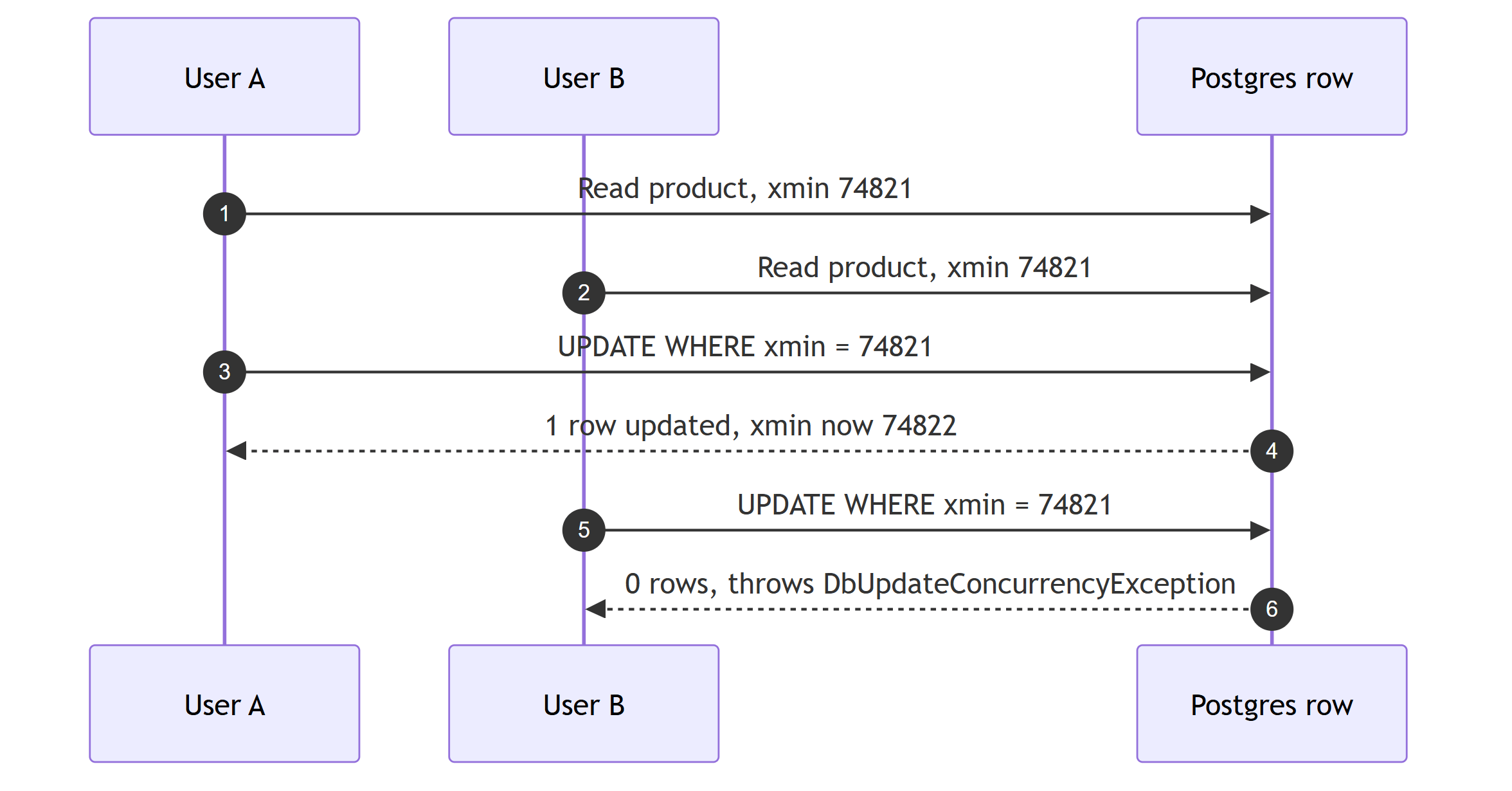
Two users load the same record, edit it, and hit save.
Without a concurrency token, the second write overwrites the first, and nobody finds out until the data looks wrong.
The usual fix is adding a Version column and remembering to configure it on every entity.
But if you run PostgreSQL, you already have a version number on every row.
It is called xmin, and EF Core can use it as a concurrency token with zero schema changes.
What Is xmin in PostgreSQL?
PostgreSQL uses multi-version concurrency control (MVCC). Every update creates a new physical version of the row instead of overwriting it in place.
Each row version carries hidden system columns, and one of them is xmin: the ID of the transaction that created this version of the row.
Update the row, and the new version gets a new xmin.
You can see it yourself:
SELECT xmin, id, name FROM products WHERE id = 1;

-- xmin  | id | name
-- 74821 | 1  | Keyboard

UPDATE products SET name = 'Mechanical Keyboard' WHERE id = 1;

SELECT xmin, id, name FROM products WHERE id = 1;

-- xmin  | id | name
-- 74822 | 1  | Mechanical Keyboard
The value changed because the update ran in a new transaction. That is the behavior you want from a row version: it changes on every write, and you do not have to maintain it.
Mapping xmin in EF Core
The Npgsql provider supports this directly.
Add a uint property to your entity and configure it as a row version:
public class Product
{
    public int Id { get; set; }
    public string Name { get; set; } = string.Empty;
    public decimal Price { get; set; }

    public uint Version { get; set; }
}
Then in OnModelCreating:
protected override void OnModelCreating(ModelBuilder modelBuilder)
{
    modelBuilder.Entity<Product>()
        .Property(p => p.Version)
        .IsRowVersion();
}
When the Npgsql provider sees a uint property configured as a row version, it maps it to the xmin system column instead of creating a real column.
Now generate a migration:
dotnet ef migrations add MapXminConcurrencyToken
The migration is empty. There is no schema change because the column already exists on every table. That means you can add optimistic concurrency to legacy tables, to databases you share with other applications, and to tables you are not allowed to alter.
What EF Core Does With It
Once mapped, EF Core includes the token in every UPDATE and DELETE:
UPDATE products
SET name = @p0, price = @p1
WHERE id = @p2 AND xmin = @p3
RETURNING xmin;
The RETURNING clause reads the new xmin back, so the tracked entity carries the fresh version after a successful save.
If another transaction updated the row after you read it, xmin no longer matches.
The WHERE clause matches zero rows, EF Core sees zero rows affected, and SaveChangesAsync throws a DbUpdateConcurrencyException.
Handling it looks like this:
try
{
    product.Price = newPrice;
    await dbContext.SaveChangesAsync();
}
catch (DbUpdateConcurrencyException)
{
    // Someone else changed the row since we read it.
    // Reload, re-apply, or surface a conflict to the caller.
    return Results.Conflict("The product was modified by another user.");
}
For a full walkthrough of the retry-and-merge strategies, see my post on solving race conditions with EF Core optimistic locking. The mechanics are identical. The only difference is that here the token is maintained by Postgres itself.
The Disconnected Scenario
The typical web flow is disconnected: you send the row (including its version) to the client, the user edits it, and the update comes back in a later request with a fresh DbContext.
You need to tell EF Core what the original version was when you read the entity, not what it is now:
app.MapPut("/products/{id}", async (
    int id,
    UpdateProductRequest request,
    AppDbContext dbContext) =>
{
    var product = await dbContext.Products.FindAsync(id);

    if (product is null)
    {
        return Results.NotFound();
    }

    product.Name = request.Name;
    product.Price = request.Price;

    // The version the client originally read
    dbContext.Entry(product)
        .Property(p => p.Version)
        .OriginalValue = request.Version;

    try
    {
        await dbContext.SaveChangesAsync();
        return Results.NoContent();
    }
    catch (DbUpdateConcurrencyException)
    {
        return Results.Conflict();
    }
});
Setting OriginalValue makes EF Core send the client's version in the WHERE clause.
If anyone saved between the client's read and this write, the update fails and you return 409 Conflict.
The Version property serializes as a plain number, so it travels through your API contract like any other field.
This pairs well with idempotent REST APIs, where the client is expected to participate in conflict handling anyway.
Caveats You Should Know
xmin is free, but it is not identical to a version column you own. There are three differences:
Any write bumps it, not just yours.
Triggers, batch jobs, and other services touching the same table all change xmin, and so does an UPDATE that sets a column your entity does not map.
A hand-rolled version column lets you decide what counts as a conflicting change, while xmin treats every write as a conflict.
This is usually the behavior you want, but it can produce conflicts on writes you consider irrelevant.
It is a 32-bit transaction ID.
xmin is not a monotonic counter you should store long-term or compare for ordering.
Transaction IDs wrap around, and PostgreSQL's freezing process is designed around that.
Use it as an opaque token: read it, send it back, compare for equality.
Do not build audit logic on top of it.
It is Postgres-only.
If your codebase targets multiple providers (SQL Server and PostgreSQL side by side, for example), you need provider-specific model configuration.
SQL Server has rowversion for the same job, but the property type differs (byte[] vs uint), so the entity cannot be identical across providers without extra mapping.
When I Still Add My Own Version Column
xmin is my default for Postgres because zero schema changes is a real advantage. Use an explicit column instead when:
- I need the version to survive export and import.
xminvalues are physical to the database instance, so restoring data elsewhere resets them. A real column travels with the data. - I want conflict detection scoped to specific fields. EF Core also supports
IsConcurrencyToken()on individual properties, which detects conflicting changes only on the properties you mark. - The domain needs a meaningful version number (an aggregate version in event sourcing, an ETag you control). A system column cannot carry business meaning.
If none of those apply, the hidden column Postgres already maintains does the job with less code and no migration. And if optimistic concurrency does not fit your write patterns at all, the alternative is pessimistic locking with EF Core and PostgreSQL, which blocks the conflict instead of detecting it.
Summary
PostgreSQL versions every row for its own MVCC machinery, and the Npgsql EF Core provider lets you piggyback on that with a single uint property and an IsRowVersion() call.
You get last-write-wins protection with an empty migration.
Know the caveats: every write conflicts, the value is opaque and instance-local, and it does not port to other databases. For most Postgres-backed applications, none of that matters, and the five lines of mapping code are all you need.
Set the client's version as OriginalValue in disconnected scenarios, catch DbUpdateConcurrencyException, and return 409 Conflict.
Frequently Asked Questions
What is the xmin column in PostgreSQL?
xmin is a hidden system column that PostgreSQL maintains on every table. It stores the ID of the transaction that inserted the current version of the row, so it changes automatically on every update. That makes it a natural row version for optimistic concurrency.
How do I use xmin as a concurrency token in EF Core?
Add a uint property to your entity and configure it with IsRowVersion() in OnModelCreating. The Npgsql provider maps a uint row version property to the xmin system column automatically. No migration is needed because the column already exists.
Does xmin require a database migration?
No. xmin exists on every PostgreSQL table already. Mapping it in EF Core produces an empty migration because there is no schema change, which is the main advantage over adding your own version column.
What is the difference between xmin and a rowversion column in SQL Server?
They serve the same purpose. SQL Server rowversion is a real 8-byte column you add to the table, while xmin is a 4-byte transaction ID that PostgreSQL maintains for free on every row. Both change on every update and both work with EF Core IsRowVersion mapping.
