
MassTransit is a .NET messaging framework that manages message contracts, scoped consumers, broker topology, retries, and error queues. This guide uses RabbitMQ and pins MassTransit 8.5.11. It demonstrates publishing and consuming an event, then explains the outbox and idempotency needed when messages change persistent state.
Which Version Does This Guide Use?
MassTransit v8 is licensed under Apache 2.0. MassTransit v9 is a commercial product; the current licensing documentation describes its license configuration. The package commands below pin v8 so copying them does not silently select a different licensing model or API version. Check the maintainer's current support policy when choosing a version for a long-lived production service.
I discussed the transition in MediatR and MassTransit going commercial. The messaging semantics below still matter whichever version you choose.
Set Up RabbitMQ and the Application
Run RabbitMQ locally and create an ASP.NET Core project:
docker run -d --name rabbitmq -p 5672:5672 -p 15672:15672 rabbitmq:4-management
dotnet new web -n MessagingDemo --framework net10.0
cd MessagingDemo
dotnet add package MassTransit.RabbitMQ --version 8.5.11
The management UI is available at http://localhost:15672 with the local guest credentials.
The RabbitMQ beginner's guide explains the exchanges and queues you will see there.
Create Contracts.cs with a namespace shared by publishers and consumers:
namespace MessagingDemo.Contracts;

public sealed record OrderPlacedEvent(
    Guid OrderId,
    Guid CustomerId,
    decimal TotalAmount,
    DateTimeOffset OccurredAt);

public sealed record ProcessPaymentCommand(Guid OrderId, decimal Amount);
MassTransit includes a message's namespace and type name in its identity. Keep the contract compatible across deployments; renaming it on only one side breaks routing.
Put the following in Program.cs:
using MassTransit;
using MessagingDemo.Contracts;

var builder = WebApplication.CreateBuilder(args);

builder.Services.AddMassTransit(x =>
{
    x.SetKebabCaseEndpointNameFormatter();
    x.AddConsumer<OrderPlacedConsumer>();
    x.AddConsumer<ProcessPaymentConsumer>();

    x.UsingRabbitMq((context, cfg) =>
    {
        cfg.Host("localhost", "/", h =>
        {
            h.Username("guest");
            h.Password("guest");
        });
        cfg.UseMessageRetry(r => r.Immediate(2));
        cfg.ConfigureEndpoints(context);
    });
});

builder.Services.Configure<MassTransitHostOptions>(o => o.WaitUntilStarted = true);

var app = builder.Build();

app.MapPost("/events/orders", async (
    OrderPlacedEvent message, IPublishEndpoint publisher, CancellationToken ct) =>
{
    await publisher.Publish(message, ct);
    return Results.Accepted();
});

app.MapPost("/commands/payments", async (
    ProcessPaymentCommand command,
    ISendEndpointProvider endpoints,
    CancellationToken ct) =>
{
    var endpoint = await endpoints.GetSendEndpoint(new Uri("queue:process-payment"));
    await endpoint.Send(command, ct);
    return Results.Accepted();
});

app.Run();

public sealed class OrderPlacedConsumer(ILogger<OrderPlacedConsumer> logger)
    : IConsumer<OrderPlacedEvent>
{
    public Task Consume(ConsumeContext<OrderPlacedEvent> context)
    {
        logger.LogInformation("Order {OrderId}, amount {Amount}",
            context.Message.OrderId, context.Message.TotalAmount);
        return Task.CompletedTask;
    }
}

public sealed class ProcessPaymentConsumer(ILogger<ProcessPaymentConsumer> logger)
    : IConsumer<ProcessPaymentCommand>
{
    public Task Consume(ConsumeContext<ProcessPaymentCommand> context)
    {
        logger.LogInformation("Payment requested for {OrderId}", context.Message.OrderId);
        return Task.CompletedTask;
    }
}
This is a transport demonstration: both consumers log their input and do not charge cards or persist orders.
Run it with dotnet run, then use the displayed HTTP URL to POST an event or command.
SetKebabCaseEndpointNameFormatter makes the queues order-placed and process-payment; kebab case is an explicit configuration choice.
Consumers have a DI scope per delivery.
When you add a scoped DbContext, inject it into the consumer instead of resolving it from a singleton.
When Should You Publish or Send?
Publish routes an event to every subscribed endpoint for that message type. Send targets one endpoint, whose service instances may compete to process deliveries. Neither operation means the consumer has finished, and a successful publish can have no subscribers.
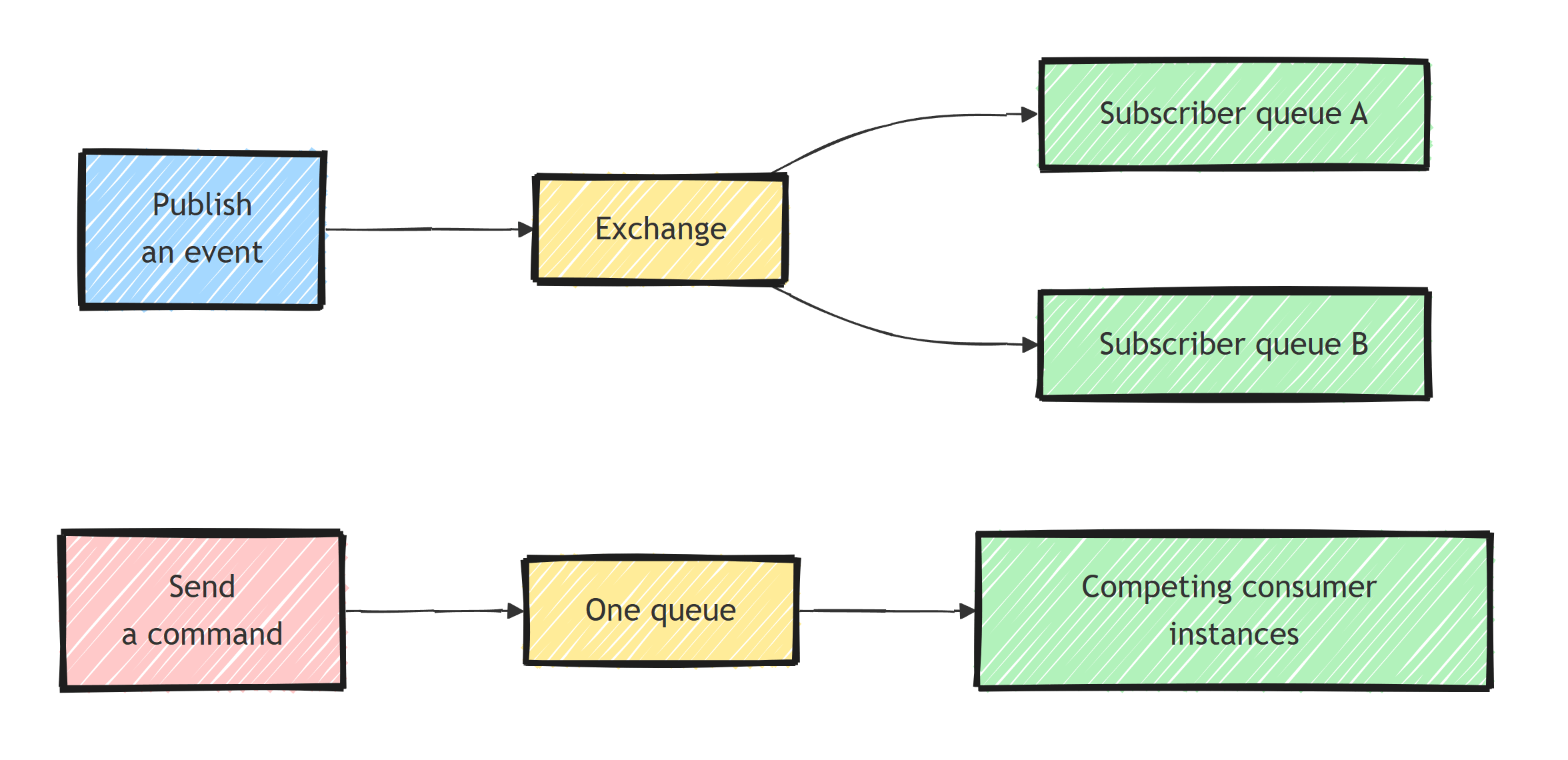
Create subscriber topology before publishing events you need to retain. An event exchange alone does not hold a backlog for a subscriber whose queue and binding do not exist yet. The pub/sub guide shows independent subscriber queues.
Use request-response when the caller must wait for a consumer's answer. That creates an availability dependency on both the broker and the responding service, so choose the timeout explicitly. The request-response guide covers response contracts and request clients.
What Happens When a Consumer Fails?
The sample configures two immediate retries after the first attempt.
Without retry middleware, an exception goes through fault handling after one attempt.
After retries are exhausted, MassTransit moves the message to the endpoint's _error queue and produces a Fault<T> message according to the fault routing configuration.
Use short retries only for failures that can recover quickly. Retry middleware keeps the delivery and a concurrency slot occupied; a long outage calls for redelivery or pausing consumption instead. Inspect dead letter queues and retain enough failure context to replay deliberately.
To configure retries per consumer, replace its original registration with:
x.AddConsumer<OrderPlacedConsumer>(consumer =>
{
    consumer.UseMessageRetry(r => r.Immediate(2));
});
Do not add this on top of the bus-level retry policy without considering the multiplied attempt count. When a handler talks to a database or payment API, duplicate deliveries must have no additional business effect.
Persist Events With the EF Core Outbox
Saving an order and publishing an event are two independent operations unless you coordinate them.
The MassTransit bus outbox captures messages through the scoped IPublishEndpoint, then writes them in the same SaveChangesAsync transaction as your entity changes.
For a PostgreSQL application, install matching packages:
dotnet add package MassTransit.EntityFrameworkCore --version 8.5.11
dotnet add package Npgsql.EntityFrameworkCore.PostgreSQL --version 10.0.0
dotnet add package Microsoft.EntityFrameworkCore.Design --version 10.0.0
Add using Microsoft.EntityFrameworkCore; to Program.cs and register the context before AddMassTransit:
builder.Services.AddDbContext<OrderDbContext>(o => o.UseNpgsql(
    builder.Configuration.GetConnectionString("Orders")
        ?? throw new InvalidOperationException("Missing Orders connection string.")));
Inside the existing AddMassTransit callback, add:
x.AddEntityFrameworkOutbox<OrderDbContext>(o =>
{
    o.UsePostgres();
    o.UseBusOutbox();
});
Create OrderDbContext.cs:
using MassTransit;
using Microsoft.EntityFrameworkCore;

public sealed class OrderDbContext(DbContextOptions<OrderDbContext> options)
    : DbContext(options)
{
    public DbSet<StoredOrder> Orders => Set<StoredOrder>();

    protected override void OnModelCreating(ModelBuilder modelBuilder)
    {
        modelBuilder.Entity<StoredOrder>().HasKey(o => o.Id);
        modelBuilder.AddInboxStateEntity();
        modelBuilder.AddOutboxMessageEntity();
        modelBuilder.AddOutboxStateEntity();
    }
}

public sealed class StoredOrder
{
    public Guid Id { get; set; }
    public Guid CustomerId { get; set; }
    public decimal TotalAmount { get; set; }
}
Configure ConnectionStrings:Orders using your normal configuration provider, create a migration with an EF 10 dotnet-ef tool, and apply it before starting the application.
The three outbox model registrations are required; registering middleware alone does not create its tables.
Replace the earlier event endpoint with this endpoint before app.Run():
app.MapPost("/orders", async (
    StoredOrder order,
    OrderDbContext db,
    IPublishEndpoint publisher,
    CancellationToken ct) =>
{
    if (order.Id == Guid.Empty || order.CustomerId == Guid.Empty || order.TotalAmount < 0)
        return Results.BadRequest();

    db.Orders.Add(order);
    await publisher.Publish(new OrderPlacedEvent(
        order.Id, order.CustomerId, order.TotalAmount, DateTimeOffset.UtcNow), ct);
    await db.SaveChangesAsync(ct);
    return Results.Created($"/orders/{order.Id}", order.Id);
});
Publish before SaveChangesAsync, using the publisher and context from the same request scope.
A background delivery service forwards committed outbox records to RabbitMQ.
This closes the save/publish gap; it does not make external side effects or HTTP retries exactly once.
For the underlying mechanics, see transactional outbox with EF Core.
Test Consumer Behavior
MassTransit's in-memory test harness exercises dispatch and consumer behavior without a broker.
Add a reference to the web project from an xUnit test project and install MassTransit.TestFramework version 8.5.11.
The following test verifies the logging consumer from the first example:
using MassTransit;
using MassTransit.Testing;
using MessagingDemo.Contracts;
using Microsoft.Extensions.DependencyInjection;
using Xunit;

public sealed class ConsumerTests
{
    [Fact]
    public async Task OrderPlaced_IsConsumedWithoutFault()
    {
        await using var provider = new ServiceCollection()
            .AddLogging()
            .AddMassTransitTestHarness(x => x.AddConsumer<OrderPlacedConsumer>())
            .BuildServiceProvider(true);

        var harness = provider.GetRequiredService<ITestHarness>();
        await harness.Start();
        try
        {
            await harness.Bus.Publish(new OrderPlacedEvent(
                Guid.NewGuid(), Guid.NewGuid(), 100m, DateTimeOffset.UtcNow));

            var consumer = harness.GetConsumerHarness<OrderPlacedConsumer>();
            Assert.True(await consumer.Consumed.Any<OrderPlacedEvent>());
            Assert.All(consumer.Consumed.Select<OrderPlacedEvent>(),
                message => Assert.Null(message.Exception));
        }
        finally
        {
            await harness.Stop();
        }
    }
}
Recording a consumed message does not by itself prove the consumer succeeded; inspect its exception and assert the business result. Use real PostgreSQL tests for outbox commits and real RabbitMQ tests for bindings, reconnects, and delivery behavior.
Summary
Start with explicit contracts, scoped consumers, and known endpoint names. Publish events to subscribers, send commands to an endpoint, and configure retry behavior for the failures your handler can recover from. Once a message must agree with a database change, persist both through the outbox and make downstream processing idempotent.
Frequently Asked Questions
Is MassTransit free to use?
MassTransit v8 is free and open source under the Apache 2.0 license. MassTransit v9 is commercially licensed. These examples pin v8.5.11; review the current support and licensing terms before choosing a version for production. Evaluate the licensing cost or alternatives like Rebus and Wolverine for new projects.
What message brokers does MassTransit support?
MassTransit supports RabbitMQ, Azure Service Bus, Amazon SQS/SNS, and an in-memory transport for testing. There are also riders for Kafka and Azure Event Hubs. Your consumers stay the same when you switch transports; only the bus configuration changes.
What is the difference between Publish and Send in MassTransit?
Publish broadcasts an event to every consumer that subscribes to the message type, which can be zero or many. Send delivers a command to one specific endpoint queue, where competing consumers share delivery attempts. Redelivery can still happen. Use Publish for events and Send for commands.
Do I need a message broker running to test MassTransit consumers?
No. The MassTransit test harness runs the entire bus in memory, so you can publish messages and assert that consumers processed them without RabbitMQ or any broker installed.
Why use MassTransit instead of the RabbitMQ client directly?
The raw client gives you channels, exchanges, and manual acknowledgements, and you end up hand-building retries, error queues, serialization, and topology. MassTransit provides all of that out of the box, plus sagas, the outbox, and scheduling, while keeping your code broker-agnostic.
