

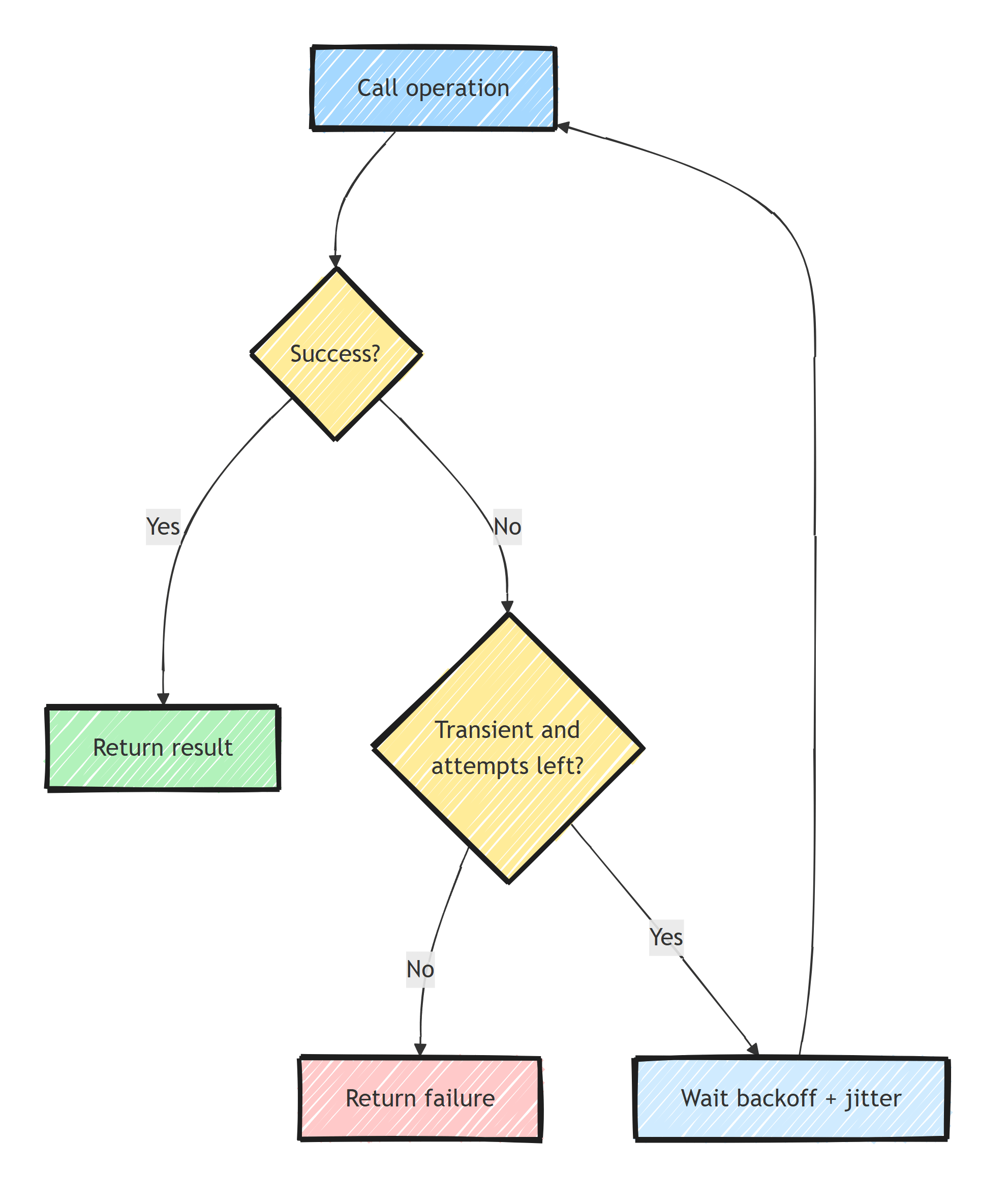
The retry pattern repeats an operation after a transient failure, with a maximum attempt count and a delay between attempts.
In .NET, Polly provides backoff, jitter, and failure predicates; the HTTP resilience package integrates these with HttpClient.
Only retry when another attempt can succeed and repeating the operation is safe.
Why Retry?
In distributed systems, transient failures are common:
- A database connection times out momentarily
- An HTTP call fails because the target server is restarting
- A message broker is temporarily unreachable
These failures are temporary. Retrying after a short delay usually succeeds.
The retry pattern automatically re-executes a failed operation, with configurable delays and limits, so your application recovers from transient issues without manual intervention.
Polly in .NET
Polly provides retry and other resilience strategies.
Microsoft.Extensions.Resilience supplies dependency-injection integration, and Microsoft.Extensions.Http.Resilience adds HTTP-specific strategies and handlers.
Install the packages:
dotnet add package Microsoft.Extensions.Resilience
dotnet add package Microsoft.Extensions.Http.Resilience
Basic Retry
Create an ASP.NET Core project with dotnet new web -n RetryDemo and install the packages above.
In Program.cs, retry only selected HTTP transport and status failures:
using System.Net;
using Polly;
using Polly.Registry;
using Polly.Retry;

var builder = WebApplication.CreateBuilder(args);
builder.Services.AddResiliencePipeline("orders", pipelineBuilder =>
{
    pipelineBuilder.AddRetry(new RetryStrategyOptions
    {
        MaxRetryAttempts = 3,
        Delay = TimeSpan.FromMilliseconds(500),
        ShouldHandle = new PredicateBuilder()
            .Handle<HttpRequestException>(TransientHttp.IsRetryable)
    });
});

builder.Services.AddHttpClient<OrderService>(client =>
    client.BaseAddress = new Uri("https://orders.example.com"));

var app = builder.Build();
app.MapGet("/orders/{id:guid}",
    (Guid id, OrderService orders, CancellationToken ct) =>
        orders.GetOrderAsync(id, ct));
app.Run();

public static class TransientHttp
{
    public static bool IsRetryable(HttpRequestException exception) =>
        exception.StatusCode is null or HttpStatusCode.RequestTimeout
            or HttpStatusCode.TooManyRequests ||
        (int)exception.StatusCode.Value >= 500;
}
Add OrderService.cs to resolve the shared pipeline and the factory-managed client:
using System.Net.Http.Json;
using Polly;
using Polly.Registry;

public sealed record Order(Guid Id, decimal Total);

public sealed class OrderService
{
    private readonly ResiliencePipeline _pipeline;
    private readonly HttpClient _httpClient;

    public OrderService(HttpClient httpClient,
        ResiliencePipelineProvider<string> pipelineProvider)
    {
        _pipeline = pipelineProvider.GetPipeline("orders");
        _httpClient = httpClient;
    }

    public async Task<Order> GetOrderAsync(Guid orderId, CancellationToken ct)
    {
        return await _pipeline.ExecuteAsync(async token =>
        {
            return await _httpClient.GetFromJsonAsync<Order>(
                $"/api/orders/{orderId}", token)
                ?? throw new InvalidOperationException("The order response was empty.");
        }, ct);
    }
}
MaxRetryAttempts = 3 permits three retries after the original call: four attempts total.
The predicate excludes permanent HTTP errors, JSON errors, and caller cancellation.
The basic example does not retry HttpClient timeouts; the HTTP resilience handler below adds a separate attempt timeout and handles it explicitly.
Retry With Exponential Backoff
Fixed delays can overwhelm a struggling service. Exponential backoff increases the delay between each retry:
pipelineBuilder.AddRetry(new RetryStrategyOptions
{
    MaxRetryAttempts = 3,
    BackoffType = DelayBackoffType.Exponential,
    Delay = TimeSpan.FromSeconds(1),
    UseJitter = true,
    ShouldHandle = new PredicateBuilder()
        .Handle<HttpRequestException>(TransientHttp.IsRetryable)
});
Without jitter, these retry delays would be 1, 2, and 4 seconds. With exponential jitter enabled, Polly uses a decorrelated sequence, so individual delays can be shorter or longer and need not increase monotonically. The retry documentation describes the delay calculation.
Retry for HTTP Clients
The most common use case is retrying HTTP calls with IHttpClientFactory:
builder.Services.AddHttpClient("OrdersApi", client =>
{
    client.BaseAddress = new Uri("https://orders.example.com");
})
.AddStandardResilienceHandler(options =>
    options.Retry.DisableForUnsafeHttpMethods());
AddStandardResilienceHandler() adds a pre-configured resilience pipeline that includes:
- Retry: 3 retries with exponential backoff and jitter
- Circuit breaker: stops calling a failing service
- Attempt timeout: limits each network attempt
- Concurrency limiter: bounds simultaneous executions for this handler, rather than requests per minute across the fleet
- Total timeout: overall time limit for all attempts
You can also override the default resilience handlers when the standard settings don't fit.
Add using Microsoft.Extensions.Http.Resilience; for these HTTP-specific APIs.
The standard handler retries every HTTP method by default; DisableForUnsafeHttpMethods() disables retries for POST, PATCH, PUT, DELETE, and CONNECT.
Use this handler instead of the manually wrapped OrderService pipeline above, so requests are not retried at both layers.
For custom configuration:
builder.Services.AddHttpClient("OrdersApi", client =>
{
    client.BaseAddress = new Uri("https://orders.example.com");
})
.AddResilienceHandler("custom", pipeline =>
{
    pipeline.AddTimeout(TimeSpan.FromSeconds(20));
    var retry = new HttpRetryStrategyOptions
    {
        MaxRetryAttempts = 3,
        BackoffType = DelayBackoffType.Exponential,
        Delay = TimeSpan.FromSeconds(1),
        UseJitter = true
    };
    retry.DisableForUnsafeHttpMethods();
    pipeline.AddRetry(retry);
    pipeline.AddTimeout(TimeSpan.FromSeconds(5));
});
The HTTP defaults handle 408, 429, 5xx, HttpRequestException, and Polly's TimeoutRejectedException.
HttpRetryStrategyOptions also honors Retry-After when supplied.
The outer timeout caps all attempts and delays together; the inner timeout caps each attempt.
Retry With Circuit Breaker
Retrying a service that's completely down wastes time and resources. Combine retry with a circuit breaker:
// Add using Polly.CircuitBreaker; and using Polly.Timeout;
builder.Services.AddResiliencePipeline("external-api", pipeline =>
{
    pipeline
        .AddRetry(new RetryStrategyOptions
        {
            MaxRetryAttempts = 3,
            BackoffType = DelayBackoffType.Exponential,
            Delay = TimeSpan.FromMilliseconds(500),
            UseJitter = true,
            ShouldHandle = new PredicateBuilder()
                .Handle<HttpRequestException>(TransientHttp.IsRetryable)
                .Handle<TimeoutRejectedException>()
        })
        .AddCircuitBreaker(new CircuitBreakerStrategyOptions
        {
            FailureRatio = 0.5,               // Open after 50% failure rate
            SamplingDuration = TimeSpan.FromSeconds(30),
            MinimumThroughput = 10,            // Need at least 10 calls in window
            BreakDuration = TimeSpan.FromSeconds(30),
            ShouldHandle = new PredicateBuilder()
                .Handle<HttpRequestException>(TransientHttp.IsRetryable)
                .Handle<TimeoutRejectedException>()
        });
});
The circuit breaker tracks the failure rate.
If too many calls fail, it "opens" and immediately rejects subsequent calls without attempting them, so the downstream service gets time to recover.
The retry predicate excludes BrokenCircuitException, so an open circuit ends the operation immediately.
Reuse the registered pipeline across calls; creating a new breaker for every request discards its failure history.
A local .NET 10 check used a callback that throws, zero retry delay, and a two-call breaker threshold:
Polly: three retries produce four attempts; 404 and cancellation are not retried; open breaker stops after two failing calls.
What to Retry (and What Not To)
Candidates for retry, when the operation is safe to repeat:
- Network timeouts
- HTTP 429 (rate limited) and 5xx (server errors)
- Database connection failures
- Message broker connection issues
Don't retry these (permanent failures):
- HTTP 400 (bad request): your data is wrong, so retrying won't fix it
- HTTP 401/403 (authentication/authorization): your credentials won't become valid on the next attempt
- HTTP 404 (not found): the resource doesn't exist
- Validation errors
- Business rule violations
Status codes alone do not prove a failure is temporary. For example, a 501 response may indicate a permanently unsupported operation; tailor the policy to the dependency's documented contract.
Retries and Idempotency
A timeout leaves the outcome uncertain. The server might have processed the request successfully and the response got lost.
Now imagine that request was POST /api/payments.
Your retry just charged the customer twice.
Only retry operations that are idempotent (safe to execute multiple times).
GET,PUT, andDELETEare idempotent by conventionPOSTis not, unless you make it so
The standard fix is an idempotency key: the client sends a unique key with the request, and the server returns the stored result if it has already processed that key. Reuse the same key across attempts, and require server-side deduplication to be atomic with the side effect. The server's key retention and payload-matching rules determine how long retrying remains safe.
Retry Amplification
Retries also multiply across layers.
Say your API retries 3 times, it calls a service that retries 3 times, and that service calls a database client that retries 3 times. A single user request can turn into 64 database attempts: four attempts per layer, multiplied across three layers. Three total attempts per layer would produce 27. When the database is struggling, this retry storm makes the outage worse.
Two guidelines:
- Retry at one layer, ideally the outermost one that has enough context to decide
- Keep retry counts low, distinguish retries from total attempts, and cap the overall execution time
This is part of a broader set of resilience patterns for distributed systems that work best in combination.
Handling Retry in EF Core
EF Core has built-in retry logic for database providers:
Install Npgsql.EntityFrameworkCore.PostgreSQL, import Microsoft.EntityFrameworkCore, and use your application's AppDbContext and connection string:
builder.Services.AddDbContext<AppDbContext>(options =>
    options.UseNpgsql(connectionString, npgsql =>
        npgsql.EnableRetryOnFailure(
            maxRetryCount: 3,
            maxRetryDelay: TimeSpan.FromSeconds(10),
            errorCodesToAdd: null)));
This handles transient PostgreSQL errors automatically. You don't need Polly for EF Core database calls; use the built-in connection resiliency.
EF Core's execution strategy wraps each SaveChangesAsync call.
If you need to retry a larger operation (multiple SaveChanges calls in a transaction), use an explicit execution strategy:
// Create a fresh context for each replay through IDbContextFactory<AppDbContext>.
await using var strategyContext = await dbContextFactory.CreateDbContextAsync(ct);
var strategy = strategyContext.Database.CreateExecutionStrategy();

await strategy.ExecuteAsync(async token =>
{
    await using var db = await dbContextFactory.CreateDbContextAsync(token);
    await using var transaction = await db.Database.BeginTransactionAsync(token);

    // Recreate your database-only operation here on every attempt.
    await db.SaveChangesAsync(token);

    await transaction.CommitAsync(token);
}, ct);
Register the factory with AddDbContextFactory<AppDbContext> and the same provider retry options.
This shows the transaction boundary; insert your actual database mutations inside the delegate.
Do not send email or make payment calls there, and account for an uncertain commit outcome with stable operation IDs or a verification step.
Logging Retries
Always log retries so you can detect patterns:
pipeline.AddRetry(new RetryStrategyOptions
{
    MaxRetryAttempts = 3,
    BackoffType = DelayBackoffType.Exponential,
    Delay = TimeSpan.FromSeconds(1),
    ShouldHandle = new PredicateBuilder()
        .Handle<HttpRequestException>(TransientHttp.IsRetryable),
    OnRetry = args =>
    {
        logger.LogWarning(
            "Retry {Attempt} after {Delay}ms. Reason: {Reason}",
            args.AttemptNumber + 1,
            args.RetryDelay.TotalMilliseconds,
            args.Outcome.Exception?.Message ?? "Non-success result");

        return ValueTask.CompletedTask;
    }
});
If you see frequent retries in your logs, investigate the root cause rather than just increasing retry counts.
Summary
Retry only transient failures and only when the operation is idempotent or protected by an idempotency key.
Use exponential backoff with jitter, keep the retry budget at one layer, and let a circuit breaker stop pressure on a dependency that is not recovering.
AddStandardResilienceHandler() is a sensible HTTP baseline, but its events still need monitoring because frequent retries are a dependency-health signal.
Frequently Asked Questions
What is the retry pattern?
The retry pattern automatically re-executes a failed operation after a short delay, on the assumption that the failure is transient. It is typically combined with exponential backoff, jitter, and a maximum attempt count.
Should I use Polly directly or Microsoft.Extensions.Resilience?
Microsoft.Extensions.Resilience is built on Polly v8 and integrates with dependency injection, so it is the recommended entry point in .NET 8 and later. You are still writing Polly strategies either way.
Which HTTP status codes should trigger a retry?
The standard HTTP resilience handler considers 408, 429, 5xx, network failures, and attempt timeouts retryable. Tailor that policy to the dependency and retry only operations that are safe to repeat. Most 400, 401, 403, and 404 responses need a changed request rather than an automatic retry.
Is it safe to retry a POST request?
Only if the operation is idempotent. If the first attempt actually succeeded but the response was lost, a retry can create a duplicate order or double charge. Use idempotency keys to make retries of POST requests safe.
Do I need Polly for EF Core database retries?
No. EF Core has built-in connection resiliency via EnableRetryOnFailure, which understands provider-specific transient error codes. Use that instead of wrapping database calls in Polly.
