

Distributed rate limiting coordinates admission across application instances. This .NET example stores a sliding window in Redis and uses an atomic Lua script to admit or reject each request. It uses Redis time and returns 503 when the shared limiter cannot decide.
The built-in ASP.NET Core rate limiting middleware keeps counters in process memory. For example, five instances configured for 100 requests per minute can admit up to 500 in aggregate if clients reach every instance.
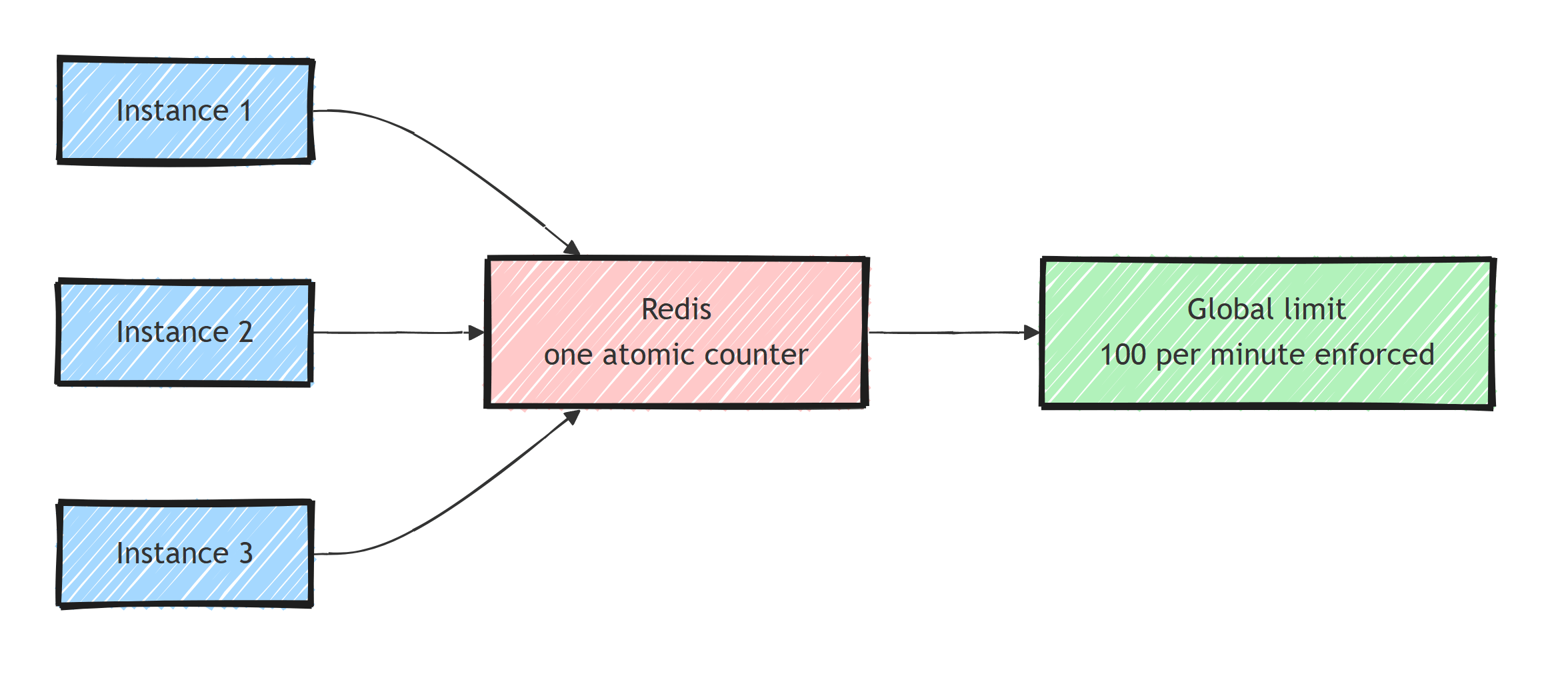
Why the Naive Redis Version Is Racy
The obvious approach is a counter per client per window.
INCR ratelimit:client-42:2026-07-03T10:15
EXPIRE ratelimit:client-42:2026-07-03T10:15 60
Two problems.
First, INCR and EXPIRE as separate commands can interleave with a crash in between, leaving a key that never expires.
Second, a check-then-act version (GET, compare, INCR) is a textbook race: two instances both read 99, both allow, and the limit is now 101.
Redis solves both with Lua: a script executes atomically, as one unit, with no other commands interleaved. Concurrent callers cannot interleave the script's count and admission steps.
How Does a Fixed Window Behave?
The fixed-window limiter in atomic Lua:
-- KEYS[1] = counter key (includes the window start)
-- ARGV[1] = limit, ARGV[2] = window seconds
local count = redis.call('INCR', KEYS[1])

if count == 1 then
    redis.call('EXPIRE', KEYS[1], ARGV[2])
end

if count > tonumber(ARGV[1]) then
    return 0
end

return 1
Its weakness is the window boundary: 100 requests at 10:00:59 and 100 more at 10:01:01 are both legal, 200 requests in 2 seconds. Use a sliding window if that boundary burst is too large for the downstream service.
Counting a Sliding Window
A sliding window counts requests in the trailing N seconds from each request, so there is no boundary to straddle. The classic Redis implementation uses a sorted set per client: members are request identifiers, scores are timestamps.
The whole policy is one script:
-- KEYS[1] = zset key for the client
-- ARGV[1] = window ms, ARGV[2] = limit, ARGV[3] = unique member id
local time = redis.call('TIME')
local now = tonumber(time[1]) * 1000 + math.floor(tonumber(time[2]) / 1000)
local window = tonumber(ARGV[1])
local limit = tonumber(ARGV[2])

-- 1. Evict entries older than the window
redis.call('ZREMRANGEBYSCORE', KEYS[1], '-inf', now - window)

-- 2. Count what's left
local count = redis.call('ZCARD', KEYS[1])

if count < limit then
    -- 3. Admit: record this request and refresh expiry
    redis.call('ZADD', KEYS[1], now, ARGV[3])
    redis.call('PEXPIRE', KEYS[1], window)
    return {1, limit - count - 1, 0}
end

-- 4. Reject: report when the oldest entry ages out
local oldest = redis.call('ZRANGE', KEYS[1], 0, 0, 'WITHSCORES')
local retryAfterMs = 0
if oldest[2] then
    retryAfterMs = math.max(0, tonumber(oldest[2]) + window - now)
end

return {0, 0, retryAfterMs}
Evict, count, admit or reject, and compute Retry-After, all atomically.
TIME uses one server's clock for every instance's admissions, avoiding client clock skew.
This example targets Redis 7 or later, where scripts use effects replication and may call TIME before writing.
Redis wall-clock changes or failover can still affect timing; this is an operational rate limit, not an exact billing ledger.
Memory cost: one sorted-set entry per admitted request in the window, bounded by the limit for each client key. For high limits (100k/min), switch to a sliding-window counter approximation (two fixed windows, weighted), which trades a small accuracy loss for O(1) memory. For typical API limits, the exact zset is fine.
The .NET Implementation
Install the client:
dotnet add package StackExchange.Redis
Add this service to a .NET 10 ASP.NET Core project. The script handles admission in one Redis operation; the client manages script caching and reloads when needed:
using System.Globalization;
using System.Security.Cryptography;
using System.Text;
using StackExchange.Redis;

public sealed record RateLimitResult(bool IsAllowed, long Remaining, TimeSpan RetryAfter);

public sealed class SlidingWindowRateLimiter(IConnectionMultiplexer redis)
{
    private const string Script = """
        local time = redis.call('TIME')
        local now = tonumber(time[1]) * 1000 + math.floor(tonumber(time[2]) / 1000)
        local window = tonumber(ARGV[1])
        local limit = tonumber(ARGV[2])
        redis.call('ZREMRANGEBYSCORE', KEYS[1], '-inf', now - window)
        local count = redis.call('ZCARD', KEYS[1])
        if count < limit then
            redis.call('ZADD', KEYS[1], now, ARGV[3])
            redis.call('PEXPIRE', KEYS[1], window)
            return {1, limit - count - 1, 0}
        end
        local oldest = redis.call('ZRANGE', KEYS[1], 0, 0, 'WITHSCORES')
        local retryAfterMs = 0
        if oldest[2] then
            retryAfterMs = math.max(0, tonumber(oldest[2]) + window - now)
        end
        return {0, 0, retryAfterMs}
        """;

    public async Task<RateLimitResult> CheckAsync(
        string clientId, int limit, TimeSpan window, CancellationToken ct = default)
    {
        ArgumentException.ThrowIfNullOrWhiteSpace(clientId);
        ArgumentOutOfRangeException.ThrowIfNegativeOrZero(limit);
        if (window < TimeSpan.FromMilliseconds(1) || window > TimeSpan.FromDays(1))
            throw new ArgumentOutOfRangeException(nameof(window));

        ct.ThrowIfCancellationRequested();
        var windowMs = (long)Math.Ceiling(window.TotalMilliseconds);
        var clientHash = Convert.ToHexString(SHA256.HashData(Encoding.UTF8.GetBytes(clientId)));
        var key = FormattableString.Invariant($"rl:v1:{limit}:{windowMs}:{clientHash}");
        var db = redis.GetDatabase();

        var result = (RedisResult[])(await db.ScriptEvaluateAsync(
            Script,
            keys: [new RedisKey(key)],
            values:
            [
                windowMs,
                limit,
                Guid.NewGuid().ToString("N")
            ]).WaitAsync(TimeSpan.FromMilliseconds(100), ct))!;

        return new RateLimitResult(
            IsAllowed: (long)result[0] == 1,
            Remaining: (long)result[1],
            RetryAfter: TimeSpan.FromMilliseconds((long)result[2]));
    }
}
Wire it into middleware, with proper headers so clients can behave (the contract I described in rate limit headers and 429 responses):
using System.Globalization;
using StackExchange.Redis;

var builder = WebApplication.CreateBuilder(args);
var redisOptions = ConfigurationOptions.Parse(
    builder.Configuration.GetConnectionString("Redis")
        ?? throw new InvalidOperationException("Configure ConnectionStrings:Redis."));
redisOptions.AbortOnConnectFail = false;
builder.Services.AddSingleton<IConnectionMultiplexer>(
    _ => ConnectionMultiplexer.Connect(redisOptions));

builder.Services.AddSingleton<SlidingWindowRateLimiter>();

var app = builder.Build();
// Initialize once during startup, outside the request latency budget.
_ = app.Services.GetRequiredService<IConnectionMultiplexer>();

app.Use(async (context, next) =>
{
    var limiter = context.RequestServices
        .GetRequiredService<SlidingWindowRateLimiter>();

    // This standalone demo limits by the actual connection's IP address.
    var clientId = context.Connection.RemoteIpAddress?.ToString()
        ?? "anonymous";

    RateLimitResult result;
    try
    {
        result = await limiter.CheckAsync(
            clientId, 100, TimeSpan.FromMinutes(1), context.RequestAborted);
    }
    catch (Exception ex) when (ex is RedisException or TimeoutException)
    {
        context.RequestAborted.ThrowIfCancellationRequested();
        app.Logger.LogWarning(ex, "Rate limiter unavailable");
        context.Response.StatusCode = StatusCodes.Status503ServiceUnavailable;
        return;
    }

    context.Response.Headers["X-RateLimit-Limit"] = "100";
    context.Response.Headers["X-RateLimit-Remaining"] =
        result.Remaining.ToString(CultureInfo.InvariantCulture);

    if (!result.IsAllowed)
    {
        context.Response.StatusCode = StatusCodes.Status429TooManyRequests;
        context.Response.Headers.RetryAfter =
            Math.Max(1, Math.Ceiling(result.RetryAfter.TotalSeconds))
                .ToString(CultureInfo.InvariantCulture);
        return;
    }

    await next(context);
});

app.MapGet("/", () => Results.Ok("Admitted"));
app.Run();
Configure ConnectionStrings:Redis and run Redis locally with docker run --rm -p 127.0.0.1:6379:6379 redis:7.
The shared multiplexer reconnects after connection failures; startup initializes it before requests arrive.
The X-RateLimit-* fields are example application headers; Retry-After gives rejected clients a delay in whole seconds.
Behind a proxy, configure forwarded headers from explicitly trusted proxies before this middleware, or all clients may share the proxy's IP.
For authenticated APIs, run authentication first and key the limiter by a validated user or tenant identity.
Never trust an arbitrary X-Api-Key header as identity: rotating it would bypass the limit and create unlimited keys.
All instances using the same Redis database, key policy, and identity now share one admission count.
A local check against Redis 7.4.11 used a limit of 25 admissions in two seconds and issued 200 concurrent checks for one client:
Redis 7: 200 concurrent checks admit exactly 25; denials include a delay; admission resumes after expiry.
Production Decisions
When Redis is down, what wins: availability or the limit? This is the decision to make before the outage. Fail open keeps the API available while removing protection from the shared limiter. Fail closed, as above, protects a constrained dependency by returning 503 when admission cannot be decided. Choose according to the cost of overload and the API's availability requirements.
RateLimitResult result;
try
{
    result = await limiter.CheckAsync(
        clientId, 100, TimeSpan.FromMinutes(1), context.RequestAborted);
}
catch (Exception ex) when (ex is RedisException or TimeoutException)
{
    context.RequestAborted.ThrowIfCancellationRequested();
    app.Logger.LogWarning(ex, "Rate limiter unavailable; allowing request");
    result = new RateLimitResult(true, 0, TimeSpan.Zero); // fail open
}
WaitAsync limits how long the caller waits; it does not cancel a Redis command already sent.
A timed-out command can still record an admission, so monitor timeout rates and configure StackExchange.Redis connection and command timeouts too.
Latency budget. Measure the Redis round trip in your deployment. If even that is too much for ultra-hot endpoints, put a loose in-process limiter in front as a pre-filter (it catches abusive floods locally) and keep the Redis limiter as the source of truth behind it.
Key hygiene. Every admitted request refreshes the key expiry, so abandoned client keys eventually disappear. Watch client cardinality: per-user keys are fine; per-user-per-endpoint keys at high fan-out need a memory estimate first. Include a policy identifier in the key if different endpoints have independent budgets with the same numerical settings.
State loss. Eviction or an asynchronously replicated failover can lose recent admissions and temporarily exceed the limit. Reserve capacity, monitor evictions, and decide whether those failure semantics meet the product requirement.
Don't rebuild what the platform gives you. The shape here (identity resolution, policies per endpoint, 429 handling) mirrors the built-in middleware on purpose. If you are on YARP or an API gateway, enforcing at the edge with this same Redis script keeps the limit global across services, not just across instances of one service. On the other side of the contract, your own outbound clients should respect these headers too, which is client-side rate limiting.
Summary
- In-process limiters multiply by instance count. A real limit for a fleet requires a shared counter, and Redis is the practical place to keep it.
- Check-then-act across instances is a race. One Lua script makes evict-count-admit a single atomic operation.
- Fixed window allows boundary double-bursts; the sorted-set sliding window eliminates them for one round trip per request and modest memory.
- Decide fail-open vs fail-closed, bound waiting time, and return
Retry-Afteron 429 responses so clients can back off.
Test concurrent requests across two instances and verify that they share the same counter. Also test Redis timeouts and failover; those paths define the limits of the admission guarantee.
Frequently Asked Questions
Why does my ASP.NET Core rate limiter allow more requests than configured?
The built-in rate limiting middleware keeps its counters in process memory. Each instance behind your load balancer enforces the limit independently, so five instances at 100 requests per minute allow up to 500 in aggregate. You need a shared store like Redis to enforce a global limit.
Why do I need a Lua script for Redis rate limiting?
A limiter needs several operations, like reading a count, comparing, incrementing, and setting expiry, to happen atomically. Separate commands from concurrent instances interleave and overcount or undercount. Redis executes a Lua script as one atomic unit, closing the race.
What is the difference between a fixed window and a sliding window rate limiter?
A fixed window resets the counter at boundaries, which permits up to double the limit in a burst straddling the boundary. A sliding window counts requests in the trailing interval from each request, eliminating the boundary burst at a slightly higher storage and computation cost.
What happens to rate limiting if Redis goes down?
Choose fail open to preserve availability or fail closed to protect the downstream service when the limiter cannot decide. This example returns 503 when Redis is unavailable. Atomic admission does not make Redis a billing ledger: eviction, failover, or data loss can still reset counters.
