
Competing consumers are multiple workers that receive delivery attempts from the same queue. They increase processing capacity without changing the producer, until the broker or a shared dependency becomes the bottleneck. Messages can be redelivered after failure, and concurrent processing does not preserve completion order, so handlers need idempotency and explicit ordering rules.
What Are Competing Consumers?
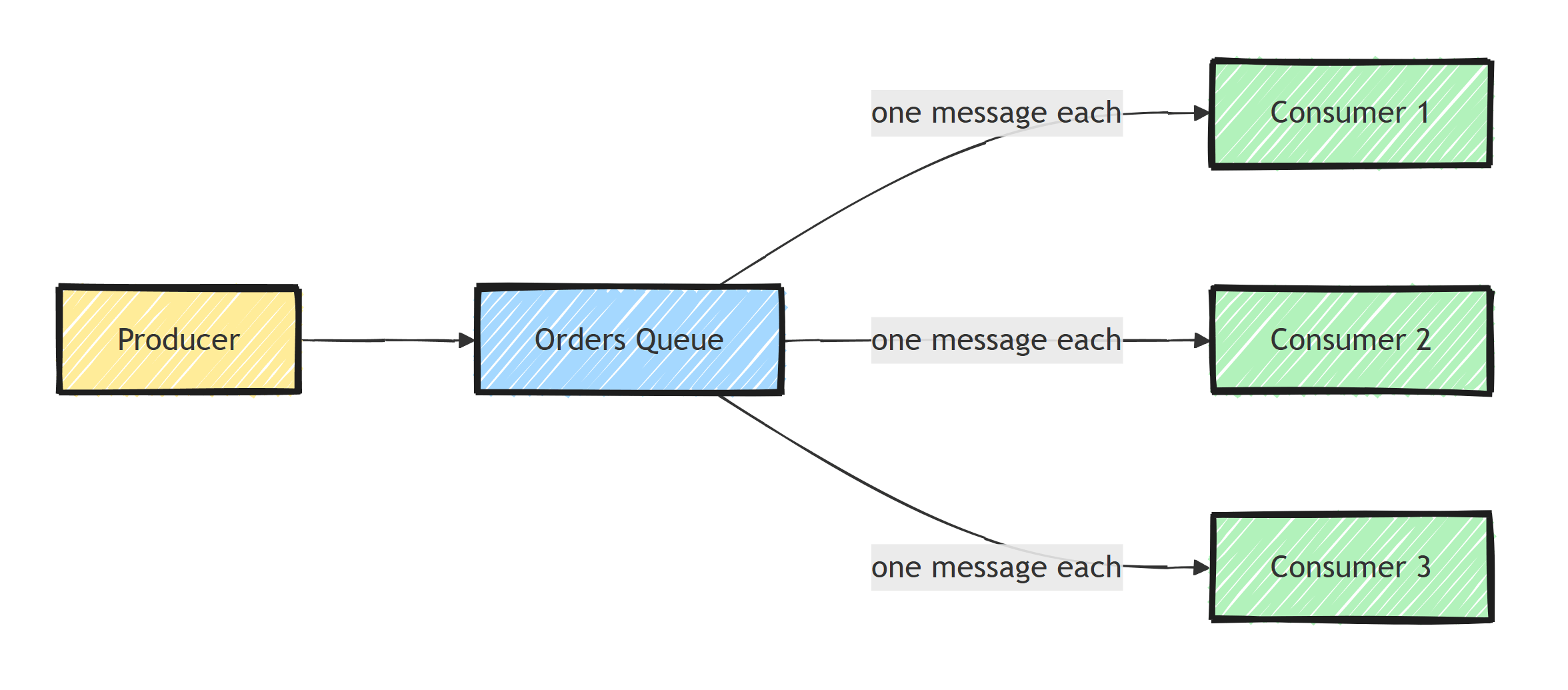
The competing consumers pattern scales message processing by having multiple consumers read from the same queue. Each delivery attempt goes to one consumer, allowing work to run in parallel. A message can be delivered again after a failure, so the pattern does not guarantee exactly-once processing.
Use this pattern when one consumer cannot keep up and the work can be processed in parallel. Adding consumers is the simplest way to scale message queue processing, provided the downstream dependencies can absorb the concurrency.
Think of it like a supermarket checkout: one line, multiple registers. Customers (messages) join a single queue, and the next available register (consumer) serves them.
How It Works
The broker delivers each attempt to one consumer from the group. The distribution is typically round-robin but can vary:
- Producer publishes messages to a queue
- Multiple consumers connect to the same queue
- The broker delivers each message to one consumer
- The consumer processes and acknowledges the message
- If a consumer fails, the message returns to the queue for another consumer
This gives you three benefits: higher throughput, fault tolerance (if one consumer dies, others continue), and horizontal scalability.
One consequence of redelivery: a consumer can crash after doing the work but before acknowledging, so another consumer will process the same message again. Competing consumers therefore assume idempotent message handlers.
How Do You Share a RabbitMQ Queue?
Run several service instances with the same receive endpoint name. RabbitMQ distributes deliveries among consumers on that queue, subject to acknowledgments, prefetch, and consumer availability. Giving each instance a different queue name instead creates separate subscriptions, which is publish/subscribe.
With the raw RabbitMQ.Client 7 API, use a connection per process and a channel per consumer. Declare the queue before consuming, keep the host alive while callbacks run, and dispose channels during shutdown. The RabbitMQ beginner's guide supplies a complete console example; the worker below lets MassTransit manage those lifetimes.
Prefetch Count Tuning
The prefetch count is the most important setting for competing consumers. It controls how many unacknowledged messages each consumer holds:
// Each consumer can hold up to 10 unacknowledged messages
await channel.BasicQosAsync(prefetchSize: 0, prefetchCount: 10, global: false);
- Too low (1): Consumer sits idle between messages while waiting for the next delivery
- Too high (1000): One consumer hoards messages while others starve
- Sweet spot: Start with 10-20 and adjust based on your processing time
Tune from measured processing time, network latency, and fairness across consumers. Prefetch buffers deliveries; it does not by itself make a callback run concurrently.
Run a MassTransit Worker
This worker logs orders to demonstrate competing delivery, without pretending to implement business persistence. It uses MassTransit 8.5.11; review the version and licensing notes before selecting a production version.
docker run -d --name rabbitmq -p 5672:5672 -p 15672:15672 rabbitmq:4-management
dotnet new console -n OrderWorker --framework net10.0
cd OrderWorker
dotnet add package Microsoft.Extensions.Hosting --version 10.0.0
dotnet add package MassTransit.RabbitMQ --version 8.5.11
Put this in Program.cs:
using MassTransit;
using Microsoft.Extensions.DependencyInjection;
using Microsoft.Extensions.Hosting;
using Microsoft.Extensions.Logging;
using OrderWorker.Contracts;

var builder = Host.CreateApplicationBuilder(args);
builder.Services.AddMassTransit(x =>
{
    x.AddConsumer<OrderCreatedConsumer>();
    x.UsingRabbitMq((context, cfg) =>
    {
        cfg.Host("localhost");
        cfg.ReceiveEndpoint("order-processing", e =>
        {
            e.PrefetchCount = 16;
            e.ConcurrentMessageLimit = 8;
            e.UseMessageRetry(r => r.Immediate(2));
            e.ConfigureConsumer<OrderCreatedConsumer>(context);
        });
    });
});
builder.Services.Configure<MassTransitHostOptions>(o =>
{
    o.WaitUntilStarted = true;
    o.StopTimeout = TimeSpan.FromSeconds(45);
    o.ConsumerStopTimeout = TimeSpan.FromSeconds(30);
});
builder.Services.Configure<HostOptions>(o => o.ShutdownTimeout = TimeSpan.FromSeconds(60));

using var host = builder.Build();
await host.RunAsync();

public sealed class OrderCreatedConsumer(ILogger<OrderCreatedConsumer> logger)
    : IConsumer<OrderCreated>
{
    public Task Consume(ConsumeContext<OrderCreated> context)
    {
        logger.LogInformation("Process {ProcessId} received order {OrderId}",
            Environment.ProcessId, context.Message.OrderId);
        return Task.CompletedTask;
    }
}
Create a shared Contracts.cs:
namespace OrderWorker.Contracts;

public sealed record OrderCreated(Guid OrderId);
Run the worker in two terminals.
Both instances consume the order-processing queue; they do not create one queue per process.
From a publisher using the same contract, send to queue:order-processing or publish OrderCreated after the workers have created their subscription topology.
ConcurrentMessageLimit = 8 applies per receive endpoint instance.
Five replicas can run roughly forty handlers concurrently, so size database pools and external API limits for the combined load.
Keep the endpoint declaration identical across instances.
Scaling With Kubernetes
In Kubernetes, scale consumers by adjusting the replica count:
apiVersion: apps/v1
kind: Deployment
metadata:
  name: order-processor
spec:
  replicas: 5 # 5 competing consumers
  selector:
    matchLabels:
      app: order-processor
  template:
    metadata:
      labels:
        app: order-processor
    spec:
      containers:
        - name: order-processor
          image: myapp/order-processor:latest
          resources:
            requests:
              cpu: '250m'
              memory: '256Mi'
Replace the example image with your built worker and supply its broker configuration.
An HPA can use an external queue-depth metric if an installed metrics adapter exposes it. The following metric name is an adapter configuration example, not a metric Kubernetes provides automatically:
apiVersion: autoscaling/v2
kind: HorizontalPodAutoscaler
metadata:
  name: order-processor-hpa
spec:
  scaleTargetRef:
    apiVersion: apps/v1
    kind: Deployment
    name: order-processor
  minReplicas: 2
  maxReplicas: 20
  metrics:
    - type: External
      external:
        metric:
          name: rabbitmq_queue_messages
          selector:
            matchLabels:
              queue: order-processing
        target:
          type: AverageValue
          averageValue: '100'
Handling Message Ordering
Competing consumers break message ordering because messages are distributed across consumers. If ordering matters, you have several options:
1. Single Active Consumer Per Partition: Route related messages to the same queue by a stable business key and process each queue sequentially.
For RabbitMQ's x-consistent-hash exchange, enable the consistent-hash plugin, declare the destination queues, and publish with that business key as the routing key.
Hashing alone does not prevent competing consumers on one partition from completing out of order.
Topology changes can also remap keys, so drain or otherwise coordinate changes when ordering matters.
2. Sequence numbers and reordering: See message ordering in distributed systems.
3. Accept eventual consistency: Many scenarios don't actually need strict ordering.
Graceful Shutdown
The worker configures the host shutdown timeout to exceed MassTransit's bus stop timeout, and its consumer timeout to be shorter than both.
On shutdown, MassTransit stops receiving and waits for active consumers within those limits.
Handlers doing async work must pass context.CancellationToken to their dependencies and avoid swallowing cancellation.
If a handler cannot finish, leave its delivery unsettled so the broker can redeliver it.
Cancellation does not undo already-committed database or external side effects; that is why the idempotency requirement remains.
For Kubernetes, make terminationGracePeriodSeconds long enough for the shutdown budget.
The graceful shutdown guide covers the host lifecycle.
Monitoring Consumer Performance
Track consumer metrics to know when to scale:
using System.Diagnostics.Metrics;

public class ConsumerMetrics
{
    // Declared first: static fields initialize in declaration order
    private static readonly Meter Meter = new("OrderProcessing");

    private static readonly Counter<long> MessagesProcessed =
        Meter.CreateCounter<long>("messaging.messages.processed");

    private static readonly Histogram<double> ProcessingDuration =
        Meter.CreateHistogram<double>("messaging.messages.duration", "ms");

    public static void RecordProcessed(string consumerName, double durationMs)
    {
        MessagesProcessed.Add(1, new KeyValuePair<string, object?>(
            "consumer", consumerName));

        ProcessingDuration.Record(durationMs, new KeyValuePair<string, object?>(
            "consumer", consumerName));
    }
}
For scaling decisions, watch queue depth over time rather than consumer throughput. A queue that keeps growing means consumers can't keep up; a queue that drains instantly means you may be over-provisioned.
Summary
Scale from queue depth over time, then tune prefetch against processing duration and downstream capacity. Competing consumers improve parallelism but give up global ordering, so partition by the key whose order matters. Graceful shutdown must stop new deliveries and finish or return in-flight work before the instance exits.
Frequently Asked Questions
What is the competing consumers pattern?
Multiple consumers read from the same queue, and the broker delivers each message to one of them. Adding consumers can increase throughput until the broker, database, API, or another shared dependency becomes the bottleneck; surviving consumers also keep processing when one instance fails.
How is competing consumers different from publish-subscribe?
With competing consumers, one queue is shared and each delivery attempt goes to one consumer; failed or unacknowledged messages can be redelivered. With pub-sub, each subscriber has its own queue and every subscriber receives a copy of every message.
What prefetch count should I use for RabbitMQ consumers?
Start with 10-20 for fast handlers (under a second) and 1-3 for slow ones. Too low leaves consumers idle between deliveries; too high lets one consumer hoard messages while others starve.
Do competing consumers preserve message order?
No. Messages are distributed across consumers that run in parallel, so global ordering is lost. If order matters for related messages, partition by a key (consistent hashing, sessions, or message groups) so each partition has one consumer.
How do I autoscale message consumers in Kubernetes?
Scale the deployment on queue depth rather than CPU. Use an HPA with an external queue-length metric, or KEDA, which has built-in scalers for RabbitMQ, Azure Service Bus, and SQS.
