
A migration bundle is a self-contained executable, produced by dotnet ef migrations bundle, that applies your pending migrations to a database.
Your pipeline runs it as a deploy step before the new code ships, so a broken migration is a failed build instead of a crash-looping app.
The machine that runs it needs no SDK and no project source, and the connection string is supplied at run time.
There are two moments a schema migration can run: when your pipeline deploys, or when your application boots.
Database.Migrate() in Program.cs picks the second, and it is the default in a thousand tutorials.
It is also the option where a broken migration takes down production instead of failing a pipeline step, three replicas race to alter the same table, and your web app carries DDL permissions it should not have.
Migration bundles exist to make the first option as easy as the second. One command produces a self-contained executable; your pipeline runs it before the new code ships.
Why Migrate-on-Startup Bites
The convenient version looks like this:
using (var scope = app.Services.CreateScope())
{
    var db = scope.ServiceProvider.GetRequiredService<AppDbContext>();
    await db.Database.MigrateAsync();
}

app.Run();
Four operational risks follow:
- Replica races. Kubernetes starts three pods; all three call
MigrateAsyncsimultaneously. EF Core 9+ takes a migration lock and usually survives, but older versions take none, and concurrent migrators can deadlock or half-apply. - Failure lands in the wrong place. A migration that times out on a large table turns into a crash-looping app and an outage. The same failure in a pipeline step is a red build and a rollback, with the old version still serving.
- Permissions. The app's runtime identity now needs
ALTER,CREATE,DROP, so the app can no longer run under a least-privilege database user. - Rolling deploys invert the order. During a rolling update, the new pod migrates the schema while old pods still run old queries against it. You need zero-downtime discipline either way, but startup migration removes your control over the timing.
Startup migration is defensible only for local development and single-instance internal tools. Everywhere else, apply migrations as a deployment step.
Building a Bundle
The tooling is part of dotnet-ef:
dotnet tool install --global dotnet-ef

dotnet ef migrations bundle \
  --project src/MyApp.Infrastructure \
  --startup-project src/MyApp.Api \
  --self-contained -r linux-x64 \
  --output efbundle
The output is a single executable containing your compiled migrations, your model snapshot, and, with --self-contained, the .NET runtime itself (which makes it weigh tens of megabytes).
The pipeline agent or init container that runs it needs nothing installed.
Running it is one command:
./efbundle --connection "Host=db;Database=myapp;Username=migrator;Password=$DB_PASSWORD"
The bundle reads the migrations history table, applies only what is pending, and exits non-zero on failure. It also accepts a target migration as an argument, which makes it usable for controlled rollbacks:
./efbundle AddOrderTable --connection "..."
Note the connection string is supplied at run time, not baked in at build time.
One artifact promotes through dev, staging, and production, credentials come from the environment, and the migration runs under a dedicated migrator database role, not the app's identity.
Wiring It into a Pipeline
Here is a GitHub Actions workflow that builds the bundle once and executes it before the deploy step:
jobs:
  build:
    runs-on: ubuntu-latest
    steps:
      - uses: actions/checkout@v4
      - uses: actions/setup-dotnet@v4
        with:
          dotnet-version: '10.0.x'

      - name: Build migration bundle
        run: |
          dotnet tool restore
          dotnet ef migrations bundle \
            --project src/MyApp.Infrastructure \
            --startup-project src/MyApp.Api \
            --self-contained -r linux-x64 \
            --output efbundle

      - uses: actions/upload-artifact@v4
        with:
          name: efbundle
          path: efbundle

  deploy:
    needs: build
    runs-on: ubuntu-latest
    steps:
      - uses: actions/download-artifact@v4
        with:
          name: efbundle

      - name: Apply migrations
        run: |
          chmod +x efbundle
          ./efbundle --connection "${{ secrets.DB_CONNECTION }}"

      - name: Deploy application
        run: ./deploy.sh
The ordering encodes the contract: schema first, code second, and only if the schema step succeeded.
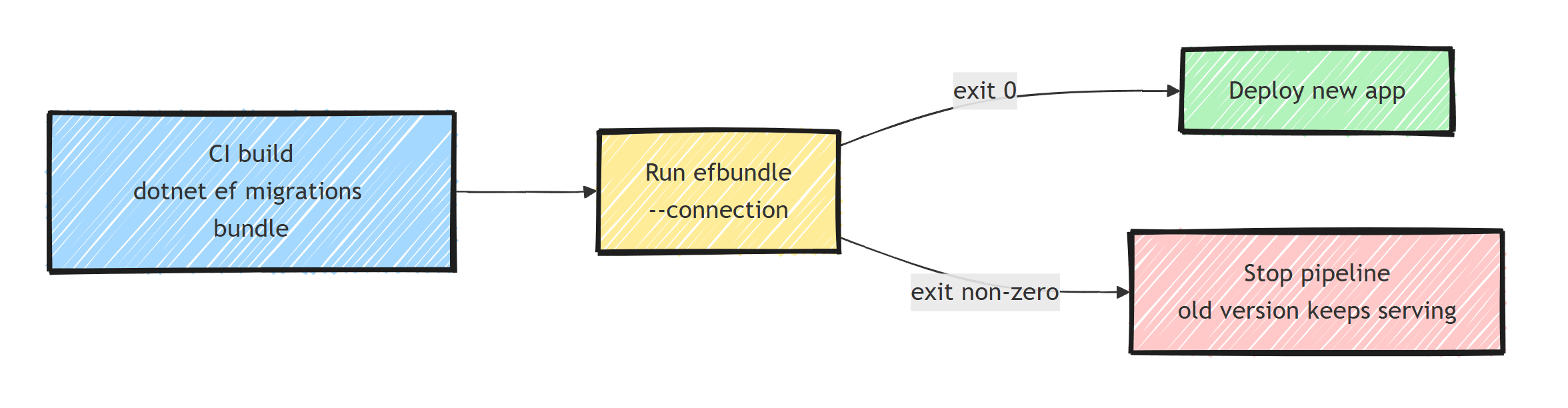
That contract is also what makes expand-and-contract migrations work, since the old code must keep running against the new schema for the duration of the rollout.
In containerized setups, the same bundle runs as a Kubernetes init container or a one-off job before the rollout.
Because it is self-contained, the migration image can be FROM debian:stable-slim with the bundle copied in, no SDK layer.
If you orchestrate local development with Aspire, migrations fit a similar "separate executor" model there too; I showed that pattern in applying EF Core migrations with Aspire.
Bundles vs SQL Scripts vs Migrate-on-Startup
The other pipeline-friendly option is generating an idempotent SQL script:
dotnet ef migrations script --idempotent --output migrations.sql
Scripts have one real advantage: a DBA can review and hand-tune the exact SQL before it runs, and script execution slots into organizations where database changes go through a review gate.
The costs are tooling (you need sqlcmd/psql on the agent) and drift risk if someone edits the script after review.
My decision line:
- Bundles: teams that own their database, automated pipelines, containers. Least ceremony, artifact matches what EF would do exactly.
- Idempotent scripts: regulated environments, mandatory DBA review, or migrations that need hand-tuned locking hints on giant tables.
- Migrate-on-startup: local dev only.
Whichever you pick, the deeper habits, small reversible migrations, never editing an applied migration, reviewing generated SQL, come from EF Core migrations best practices, and the fundamentals of the migration system itself are in EF Core migrations: a detailed guide.
Operational Details Worth Knowing
- The bundle must match the deploy. Build it in the same pipeline run as the app artifact, from the same commit. A bundle from yesterday's build can apply migrations that do not match today's code.
- Timeouts. Long-running migrations on big tables inherit the command timeout in the connection string; set
Command Timeout=600(or provider equivalent) explicitly for heavyweight releases. - Concurrency guard. Pipelines can race too, if two deploys overlap. Serialize the deploy job per environment; the pipeline is the right place for that lock, not the database.
- EF 9+ fails loudly when the model has changes not covered by any migration: the bundle throws before applying anything, so the "forgot to add a migration" failure stops the deploy job instead of reaching production. Run
dotnet ef migrations has-pending-model-changesin the build job to catch it in CI. I covered that check in fixing PendingModelChangesWarning.
Summary
A migration bundle turns "apply schema changes" into a single self-contained executable your pipeline runs as a deploy step. Failures become red builds instead of crash-looping pods, the app sheds its DDL permissions, replicas stop racing, and one artifact promotes across environments with the connection string supplied at run time.
Build the bundle with dotnet ef migrations bundle in CI and run ./efbundle --connection before the deploy step.
Keep Database.Migrate() for local development.
Frequently Asked Questions
What is an EF Core migration bundle?
A migration bundle is a self-contained executable produced by dotnet ef migrations bundle. It contains your migrations and everything needed to apply them, so a CI/CD pipeline can update the database by running one file, with no SDK or project source on the deployment machine.
Why is migrating the database at application startup a bad idea?
Multiple app instances race to apply the same migrations, a failed migration crashes the app instead of the pipeline, startup needs elevated database permissions, and rolling deployments run new migrations while old code is still serving traffic. A pipeline step avoids all of that.
How do I run a migration bundle in a pipeline?
Build the bundle in CI with dotnet ef migrations bundle, publish it as an artifact, and execute it before deploying the app, passing the connection string with --connection. If the bundle exits non-zero the pipeline stops and the old app version keeps running.
Does a migration bundle apply all migrations?
By default it applies all pending migrations, and it is idempotent in the sense that already-applied migrations are skipped based on the migrations history table. You can also pass a target migration name to migrate to a specific point, forward or backward.
Do I need the .NET runtime on the server to run a bundle?
Not if you build with --self-contained and the target runtime identifier. The bundle then carries the runtime with it, so it runs on minimal pipeline agents and containers.
