
To roll back an applied EF Core migration, run dotnet ef database update <previous-migration> to revert the schema, then dotnet ef migrations remove to delete the migration file and rewind the model snapshot.
The order is not negotiable, because the database revert needs the Down method that lives in the file you are about to delete.
A migration that was never applied needs migrations remove alone.
Every EF Core migration has a Down method, so rollbacks should be trivial.
And they are, right up until someone deletes the migration file before reverting the database.
Now the history table lists a migration your project no longer has, database update cannot generate the revert SQL, and the model snapshot disagrees with both.
The fix at that point is manual repair.
The rollback commands are simple. You have to run them in the right order, against the right environment.
How Do You Undo the Last Applied Migration?
Say your history looks like this:
dotnet ef migrations list

# 20260620093011_AddOrders (applied)
# 20260701141518_AddOrderNotes (applied)   <- want to undo this one
Step 1: revert the database to the previous migration.
database update takes a target migration name and runs every Down between the current state and that target:
dotnet ef database update AddOrders
Step 2: remove the migration file. Only after the database no longer contains the migration:
dotnet ef migrations remove
migrations remove deletes the newest migration file and rewinds the model snapshot.
Doing it by hand (deleting the .cs files) leaves the snapshot describing a model with the migration still in it, and your next migration comes out empty or wrong.
If you run the steps in the wrong order, migrations remove refuses when the migration is applied and tells you to revert first.
The trouble starts when you delete files manually or sync a branch that no longer contains the migration.
The Git Branch Trap
The most common way teams corrupt migration state has no EF command in it at all:
- You apply
AddOrderNotesto your local database while working on a branch. - You abandon the branch and switch back to
main. - The migration file is gone, but your local database still has the schema change and the history row.
EF Core now considers your database ahead of your project, and there is no file to generate Down SQL from.
Your options, in order of preference:
- Recreate the database if it is disposable local dev. It is the fastest option.
- Check out the dead branch, revert, then switch. Run
dotnet ef database update AddOrderswhile the migration file still exists in your working tree. - Manual repair. Undo the schema change with hand-written SQL, then delete the history row:
DELETE FROM "__EFMigrationsHistory"
WHERE "MigrationId" = '20260701141518_AddOrderNotes';
Revert your local database before deleting or switching away from a branch with unmerged migrations. Make it muscle memory, the same way you run the practices from EF Core migrations best practices.
Rolling Back Migrations That Were Never Applied
If you added a migration and immediately regretted it (wrong name, model not ready), and it never ran anywhere:
dotnet ef migrations remove
Done.
No database step, because there is nothing to revert.
This is also the correct response to noticing a bad migration during code review: remove it, fix the model, add a fresh one.
Never edit a generated migration's Up in place beyond documented customization, and never renumber or hand-rename them.
Production: Scripts and Bundles, Not CLI Commands
dotnet ef database update against production means SDK, source code, and DDL credentials on whatever machine runs it.
Do not.
The two production options mirror how you deploy forward migrations.
Reviewed SQL scripts. Generate the revert SQL in CI, review it, run it through the same channel as any release script. Note the argument order, from current back to target:
dotnet ef migrations script AddOrderNotes AddOrders --output revert.sql
Migration bundles. A bundle accepts a target migration and will migrate down to it:
./efbundle AddOrders --connection "$DB_CONNECTION"
I covered why bundles beat startup migration, and how to build them in CI, in EF Core migration bundles.
In production, Down methods are only safe when they do not drop or rewrite data.
Reverting AddColumn runs DropColumn, and every value in that column is gone.
Reverting a data migration can be impossible to express.
EF Core generates Down code mechanically and does not warn you when running it destroys data.
So before any production rollback:
- Read all of the generated SQL.
- If any statement drops or rewrites data, prefer rolling forward: write a new migration that reverses the intent while preserving data, and deploy it like any release.
- If you must roll back destructively, snapshot first (a backup, or
SELECT INTOthe affected columns).
This is also why the expand-and-contract pattern from zero-downtime migrations is worth the extra steps: when every migration is additive, the old application version keeps working against the new schema. Rolling back the code then needs no schema rollback at all.
Rolling Back Everything
To revert all migrations (dropping the schema EF manages, useful for local resets), target 0:
dotnet ef database update 0
To list what is applied versus pending when you are not sure where an environment stands:
dotnet ef migrations list --connection "$DB_CONNECTION"
For local development, database update 0 followed by database update is a poor man's rebuild; dropping and recreating the database is usually faster and also resets anything outside EF's control.
If your integration tests fight schema drift, that reset-per-run approach is the reliable one, as I argued in fixing flaky Postgres integration tests.
The Rules That Keep Rollbacks Boring
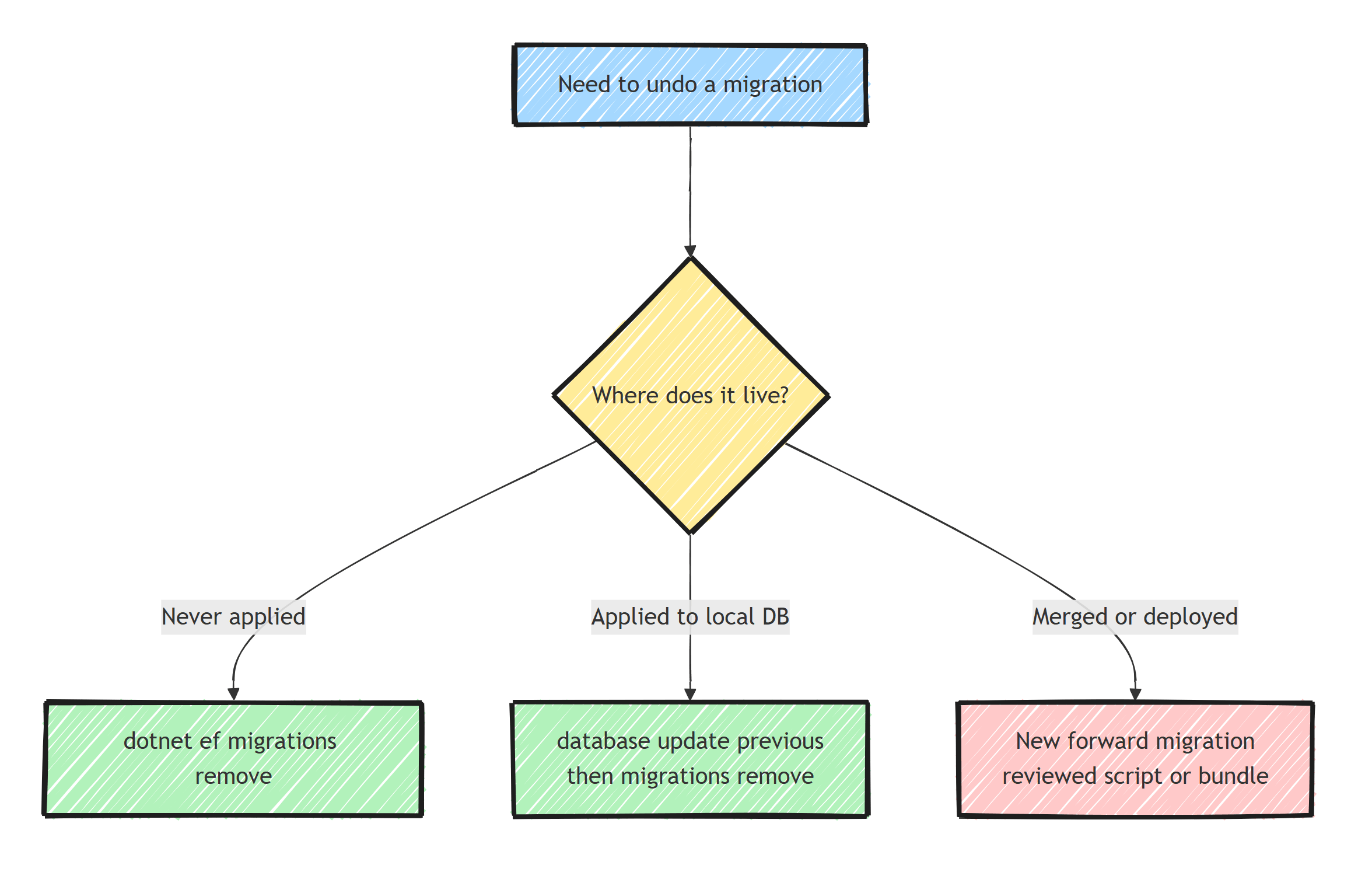
- Applied migration, local database:
database update <previous>, thenmigrations remove. In that order, always. - Unapplied migration:
migrations removealone. - Merged or deployed migration: it is immutable. Reverse it with a new forward migration, never by deleting history.
- Switching branches: revert the local database before abandoning a branch with unmerged migrations.
- Production: reviewed script or bundle with a target migration, backups before destructive
Downs, and a strong bias toward roll-forward.
For a migration already in shared history, a rollback means writing a new Up that undoes the intent instead of running Down.
The full command reference is in EF Core migrations: a detailed guide.
Summary
Rolling back a migration is dotnet ef database update <previous-migration> followed by dotnet ef migrations remove, and the order is not negotiable: the database revert needs the Down method that lives in the file you are about to delete.
migrations remove exists because the model snapshot must rewind with the file; deleting .cs files by hand corrupts the next migration.
Once a migration reaches a shared environment, stop relying on Down.
Deployed history is append-only: reverse mistakes with new forward migrations, keep changes additive so old code keeps working against the new schema, and save destructive rollbacks for databases you can afford to lose.
Frequently Asked Questions
How do I undo the last EF Core migration?
If the migration was applied, first run dotnet ef database update with the name of the previous migration to revert the schema, then run dotnet ef migrations remove to delete the migration file and roll back the snapshot. If it was never applied, migrations remove alone is enough.
Why does the order of rollback steps matter?
Reverting the database needs the migration Down method, which lives in the migration file. If you delete the file first, EF Core can no longer generate the revert SQL, and the migrations history table still lists a migration your project no longer contains.
Can I roll back a migration in production?
Yes, by generating a script with dotnet ef migrations script From To (in reverse order) or by running a migration bundle with a target migration. But Down methods for destructive changes drop data, so review the SQL and prefer roll-forward fixes when data loss is possible.
What happens to my data when a migration is rolled back?
Whatever the Down method says. Reverting an added column drops the column and its data permanently. EF Core does not warn you about data loss on rollback, so review the Down SQL before running it against anything you care about.
Should I ever edit or delete a migration that was already deployed?
No. Once a migration has run against any shared or production database, treat it as immutable. Undo its effects with a new migration that reverses the change, so every environment converges by applying the same forward history.
